
Complete guide · Thai ⇄ English
LINE Thai to English Translation: Setting Up a Group That Reads Both Ways
If you live or work in Thailand and half your LINE conversations are in Thai — a landlord, a mechanic, a condo office, a supplier in Bangkok, a partner's family group — you need a way to follow both sides without pasting every message somewhere else. LINE has a limited built-in option and it is not a group switch. This guide covers what it does, how to put two-way translation inside the group instead, and then the part most guides skip: what actually goes wrong when a machine translates Thai, and how to set a group up so it goes wrong less often.
Contents
Half the group writes Thai, and the thread only ever carries one language
What LINE translates on its own, and where it stops
How to set up Thai and English in one LINE group
The vendor group: one chat per counterparty
Thai script, and why it trips machine translation
Politeness in Thai, and what translation flattens
What the bot does not translate
Half the group writes Thai, and the thread only ever carries one language
A condo maintenance group has eleven people in it. Nine of them write Thai. The juristic office posts three lines about the water being shut off on Thursday morning, and the two foreign residents read a wall of characters they cannot segment, guess it is routine, and find out on Thursday when the tap runs dry.
People searching for a way to translate Thai to English on LINE are usually stuck at exactly this point. Both languages are in the group. The messages are only ever in one of them. The gap gets covered by whoever happens to be bilingual, until the day they are not looking.
The fix has two halves, and they are not the same size. Putting translation inside the group takes about ten minutes. Writing in a way that survives the trip between Thai and English is the part that decides whether the group is genuinely usable a month later — and Thai is a harder language to machine-translate than most people expect. This guide does the setup first and then spends most of its length on the second half.
What LINE translates on its own, and where it stops
LINE is not untranslated. It has a translation capability built into the app, and for a quick one-off message inside a single language pair it does the job.
Three things about it shape what you can build on top. It is organised per language pair rather than per group, so it is not designed around a conversation where three or four first languages are in play. The result is personal and local — you see your translation, on your device, and it does not appear in the thread for anyone else. And it handles text, not voice notes.
That last pair of limits is what matters for a group. If the translation only exists on one person's screen, the group has no shared record: nobody can scroll back and see what was actually agreed, and nobody outside the conversation can check it later. For a landlord exchange or a repair quote, the record is most of the value.
The alternative some people fall back on is a separate translation app — copy the Thai out, translate it, paste the reply back. It works, and it costs you the thread. Nothing is left in the chat, so the same message gets re-translated by the next person who needs it, and there is no history to point at when a delivery date turns out to have been understood two ways.
A translation bot takes the third option: it sits inside the group, translates every message as it arrives in both directions, and posts the result into the same thread where everyone can see it and everyone can scroll back to it.
How to set up Thai and English in one LINE group
You do not need a new group. The one you and the Thai side are already using is the one to set up:
1. Add the bot as a LINE friend. 2. Open the group you want translated and invite the bot into it. 3. Send the language command in that group.
The command is written like this: @Echonora english and thai
From then on, every English message is posted back in Thai and every Thai message in English — both directions, automatically, in the same thread, for everyone.
Things that catch people out
The command only works in a group. A one-to-one chat with the bot will not translate a conversation, so the invite step is not optional. Working on your own is just a group of one — put the bot in a group by itself and it still translates.
Use language names, not codes. "english and thai" is right; code-style forms are easy to confuse and are not recommended.
You can send the command in Thai. The bot recognises Thai as an activation language and replies in whichever language the command was written in — so if the Thai side of the group is setting it up, they can write the command in Thai and get their confirmation in Thai. That is often the difference between a counterparty who adopts it and one who never quite does.
A group takes between 2 and 5 languages at once, so a third or fourth first language in the same chat is the same group rather than a second one.
If a Burmese or Cambodian worker is in the same chat, that is the same group, not a second one — add the language name to the command.
Nobody installs anything new and nobody makes a new account. Your counterparty uses the LINE they already have, which is the single biggest reason this gets adopted by a mechanic or a landlord who has no interest in your tooling.

The vendor group: one chat per counterparty
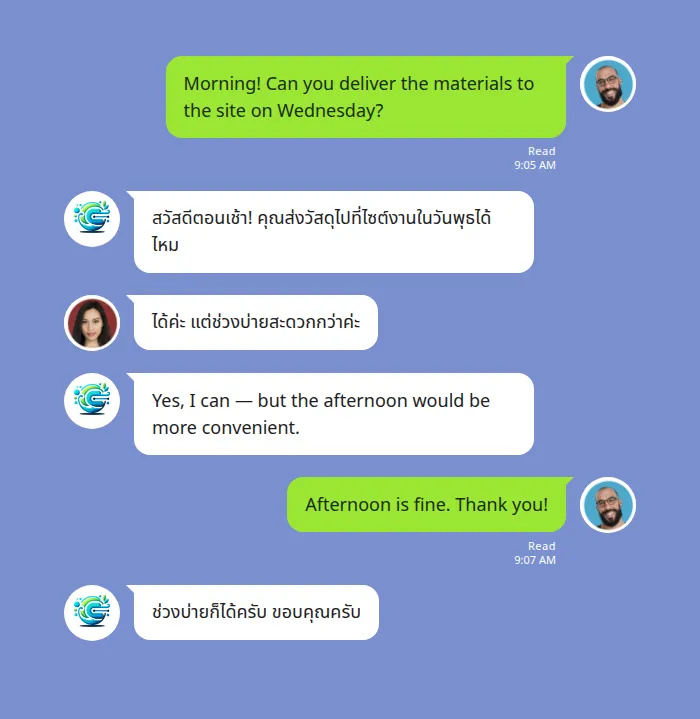
The pattern most foreigners in Thailand settle into is not one big translated group. It is a lot of small, disposable ones — a group per counterparty, made when you need it and abandoned when the job is done.
A car repair. A plumber. The insurance adjuster after someone reversed into you. The agent handling a lease renewal. Each one is two people, a handful of messages, a price and a date — and each one is a conversation where being approximately understood is not good enough, because the output is a number and a time.
Set up this way, the translated thread does something a live interpreter cannot: it stays. When the mechanic quotes a figure on Tuesday and the bill on Friday is different, the Tuesday message is still in the group, in both languages, and neither side has to rely on memory.
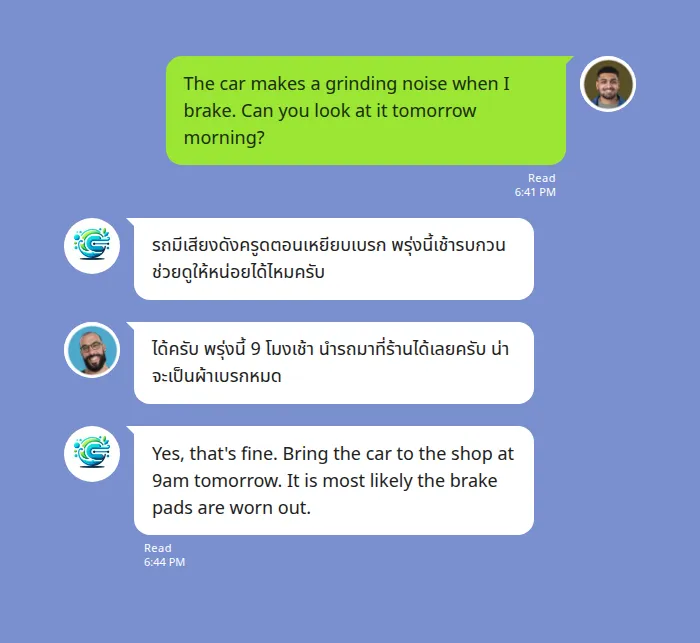
Two habits make these groups work. Put the number and the date in the message rather than leaving them implied, because that is the part a translation carries reliably. And ask the other side to confirm the arrangement back in their own words instead of replying "ok" — a restated sentence tells you the meaning survived; an acknowledgement tells you only that the message arrived.
Thai script, and why it trips machine translation
Thai is written in its own script and, like Chinese and Japanese, puts no spaces between words. A Thai sentence is one unbroken run of characters, and the translator has to decide for itself where each word begins and ends before it can translate anything. This is a major source of Thai translation errors, and it is worth understanding because it shapes how you should write.
No word boundaries. English separates words with spaces; Thai does not. An ambiguous string of characters can legitimately be split more than one way, and a wrong split changes the meaning of the whole sentence. Spaces in Thai mark the end of a clause or sentence, not a word — the opposite of what a translator trained mostly on spaced languages expects.
No capital letters and no full stops. Thai has neither, so the usual signals a machine uses to find the start and end of a sentence are missing. Where a run of text breaks into sentences is inferred, not marked.
Vowels that sit above, below and around consonants. Thai vowels can be written before, after, above or below the consonant they attach to. A single mis-segmented cluster can turn one word into another.
You cannot change how Thai is written, but you can write to give the segmenter less to guess: send whole sentences rather than clipped fragments, because the surrounding words are the context that tells the translator where the boundaries fall; keep one topic per message instead of stacking several thoughts onto one line; and go easy on slang, abbreviations and inside shorthand, which have no stable translation and give the segmenter nothing to hold onto.
Politeness in Thai, and what translation flattens
Thai carries politeness and social distance in ways English simply does not, and this is where a translation can be technically correct and still land wrong.
| In Thai | What it carries | What survives the trip to English |
|---|---|---|
| Polite particles — ครับ / ค่ะ | Deference and warmth, attached to the speaker's gender | Nothing. They have no dictionary meaning, so they vanish — and a Thai reader can find the English-sourced reply curt when they come back missing |
| Many words for "I" and "you" | Age, gender, status and closeness, chosen per relationship | Two words. The machine cannot know which register you intended from the English alone |
| Dropped subjects | Who is being talked about, supplied by context | A guess. Short messages give the translator very little to infer from |
| Tone and homographs | Different meanings on identically spelled words | Whichever reading the surrounding context supports — so clipped messages are the risky ones |
None of this is unique to one tool — it is what makes Thai hard for any machine translator. A bot translating inside a live conversation has more surrounding context to work with than a single line pasted into a translator on its own, but clear writing on both sides is still what makes the difference.
The practical rule: when a message really matters — a contract term, a medical instruction, a number, a date — put it in a plain complete sentence rather than trusting a one-word reply to carry it.
Voice messages in Thai
Voice notes are normal in Thai LINE groups, and they are the messages a foreigner is least able to deal with — you cannot even paste them somewhere to look at. A Thai voice note is transcribed first and then translated, and the result comes back as text in the thread. Your original voice message stays where it was.
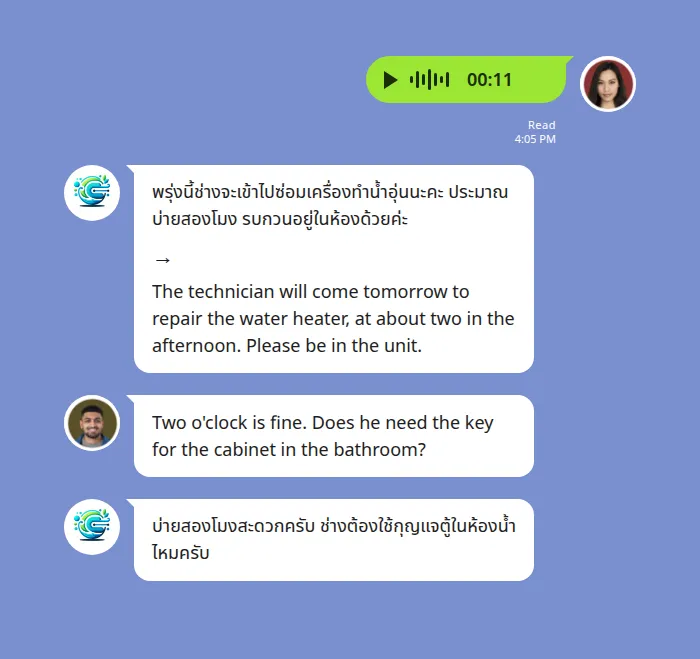
This is also the case where the transcript earns its place on screen. For a text message the translation is enough; for a voice note, seeing the Thai that the machine actually heard is what lets a bilingual colleague settle an argument about what was said.
What the free plan covers
The Echonora free plan covers 20 translated messages a day. It does not expire and it needs no credit card. A group set to several languages at once still counts one source message as one.
The unit that gets counted is the bot's translation, not what you type. A back-and-forth where each side sends ten messages is about twenty translations. A vendor group that exists to arrange one repair rarely comes close; a condo group that runs all day will.
When a group needs more, one member subscribes and the whole group gets unlimited translation. The subscription belongs to that person, so if they leave the group, the group falls back to the free limits.
Free PLAN
Free
- includes full access to all features.
- Real-Time Translations
- Group Chat Translation
- Voice Recognition
- Daily translation limit: 20 messages
- No card required
Monthly PLAN
$10/m
- includes full access to all features, auto-renews monthly
- Real-Time Translations
- Group Chat Translation
- Voice Recognition
Annual PLAN
$100/y
- includes full access; pay for 10 months and use 12, auto-renews annually
- Real-Time Translations
- Group Chat Translation
- Voice Recognition
What the bot does not translate
Worth knowing up front, so nothing surprises you. Stickers, images and files are not translated, and text inside a screenshot or a photo cannot be read — if it matters, send it as text. This is the one that bites in Thailand, where a shop or an office will often answer with a photograph of a printed notice.
One-to-one messages to the bot are not translated either. Translation happens inside a group the bot has been invited to.
When a message is not translated, check in this order
Check the language command first. A LINE app update can drop a group's configuration; sending the command again in the group restores it, and this is the most common cause by a distance.
Then check who is still in the group. If the group was running on one member's subscription and that member has left, the group is back on the free plan's daily limit — the translation did not break, the allowance changed.
Then check what was actually sent. A sticker, an image or a screenshot of text produces no translation because there is nothing to translate. Ask for it as text.
And check that both languages are on the supported list before you rely on the group for anything that matters.
Frequently asked questions
Can LINE translate Thai to English automatically in a group chat?
Not with a built-in setting. LINE's own translation is organised per language pair rather than per group, shows each person their own translation locally rather than posting it into the thread, and covers text rather than voice. For a group where Thai and English are both in use all day, translation has to come from a bot invited into the group, which posts both directions into the same thread.
How do I set up Thai and English translation in a LINE group?
Add the bot as a friend, invite it into the group, then send @Echonora english and thai in that group. Every Thai message comes back in English and every English message in Thai from that point on. The command only works inside a group — a one-to-one chat with the bot does not translate.
Can the Thai side set it up in Thai?
Yes. Thai is one of the languages the bot accepts activation commands in, and it replies in the language the command was written in — so a Thai-speaking counterparty can set the group up and get their confirmation in Thai.
Does it translate Thai voice messages?
Yes. A Thai voice note is transcribed and then translated, and the result is posted as text. The original voice message stays in the thread.
Why does the Thai translation sometimes read oddly?
Usually the source message rather than the translation. Thai is written without spaces between words, so the translator has to work out where each word ends before it can translate — and short, clipped, slang-heavy messages give it the least to work with. Whole sentences, one topic per message, and plain wording for anything carrying a number or a date.
Can a third language go in the same group?
A group takes between 2 and 5 languages at once. Add the language name to the command rather than starting a second group.
What does the free plan cover?
The free plan covers 20 translated messages a day, permanently, with no credit card and no expiry. A group running Thai, English and a third language still counts one source message as one. When a group needs more, one member subscribes and the whole group gets unlimited translation — and falls back to the free limit if that member leaves.
Related articles
General guides (any language)
LINE voice message translation: how to read one you can't understand
Why LINE shows the wrong language — and how to fix it
How to change the LINE app language on iPhone and Android
Other language pairs
LINE Chinese to English translation: setup and accuracy guide
Talking to grandparents in Japan or Taiwan in the family LINE group
Reference
Where to start
If you already have a group with Thai speakers in it, the order is: invite the bot, send the language command once, and send a real message both ways to see how it lands before anything important rides on it. Then pick the next counterparty you deal with regularly — the landlord, the garage, the office — and make one group each. The tooling is ten minutes. Everything after that is how you write.