

LINE Chinese to English Translation: Setup and Accuracy Guide
Published
If you are messaging between Chinese and English on LINE — a supplier in Taiwan, a colleague across the strait, a group where half the room writes in one language and half in the other — you have two ways to bridge it. LINE has a limited built-in option, and there is a translation bot that handles the whole conversation continuously.
This guide covers both, then the part most guides skip: what actually goes wrong when a machine translates Chinese, and how to set things up so it goes wrong less often.
What LINE translates between Chinese and English on its own
LINE runs official translator accounts you can invite into a chat, and there is one for English and Chinese. Add it to a group and it will translate a message when it is asked to, one at a time.
That works for an occasional line. It runs into two walls in a real conversation. Each official account is locked to a single fixed language pair, so the English-Chinese account does English and Chinese and nothing else — the moment a third language joins the group, you are stuck. And it translates on request rather than automatically, so someone has to drive it message by message.
For a group that is genuinely bilingual all day, you want something that translates every message as it arrives, in both directions, without being prompted.
Set up Chinese-to-English translation in a LINE group
A translation bot is invited into the group once and then works on its own. The setup is three steps:
- Add the bot as a LINE friend.
- Open the group you want translated and invite the bot into it.
- Send the language command in that group.
@Echonora english and chinesesets English and Chinese to translate to each other from that point on.
From then on, every English message is posted back in Chinese and every Chinese message in English — both directions, automatically, for everyone in the group.
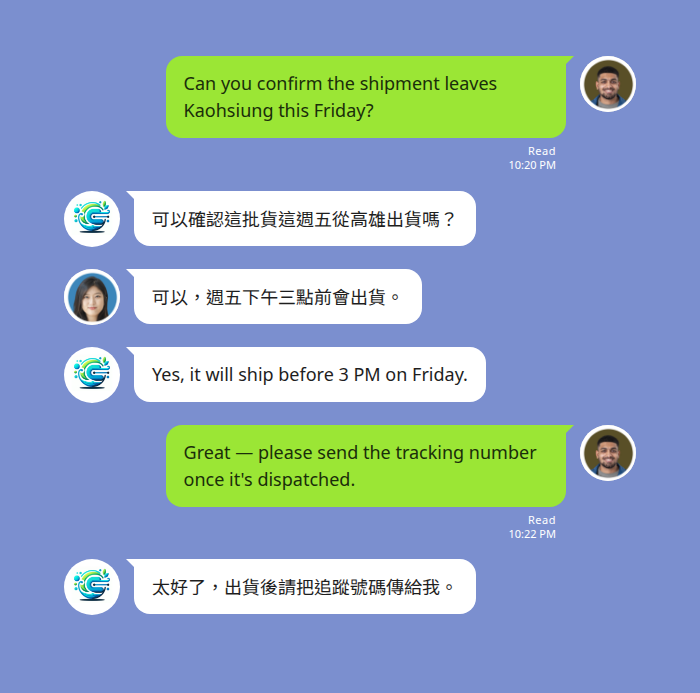
If a third language is ever part of the conversation, add it the same way — @Echonora english and chinese and japanese — up to the per-group limit. You send the command once; it keeps working in that group afterwards.
Two things to know before you rely on it:
- It is group chats only. Messaging the bot one-to-one will not translate a conversation, so the invite step is not optional.
- Voice messages are covered. A Chinese or English voice note is transcribed first, then translated, and the result appears as text. The original voice message stays in the thread.
Traditional or Simplified — which one you get
“Chinese” is not one written language, and this is the setting people miss.
When you activate with @Echonora english and chinese, the bot’s Chinese output is Traditional (繁體) by default. Traditional characters are standard in Taiwan and Hong Kong; Simplified characters are standard in mainland China and Singapore. The two share most of their vocabulary and grammar, but the characters are not identical, and a document in the wrong variant reads as visibly foreign even when the meaning survives.
So the default matters depending on who is on the other end:
- Counterparts in Taiwan or Hong Kong read Traditional, so the default is already the right one — nothing to change.
- Counterparts who read Simplified will still follow a Traditional rendering in most cases, but it is not what they are used to. If Simplified specifically is what your group needs, that default is worth confirming with the bot directly before you depend on it, rather than assuming.
Incoming Chinese is read either way — the variant setting is about what the bot writes, not what it can understand.
Where machine translation slips on Chinese
Chinese and English are far apart structurally, and that is where accuracy is won or lost. None of the following is unique to one tool — it is what makes Chinese hard for any machine translator — but knowing the failure points tells you how to write so the translation lands.
- No spaces between words. English marks word boundaries with spaces; Chinese does not. The translator has to decide where one word ends and the next begins, and an ambiguous string can be split more than one way.
- Grammar that English spells out, Chinese leaves implied. Chinese usually drops plural markers, verb tense, and often the subject of the sentence. The translator infers them from context — and a three-word message gives it almost none to work with.
- One character, several meanings. Many characters carry different meanings depending on the words around them. Short, clipped messages strip out the context that would settle which meaning is intended.
- Names that read as ordinary words. Chinese personal and place names are built from everyday characters, so a name can be translated as if it were a common phrase unless the surrounding sentence makes clear it is a name.
- Formality and tone. The difference between 你 and 您, or a blunt phrasing versus a polite one, carries weight in Chinese business messages and often flattens out in translation.
- Idioms taken literally. A four-character idiom (成語) translated character by character comes out as nonsense in English.
You cannot fix the languages, but you can write for the machine:
- Send whole sentences, not clipped fragments — the extra words are the context the translator needs.
- Keep one topic per message rather than stacking three questions into one line.
- Go easy on slang, abbreviations, and inside shorthand, which have no stable translation.
A bot that translates messages in the flow of a live conversation has more of that surrounding context to work with than a single line pasted into a translator on its own — but clear writing on both sides is still what makes the difference.
What the bot does not translate
Worth knowing up front, so nothing surprises you:
- Stickers, images, and files are not translated, and text inside a screenshot or photo cannot be read. If it matters, send it as text.
- One-to-one messages to the bot are not translated — translation happens inside a group the bot has been invited to.
Check that both of your languages are covered on the supported language list before you set it up.
Quick reference: Chinese to English on LINE
| What you want | What to use |
|---|---|
| One message, occasionally, English ⇄ Chinese | LINE’s official English-Chinese translator account |
| Every message in a group, both directions, automatically | A translation bot in the group |
| Traditional characters (Taiwan, Hong Kong) | The default — no change needed |
| Simplified characters (mainland China, Singapore) | Confirm the variant with the bot before relying on it |
| A voice note translated | Covered — transcribed, then translated to text |
| Text inside an image or screenshot | Not supported — send it as text |
Start Using Echonora — Break Language Barriers
Before you rely on it
Set the group up once, send the language command, and check that the Traditional-or-Simplified default is the one your counterparts actually read. Those two decisions are what separate a group that translates cleanly all day from one that technically works but keeps producing text someone has to squint at.
For the wider picture of what LINE does and does not translate on its own — across every language pair, not just Chinese and English — see does LINE have a translator. If your issue is that LINE’s own menus are in the wrong language, that is a separate setting, covered in why LINE shows the wrong language.