

Why LINE Shows the Wrong Language — and How to Fix It
Published
You opened LINE and the menus are in Japanese, or Chinese, or Thai — a language you never chose and cannot fully read. You did not change a setting, so it feels like the app decided this on its own.
It did not. LINE has no language setting of its own; it takes its language from your phone. Once you know that, the “wrong” language stops being a mystery and becomes one of four ordinary situations, each with a straightforward fix.
LINE borrows its language from your phone
Unlike some messaging apps, LINE ships no independent language picker. Its menus, buttons, setting labels and push notifications all render in whatever language your device is set to. Change the phone, and LINE follows.
That single fact explains almost every “why is LINE in the wrong language” question. The app is not choosing anything — it is mirroring a setting that lives outside it, which is exactly why you cannot find the control inside LINE no matter how far you dig.
The four reasons below are just the different ways that outside setting comes to differ from what you expected.
Reason 1: The phone inherited a locale when you set it up
When you first set up a phone — a brand-new device, or one bought while you were abroad — the language and region you pick in that first-run wizard become the phone’s locale. Every app installed afterwards, LINE included, inherits it.
Buy a handset in Tokyo and breeze through setup, and the phone is Japanese; LINE arrives in Japanese. Restore from a backup made on a differently configured phone and the old locale can come with it. Nothing went wrong — the app is faithfully showing the language the phone was told to use months ago.
Reason 2: Your account region is not your language
This is the one that causes the most confusion, so it is worth stating plainly: region and display language are two different things.
Your LINE region follows the phone number the account was created with. It affects region-specific features — which sticker shops and services you see, for instance. It does not set the interface language, and changing your display language does not move your account to another country. People who see LINE in Japanese often assume their account is now “a Japanese account” and go hunting for a way to change it back. There is nothing to change back; the account never moved. The only thing showing Japanese is the interface, and that is a device setting.
Reason 3: The change did not fully take — cached labels
Sometimes you did change the language, LINE mostly updated, and a few labels or notifications stubbornly stayed in the old one. That is caching, not failure. Parts of the interface are held in memory from the previous language until the app fully restarts.
Force-close LINE and reopen it and the stragglers catch up. Notifications can lag a little longer — they may keep arriving in the old language until the next restart. Older chat names and past messages, though, will not change: those are content written in a particular language, not interface labels, and nothing re-renders them.
Reason 4: Per-device drift across phone, tablet and PC
If you use LINE in more than one place — phone, iPad, desktop — each copy takes its language from that device. There is no single account-level language that syncs them, so your laptop can sit in English while your phone shows Japanese, and both are behaving correctly.
When only one of your devices looks wrong, this is usually why. Fix the language on the device that is off; the others are already set the way their own systems are.
How to actually change it
The fix in every case above is the same: change the language on the device, because that is the only place the setting exists. The exact taps differ by platform, and there is a per-app option on recent iOS and Android that lets you keep LINE in one language while the rest of the phone stays in another.
Rather than repeat all of it here, the step-by-step for both platforms is in our companion guide: how to change the LINE app language on iPhone and Android. Follow the steps there, then come back if the display language was never the thing you actually needed — which, for a lot of people, it isn’t.
When the language is right but the messages still aren’t
Here is the twist that catches most people out. Changing LINE’s display language fixes the menus. It does nothing to the messages. Those are two separate settings, and the second one is usually what someone in a bilingual chat was really after.
- Changing the display language does not translate messages people send you. Their words arrive exactly as typed.
- It does not change what anyone else sees. Your language choice is local to your phone.
If what you wanted was to read incoming messages in your own language, there are two routes:
LINE’s own translation works one message at a time, on request, and its official translator accounts are each locked to a single fixed language pair. Fine for two people, awkward once a third language joins.
A translation bot is invited into a group once and then translates every message as it arrives, in both directions. You choose the language combination and can change it later. In a family or neighbourhood group in Japan or Taiwan, that means everyone writes in their own language and reads in theirs.
The setup is short:
- Add the bot as a LINE friend.
- Open the group you want translated and invite the bot into it.
- Send the language command in that group.
@Echonora english and japanesesets English and Japanese to translate to each other from then on.
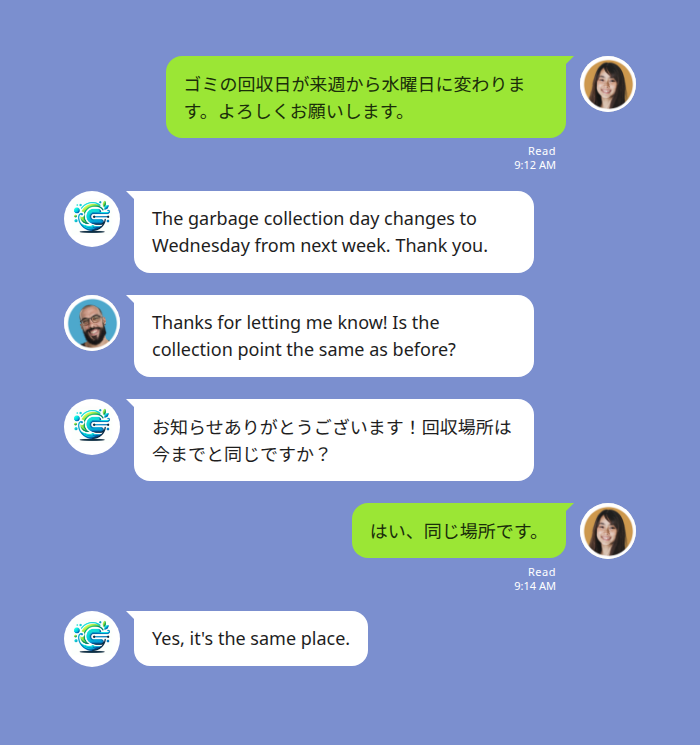
Add more languages the same way — @Echonora english and japanese and thai — up to the per-group limit. A few things worth knowing:
- Group chats only. Messaging the bot one-to-one translates nothing, so the invite step matters.
- Voice messages are covered. A LINE voice message is transcribed first, then translated, and the result appears as text. Your original voice note stays in the thread.
- Stickers, images and files are not translated, and text inside a screenshot cannot be read — send it as text instead.
- Check your language is on the supported language list before you rely on it.
Start Using Echonora — Break Language Barriers
Quick reference: symptom, cause, fix
| What you are seeing | Why | What to do |
|---|---|---|
| LINE opened in a language you never picked | Phone locale set at first setup | Change the device or per-app language |
| Menus in Japanese, and you think your account “became Japanese” | Region ≠ language; the account never moved | Change the display language only |
| Some labels or notifications still in the old language | Cached until restart | Force-close LINE and reopen |
| One device wrong, another right | Each device has its own language | Fix the language on the device that is off |
| Menus fine, but messages still unreadable | Display language ≠ message translation | Add a translation bot to the group |
Most people arrive looking for the first row and leave needing the last one.
For the wider picture of what LINE does and does not translate on its own, see does LINE have a translator.