

Talking to Grandparents in Japan or Taiwan in the Family LINE Group
Published
The family group exists. Someone set it up years ago — after a wedding, or a birth, or the first time everyone was in the same country at once. Your grandmother in Taipei posts in it. Your grandfather outside Osaka sends the occasional voice note. And most of what they send sits there, seen by everyone and answered by the two people who can read it.
This is a different problem from the one most translation advice solves. Your grandparents are not hard to reach. They are already on LINE — it is the default messaging app in both Japan and Taiwan, and it is where the rest of their life happens. The group is already there. What is missing is that half the people in it cannot read the other half.
Why the family group goes quiet
Groups like this rarely collapse. They thin out, which is harder to notice.
The pattern is consistent. An elder posts something in Japanese or Chinese. The one bilingual family member — usually the one who moved, or married in — translates it for everyone else, either in the group or privately. That works for a while. Then it becomes a small daily job that one person is doing, so they start doing it only for the messages that seem important. The rest go unanswered.
The elders read that silence accurately: nobody replied. So they post less. Within a year the group is a photo album that activates at New Year, and the actual conversation has moved into a side chat between the two people who share a language.
Nothing went wrong in that sequence. Everyone behaved reasonably. It is just that the group had a translation bottleneck of exactly one person, and that person got tired.
The gap is typing, not technology
It is tempting to file this under grandparents being uncomfortable with phones. In Japan and Taiwan that is usually the wrong diagnosis.
The generation you are trying to reach uses LINE constantly. They use it for family, for neighbours, for the clinic, for the local shop. Stickers, voice notes, photo albums, group chats — all of it is familiar. LINE is not the obstacle.
What is genuinely hard is composing a message in a second language. Reading a foreign-language message on a phone screen is harder again at seventy than at thirty. And the effort is asymmetric: a grandparent writing to you in English is doing real work every time, while you are just reading. That asymmetry is what quietly ends the exchange, and it is the part a translation layer actually fixes.
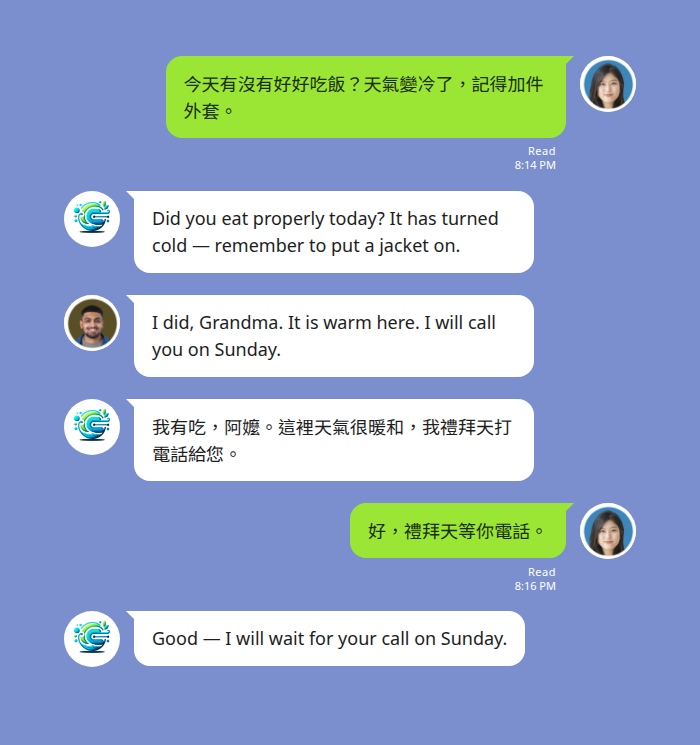
What LINE does on its own
LINE has built-in translation, and it is worth knowing its shape before adding anything.
LINE runs official translator accounts you can invite into a chat, each locked to one fixed language pair — an English-Chinese account, an English-Japanese account, and so on. They translate on request rather than continuously. There is also per-message translation available to an individual reader, which shows the result to that person only.
For an occasional message, that is enough. For a family group it runs into two things. The fixed pair becomes a wall the moment a third language is in the room, which is common in these families. And a translation only one person can see does not fix a group — everyone else still watches a message go past that they cannot read. The thing a family group needs is a translation posted into the thread, where the whole family sees the same message in a language they can read.
Setting up the family group
The setup runs once and then the group looks after itself.
- Add the bot as a LINE friend.
- Open the existing family group and invite the bot into it.
- Send the language command in the group.
@Echonora english and japanesesets English and Japanese to translate to each other from that point on — or@Echonora english and chinesefor a Taiwanese side of the family.
From then on every English message is posted back in the other language and vice versa, automatically, for everyone. No one has to ask for a translation, and no one has to be the designated interpreter.
Two details worth knowing before you rely on it. Chinese output defaults to Traditional characters (繁體), which is what Taiwan reads — so for Taiwanese grandparents the default is already right. And translation runs in groups, not in one-to-one messages with the bot, so the invite step is the one that matters. Check both of your languages on the supported language list before you set it up.
You do not have to commit anything to try it. There is a free plan with a daily message allowance, no credit card and no expiry — which for a family group that exchanges a few messages most evenings is a realistic everyday tier rather than a countdown.
Start Using Echonora — Break Language Barriers
When they would rather talk than type
This is the part that matters most for elders, and it is the reason voice is worth setting up deliberately rather than discovering by accident.
A grandparent who finds typing slow will often send a voice note instead — it is faster, it carries tone, and in Japanese or Chinese it sidesteps the input method entirely. Voice notes are translated the same way text is: the audio is transcribed first, then translated, and the result is posted as text in the thread. It usually lands within a few seconds of them finishing.
Two things about how it arrives. The original recording stays in the thread, because LINE keeps it — so you still have their actual voice, which for a lot of families is the point. And the translation comes back as text, not as spoken audio; the bot does not read anything aloud in either language.
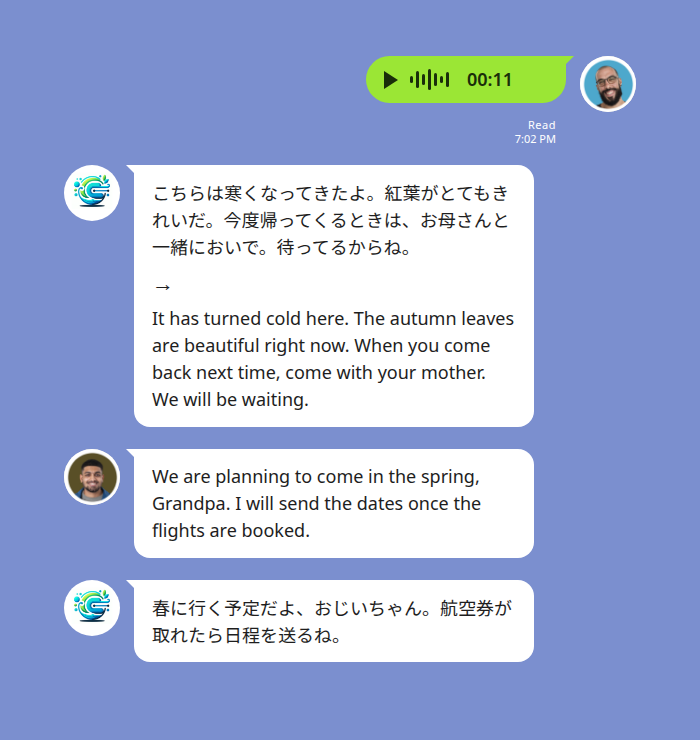
Voice is the harder input for any translation tool, so it is worth a low-stakes test first. Background noise degrades transcription, and a strong regional accent can be misread — worth knowing before something important rides on it. Sending one ordinary message and seeing how it lands tells you more than any description will. There is more on how this behaves in LINE voice message translation.
When it is three languages, not two
Plenty of these families are not one language pair. One set of grandparents is in Japan, the other in Taiwan, the couple speaks English between themselves, and everybody is in the same group for births, illnesses and New Year.
A group can carry up to five languages at once, added the same way — @Echonora english and japanese and chinese. Each message is posted back in the other languages in the group, with a flag marking each one so a Japanese grandparent and a Taiwanese grandmother can both read the same announcement in their own language without anyone repeating themselves.
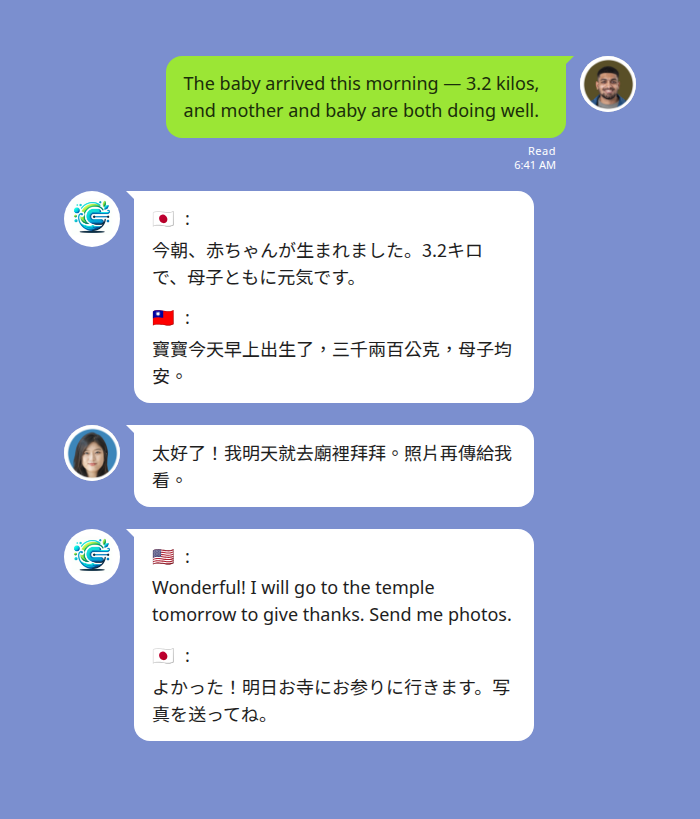
For metering this is generous rather than expensive: one message translated into three languages still counts as one, not three.
Taking the job off the kids
In a lot of these families the interpreter is a child — the one who grew up bilingual and gets handed the phone when the grandparents call or post.
It looks harmless, and for casual chat it often is. It stops being harmless when the content is medical, financial or emotionally difficult, and a ten-year-old is deciding how to phrase something between two adults. That dynamic has its own costs, set out in the hidden risk when kids translate for parents.
A translation layer in the group changes who is doing the work rather than adding a tool on top of it. The child is back to being a grandchild in the conversation, and the two adults are talking to each other directly — which is usually what both of them wanted.
What it will not do
Worth stating plainly, so nothing surprises you at the wrong moment:
- Text inside a photo or screenshot is not translated. This one catches families constantly — a photographed hospital letter, a school notice, a bill. If it matters, type it out as a message.
- Stickers and images are not translated. Given how heavily this generation uses stickers, expect them to pass through untouched.
- It is not a medical or legal interpreter. For a hospital admission, a diagnosis or anything legal, ask for a certified interpreter. This is the daily-conversation layer, not the formal-record one.
- It is not a call translator. Chat messages and voice notes only — a live LINE voice call is not covered.
- One-to-one messages with the bot are not translated. Translation happens inside a group the bot has been invited to. For solo use, the supported way is a group containing just you and the bot.
If your problem turns out to be that LINE’s own menus are in the wrong language, that is a separate setting entirely — see how to change your LINE app language. See the privacy policy for how messages are handled.
Quick reference
| What you want | What to do |
|---|---|
| Everyone in the family group reads in their own language | Invite the bot to the group and send the language command once |
| Traditional characters for Taiwanese grandparents | The default — nothing to change |
| A grandparent who would rather speak than type | Voice notes are transcribed, then translated to text |
| Their actual voice kept | Kept automatically — LINE keeps the original recording in the thread |
| Grandparents in Japan and Taiwan in one group | Add both languages — up to five per group |
| A photographed letter or school notice translated | Not supported — type the text as a message |
| A hospital appointment or legal document | Use a certified interpreter, not a chat bot |
Before you set it up
Pick the group that already exists rather than starting a new one. The family group with the dormant photo threads is the one worth switching on, because everybody is already in it and nobody has to be persuaded to join something.
Then send one ordinary message — not a test message, an actual one — and let a grandparent answer it. What you are checking is not whether the translation is accurate. It is whether the person on the other end replies, now that replying costs them nothing. That is the whole thing, and you will know within a day.
For the wider picture of what LINE translates on its own, across every pair, see does LINE have a translator. For the other family situations this comes up in — partners, in-laws, school and care — see the guide to LINE translation for cross-cultural families.