

LINE Spanish Translation for Construction Sites: Communicating with Crews in Real Time
Published
On most American job sites, the workday runs on two languages at once. The foreman calls a change in English; half the crew thinks in Spanish. A welder spots a problem and says it the fastest way he can — in his first language — and the message stalls before it reaches the person who needs to act on it. That gap is not just a productivity tax. On a site with open trenches, live wires, and swinging loads, a sentence that arrives late or garbled is a safety incident waiting to happen.
This guide shows how to close that gap in real time using a translation bot that works inside the LINE group your crew already uses — translating Spanish and English (and more) as text and voice, so a task assignment, a hazard call, or a site-wide notice reaches every worker in the language they read fastest.
This is a practical companion to our complete guide to Spanish translation in LINE — focused specifically on the construction job site.
Why Spanish–English translation matters most on construction sites
Construction is the single largest employer of Spanish-speaking workers in the United States. Crews are routinely mixed: an English-speaking general contractor and superintendent, Spanish-speaking carpenters, concrete and rebar crews, and trades who may speak a third language entirely. The coordination problem is constant and it is operational — not the occasional translated memo, but minute-to-minute task hand-offs, sequencing, and hazard awareness.
The cost of getting it wrong is unusually high here:
- Safety. A misheard instruction near an excavation, a crane pick, or energized equipment can injure someone. OSHA-style toolbox talks only help if every worker actually understands them.
- Rework. “Pour the east footings” heard as “the west footings” is a day lost and material wasted.
- Schedule. Trades that can’t coordinate hand-offs across a language line create idle time that compounds across a project.
Most sites paper over the gap with a bilingual lead who relays everything. That works until the lead is on another floor, off that day, or buried in their own task — and the translation bottleneck becomes a single point of failure.
How real-time translation works inside your crew’s LINE group
The model is simple: the crew already has a group chat. You add a translation bot to that same group, tell it which languages the crew speaks, and from then on every message posts in everyone’s language automatically — no app-switching, no copy-paste, no separate tool for the workers to learn.
What that looks like on a job site:
- Text and voice both translate. A worker can type or send a LINE voice note; the translation comes back as text the rest of the crew can read.
- Two to five languages in one group. An English + Spanish crew is the common case, but you can run a group with English, Spanish, and a third language (say Haitian Creole or Portuguese) and each message renders for everyone else.
- 180+ languages supported. Whatever mix your trades bring, the language is almost certainly covered.
- A shared, readable record. Unlike per-phone private translation, the translated message sits in the group thread where anyone — including a bilingual supervisor double-checking a safety call — can review it.
Echonora is one such bot built for exactly this kind of group. The three scenarios below are the patterns that come up most on an active site.
Scenario 1 — Morning task assignment
The foreman assigns the day’s work in English. Each Spanish-speaking crew member sees it in Spanish in the same thread, and their reply comes back to the foreman in English. No one waits for the bilingual lead to walk over.
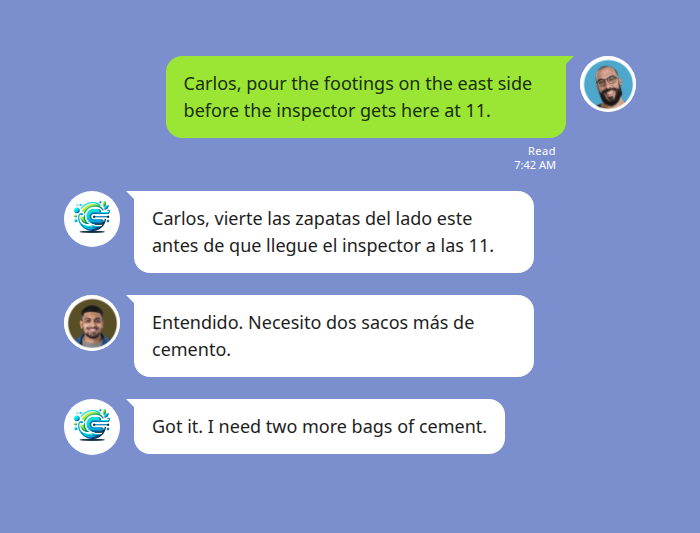
A two-language group like this translates each message into the single other language with no extra clutter — the crew just reads their own line.
Scenario 2 — Hands-free hazard call by voice
A worker with gloves on and both hands busy can’t type. He taps the voice button and says, in Spanish, that there’s an exposed wire near the scaffolding. The bot posts the transcript and the English translation together, so the supervisor sees the hazard immediately and can act.
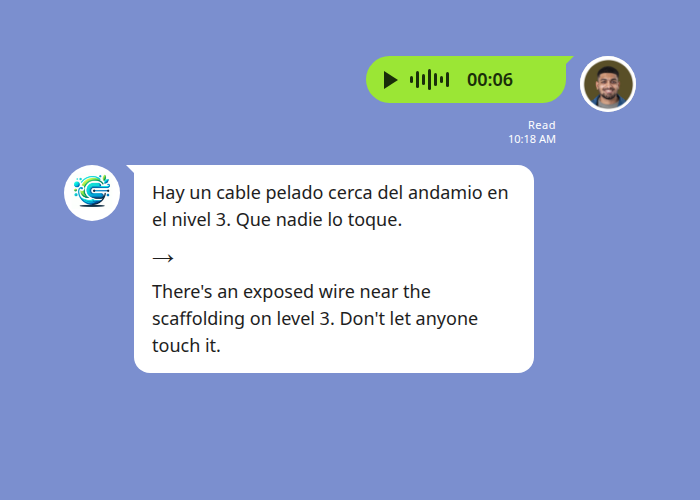
Voice is a genuine advantage on a busy site where typing is impractical. One honest caveat: heavy background noise — a running saw, a generator, traffic — degrades speech recognition. For a critical safety message, have the worker step a few feet away from the loudest equipment, or follow the voice note with a quick text. See more on translating Spanish voice messages in LINE.
Scenario 3 — Site-wide notice across three languages
A new PPE rule goes out to the whole site. The site manager posts it once in English; the bot renders it for the Spanish-speaking crew and the Haitian Creole-speaking crew in the same message, each line flagged by language. One post, every worker reached.
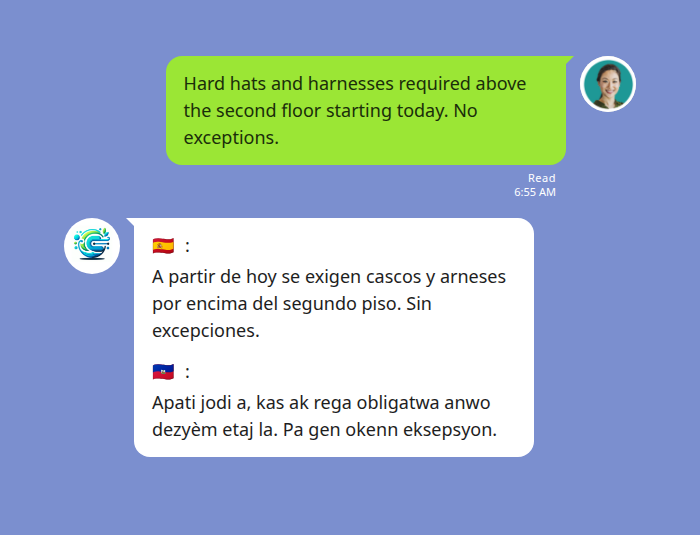
This is the same pattern as a translated toolbox talk — for the briefing side of crew communication, see managing multilingual construction crews: safety briefings and toolbox talks.
Why in-chat translation beats the workarounds crews actually use
Most sites are already “solving” the language gap somehow. Here’s how the common approaches compare for real-time job-site communication:
| Approach | Real-time? | Voice? | Shared record the crew sees? | Best for |
|---|---|---|---|---|
| Bilingual lead relays everything | Only when present | Yes (in person) | No | Small crews with the lead always on hand |
| Google Translate (separate app) | Slow — copy/paste both ways | Limited | No record kept | One-off lookups, signage |
| WhatsApp message translation | Per-message, per phone | No | No — each phone sees its own private translation | WhatsApp-based teams on supported pairs |
| In-chat bot (Echonora on LINE) | Yes — automatic in the group | Yes — text and voice | Yes — in the shared thread | Mixed-language crews coordinating live |
The decisive difference for a job site is the shared, readable record. When a translation lives in the group thread instead of on one private phone, a supervisor can verify a safety instruction landed, and there’s a trail if a dispute comes up later. For sensitive details, the privacy policy covers how messages are handled.
Getting your crew set up in about five minutes
There’s no new app for the workers to install — if they’re in the LINE group, they’re set. The whole setup is three steps:
- Add the bot to LINE. Tap the add link, then invite it into your crew’s existing group.
- Tell it your languages. Post a one-line command naming the languages your crew uses. For an English/Spanish crew: @Echonora english and spanish. For three languages, just keep adding them: @Echonora english and spanish and haitian creole.
- Start working. Every message from then on posts in everyone’s language. Use language names, not codes — no need to memorize anything.
You can run it free to prove it out on one crew first — 20 messages a day, no credit card, no expiry — then move to a paid plan for unlimited translation across all your site groups when it earns its place. For the full list of supported languages and exact activation syntax, see the supported-languages reference.
Start Using Echonora — Break Language Barriers
Supports 180+ languages, with real-time text and voice translation right inside your crew’s LINE group.
Frequently asked questions
Do my workers need to install or learn anything new?
No. If they’re already in the LINE group, translation just starts appearing. There’s no separate app, login, or training — the bot works in the chat they already use.
Does it handle voice notes, or only typed text?
Both. A worker can send a LINE voice note and the crew gets the translated text back. Just be aware that loud equipment nearby can reduce voice accuracy — step away from the noise for critical messages.
Can one group handle more than two languages?
Yes — a single group supports two to five languages at once. Each message is rendered for every other language in the group, so a mixed English, Spanish, and Haitian Creole crew all stay in one thread.
How many paid accounts does a company need?
Not one per worker. A paid subscription is per user but extends unlimited translation to every group that user is in — so a superintendent or site lead on a paid plan can cover the crews they manage. Arrange paid accounts by site or shift lead, not per employee.
Is it accurate enough for safety-critical instructions?
Translation quality is strong for clear text and clear speech. Because the translation sits in the shared thread, a bilingual supervisor can glance at a safety-critical message and confirm it reads correctly — a backstop you don’t get with private per-phone translation.
Keep your whole crew on the same page
Real-time Spanish and English translation for task hand-offs, hazard calls, and site notices — in the LINE group you already use.