

Managing Multilingual Construction Crews on LINE: Safety Briefings and Toolbox Talks
Published
A typical commercial-build day starts the same way on most sites: the foreman pulls the crew together at the gate, runs through the day’s hazards, calls out PPE, and assigns the lockout for whichever live system the trades will be working around. When the crew shares one first language, that briefing works. When the crew is mixed — an English-speaking site supervisor with Spanish-speaking concrete, Vietnamese carpenters, and Tagalog framers — the briefing turns into a chain of half-translations whispered by whoever happens to be bilingual that morning.
This post is a practical guide to running the safety briefing and the running toolbox talks through a LINE group instead — one shared chat where the foreman writes or speaks in English, and every member of the crew reads the same brief in their own first language. It is a companion to our broader guide to LINE translation in factory and manufacturing operations; construction sites share the same multilingual-crew dynamics, with an extra layer of regulated safety obligations that make the chat record itself useful.
Why Multilingual Crews Need a Different Briefing Channel
Construction-site briefings are short, dense, and consequential. A morning toolbox talk runs 5 to 10 minutes and covers hazards, exclusion zones, PPE, the day’s lockouts, and any change from yesterday’s plan. A mid-shift hazard update — an unexpected utility hit, a moved crane swing, a chemical spill — is even shorter and even higher stakes.
In a single-language crew, those messages land. In a mixed crew, three things tend to happen:
- Translation collapses to one person. A bilingual labourer becomes the unofficial interpreter and is pulled out of their actual work to relay the brief, sometimes incorrectly, often incompletely.
- The brief is delivered twice (or not at all). The foreman runs the talk in English, walks over to the Spanish-speaking crew, and runs an abbreviated version from memory — or, on a rushed day, skips the second pass.
- Nothing is written down in the workers’ language. When a regulator, a safety auditor, or an incident investigator later asks “how was this hazard communicated to the worker”, the only artefact is an English sign-in sheet the worker may not have understood.
A shared chat thread changes that. If the brief lives in a group where every message is translated in-thread, the foreman speaks or writes once and the crew reads the same content in their own language. The artefact — the chat history — becomes the record of what was said, when, and to whom.
What a LINE Group Adds to the Toolbox Talk Routine
LINE is a chat app that is dominant in Taiwan, Japan, and Thailand, and widely used by their diaspora workforces — which is why so many construction subcontractors with Southeast-Asian crews already run a LINE group as their primary site chat. That established habit matters: the briefing channel works only if the crew already opens it.
A LINE group on its own is not a translator. What turns it into a briefing channel is adding a translation bot — a small piece of software that sits in the group, reads every message as it arrives, and posts the translations straight back into the thread for everyone to read. Echonora is one such bot, designed specifically for groups where people speak different first languages.
Three properties matter for a safety briefing:
- One brief, every language, in one place. A supervisor’s message is fanned out to every configured target language inside the same chat. Workers see their own language and can re-read it at any point in the shift.
- Voice notes work the same as text. A foreman with gloves on, standing on a slab, can speak a hazard update into the LINE app; the bot transcribes the speech, translates it, and posts the translation as text. The voice file stays in the thread for anyone who wants to play it.
- The thread is the record. Every brief, every update, every worker question is timestamped and preserved in the chat. If a subcontractor lead, a safety officer, or an external investigator later needs to confirm what was communicated, the thread is the source of truth — in every language the crew speaks.
A construction-site group typically configures two to five languages — English plus whichever first languages are represented on that crew. Activation is one message in the group: @Echonora English and Spanish for a two-language crew, @Echonora English, Spanish, and Vietnamese when carpenters join the framers and concrete teams. From there on, every message is translated in-thread without further commands.
Running the Morning Briefing in 10 Minutes
A practical sequence for the morning toolbox talk, designed to run inside the LINE group:
1. Open with the day’s headline (60 seconds). The foreman posts a short text message naming the focus of the day: “Concrete pour on B-level today. Two exclusion zones — see below. PPE: hard hat, safety glasses, gloves, high-vis.” Workers in the group read it in their own language as it lands.
2. Drop the hazard list (2 minutes). Each hazard goes in its own short message — exclusion zone coordinates, lockouts in force, any height/edge work in progress. Short messages translate cleanly; a wall of text in one post is harder to read on a phone, in any language.
3. Call PPE and any changes from yesterday (1 minute). State explicitly what is required and what is different from the prior day. “Same PPE as yesterday. New: ear protection in the saw bay.” Workers who skim earlier briefs see the New: prefix in their language and stop on it.
4. Confirm receipt (2 minutes). Ask the crew to react or reply. A thumbs-up reaction is enough; a short “copy” reply in any language is even better, because it appears in the thread record as evidence the worker saw and acknowledged the brief.
5. Leave the thread open for questions (rolling). Once the day starts, any worker who hits something unclear can ask in their own language; the answer comes back in their own language, and the entire crew can see both the question and the answer in theirs.
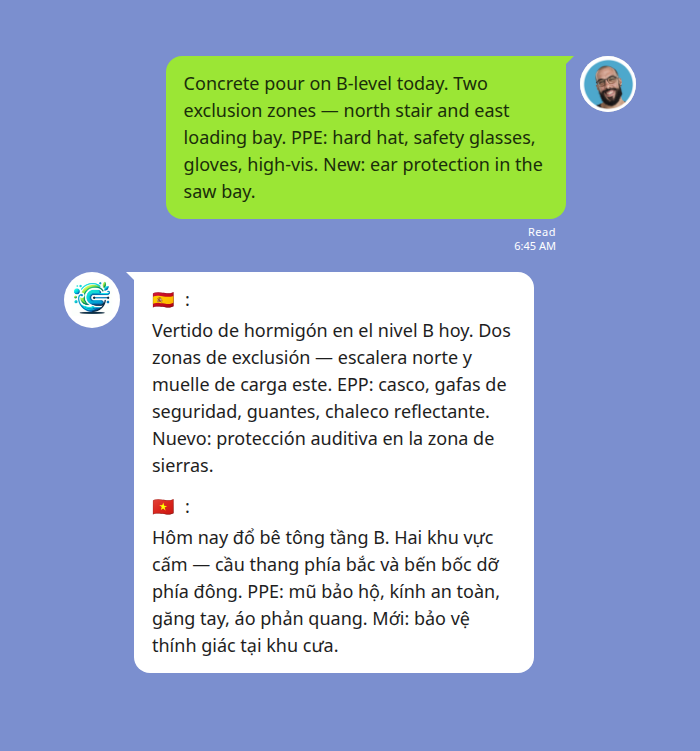
In the example above, a foreman posts the morning brief in English; the bot fans it out to the Spanish-speaking concrete crew and the Vietnamese-speaking carpenters in the same thread. Each translation is flag-marked, so a worker scanning the chat can find their own line at a glance. For three or more languages, the activation command simply lists them — see the full list of supported language pairs and exact activation syntax for the form your crew needs.
Voice Notes for the Site: Hands Free, Gloves On
Some moments on a construction site do not fit a typed message. A foreman moving an exclusion zone in real time, a supervisor calling out a sudden weather change, a labourer reporting a near-miss with hands full — typing on a phone is impractical or unsafe.
LINE voice notes solve that ergonomically. Echonora reads voice messages the same way it reads text: the audio is transcribed to text and then translated, and the translation is posted into the thread. The original voice note also stays in the chat — LINE keeps every voice message in the thread automatically — so a worker who prefers to hear the foreman’s actual voice can play it back. The text translation alongside makes the content readable in everyone’s own language.
A typical end-to-end is three to eight seconds: the foreman finishes recording, and within a few seconds the translation lands in-thread.
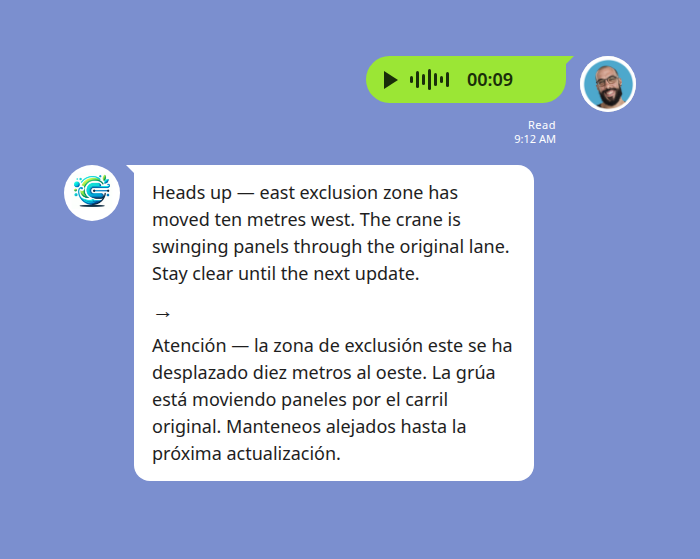
The example above shows a foreman on the slab voice-noting a moved exclusion zone; the bot posts the English transcript and the Spanish translation right beneath the voice file. The Spanish-speaking crew sees the brief, the English-speaking trades see it confirmed in English, and the voice file is preserved if anyone wants to re-listen.
One honest caveat: a construction site is acoustically hostile. Generators, saws, ambient traffic, and heavy plant all degrade speech-to-text accuracy. The fix is the same as for in-person briefings — speak clearly, get close to the phone, and break long instructions into shorter voice notes rather than one continuous monologue. For the most critical content — exclusion-zone coordinates, lockout numbers, evacuation routes — a typed message remains the safest format.
Hazard Reports and Near-Miss Capture from the Crew
The most useful thing a multilingual chat does — beyond the foreman’s outbound briefs — is invert the channel. When a worker can report a hazard or a near-miss in their own first language, and the supervisor reads it in theirs, the reporting rate goes up. Workers who would never raise a concern in a language they are not fluent in will raise it in their own.
A worker types or voice-notes “the rebar on the east edge is loose, two pieces” in Spanish; the supervisor sees the English translation in-thread within seconds and can dispatch a fix. The original message in Spanish is still in the thread for the rest of the Spanish-speaking crew to see; the English translation is in the thread for the trades who do not read Spanish.
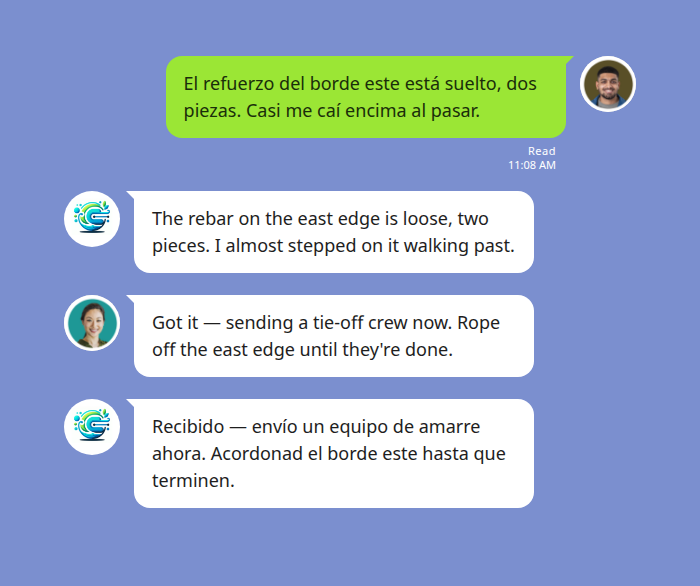
The result is a near-miss capture process that does not depend on the worker also being fluent in the site’s lead language, and a record of the report itself — timestamped, in both languages — that lives in the same chat as the original briefing it relates to. For sites where toolbox talks already happen but worker-side reporting is thin, that inversion is often the larger value the chat unlocks.
Building an Audit Trail Without Extra Paperwork
Construction safety regulators, insurers, and internal QHSE teams all ask variants of the same question after an incident or during a routine audit: what was communicated to the worker, when, in what language, and is there evidence they received it?
In a paper-and-sign-in-sheet world, the answer is partial — the sheet shows attendance but not content, and rarely shows content in the worker’s language. In a single-language chat, the answer is the chat history, useful but only readable to people who speak that language. In a translated LINE group, the answer is the full thread — every brief, every update, every worker reaction or reply — preserved in every language the crew speaks. A reviewer reading in Spanish sees the same morning brief, in Spanish, that the concrete crew saw at 6:45 AM that day.
A few operational notes for treating the chat as a record:
- One group per site, not per shift. Rotating groups every shift fractures the record. A persistent site group with everyone in it produces a single continuous artefact.
- Pin the configured language list. Post and pin a short note at group creation: “This group runs English, Spanish, and Vietnamese. If your first language is not listed, tell the foreman.” It removes ambiguity later about who was reading what.
- Keep the group active even on quiet days. A short “no changes from yesterday’s brief” still produces a dated entry the audit trail can reference. Silent days create gaps.
- Treat critical content as critical content. The chat is a briefing channel, not a substitute for a written safety management system. For SWMS, lockout permits, incident reports, and any regulated documentation, the chat is the communication record — the formal documents still live where they always have. The chat just shows they were read.
Audit-trail value is one of the reasons our broader factory and manufacturing operations guide gives translated group chat such weight: in regulated environments, the record matters as much as the message.
Start Using Echonora — Break Language Barriers
Supports 180+ languages — real-time text and voice translation right inside your LINE group, no extra apps for the crew
Frequently Asked Questions
Does the bot work with LINE voice notes, or text only?
Both. Echonora translates LINE voice notes by transcribing the audio and then translating the transcript into each configured target language. The original voice file stays in the chat for anyone who wants to play it; the translation appears as text. Background noise on a site degrades transcription accuracy — speak clearly and keep voice notes short for best results.
How many languages can one group run?
Two to five. Most construction crews run two or three — English plus Spanish, or English plus Spanish plus Vietnamese. The activation command lists them: @Echonora English and Spanish for two languages, @Echonora English, Spanish, and Vietnamese for three. Echonora supports 180+ languages in total.
What about workers who do not have LINE installed?
LINE is free to install on iOS and Android. The standard onboarding for a multilingual site is to have new workers install LINE on day one as part of induction, alongside any other site-required apps. For workers without a smartphone at all, the foreman runs an in-person briefing and notes that fact in the group chat for the record.
Does Echonora cost anything for a small crew?
There is a free plan with 20 translation events a day per group, no credit card, no expiry. A small crew running short briefs and a handful of updates can sit on the free plan indefinitely. Higher-volume sites move to a paid plan — $10 USD/month or $100 USD/year — for unlimited translation. One paying member covers the entire group, so a foreman or site supervisor typically holds the subscription on behalf of the crew. Current pricing is on echonora.com.
Can the chat be used as evidence in a safety investigation?
The chat thread is a timestamped record of what was communicated to whom and in what language. It is not a substitute for a formal incident report or a safety management system, but it is admissible alongside those documents as evidence of the communication itself. Treat it as you would any other written briefing record — keep the group persistent, keep the language list pinned, and do not delete history.
What if our crew speaks a language Echonora does not support?
Echonora supports 180+ languages drawn from the ISO 639-1 list, including every language commonly represented on US, UK, AU, and Canadian construction crews — Spanish, Portuguese, Vietnamese, Tagalog, Mandarin, Korean, Polish, Romanian, Arabic, Punjabi, and more. If your crew speaks something you do not see in the activation response, contact us via the bot in LINE and we will confirm coverage for that pair.
Turn your site’s LINE group multilingual in one message
Add Echonora, name your crew’s languages, and every brief, voice note, and hazard report is translated in-thread. Free plan: 20 messages a day, no credit card, no expiry.