

How to Translate Spanish Voice Messages in LINE Group Chats
Published
Why Voice Translation Matters in Spanish–English LINE Groups
Voice messages are how Spanish-speaking team members talk when their hands are busy. A housekeeping lead at a hotel, a foreman on a construction crew, a contractor coordinating a multilingual job site — they tap the microphone in LINE because it is faster than typing on a phone covered in dust or detergent. If half your team voice-notes in Spanish and the other half reads in English, every voice note becomes a translation bottleneck.
Built-in LINE translation does not handle voice. You long-press a message, but a voice note has no text to long-press. Copy-pasting into Google Translate does not work either — there is nothing to copy. The usual workaround is to ask the Spanish speaker to also type it out, which defeats the point of using voice.
An in-chat translation bot solves this directly. Echonora listens to voice notes in your LINE group, transcribes them, and posts the translation as a text bubble next to the original audio. Spanish speakers keep talking the way they prefer. English speakers read what was said. Nobody installs an app, nobody copies anything.
This guide walks through the exact setup for a Spanish–English LINE group. If you want the broader picture on every Spanish translation option in LINE, read the parent guide: LINE translator for Spanish — the complete guide.
What You Need Before You Start
Three things, and you probably already have all of them:
- A LINE group chat with at least one Spanish speaker and one English speaker.
- Permission to add a bot to that group (you are the group creator, or the creator agrees).
- One person to send the activation command — anyone in the group can do it.
You do not need a paid plan to try this. Echonora’s free plan handles 20 translated messages per day, perpetual, no credit card. That is enough to set up, send a few voice notes, and confirm it works in your group before deciding if you need more headroom.
Step-by-Step: Set Up Spanish Voice Translation in Your LINE Group
Step 1 — Add Echonora to the LINE group
Open the LINE group where you want Spanish voice translation. Tap the menu (three lines or the gear icon, depending on your device), then “Invite.” Add @echonora as a friend first if it isn’t already in your contacts — the fastest way is to tap add.echonora.com on your phone, which opens LINE straight to the friend-add screen.
Once @echonora is in your friend list, invite it to the group the same way you’d invite a colleague.
Step 2 — Activate Spanish and English with one command
In the group chat, type:
@Echonora english and spanishSend it. The bot replies with a confirmation in the same language you used. Order does not matter — @Echonora spanish and english works the same way. You can use language names in any of the bot’s supported activation languages: write the command in English, Spanish (@Echonora inglés y español), or any other supported activation language and the bot resolves it correctly.
For the full list of supported languages and every accepted command form, see the supported languages and activation syntax reference.
Step 3 — Send a Spanish voice message
Tap and hold the microphone icon in LINE, speak your message in Spanish, release. The voice note appears in the chat as a green play-button bubble — same as any normal LINE voice message. Echonora’s translation arrives in the next 3–8 seconds for a typical 30-second voice note.
Step 4 — Read the translation
Below your voice note, the bot posts a single text bubble with two parts:
- The transcribed Spanish (what the bot heard).
- An arrow separator (
--\>). - The English translation.
Anyone in the group can play the original Spanish voice note (LINE preserves it natively — the bot does not delete or replace it) and read the English text directly underneath. English speakers can reply by typing or by sending their own voice note in English, which the bot will translate back to Spanish the same way.
What the Spanish Voice Translation Looks Like in the Chat
Here is what a typical exchange looks like — a Spanish-speaking team member voice-notes a logistics question, and the bot translates it for the English speakers in the group:
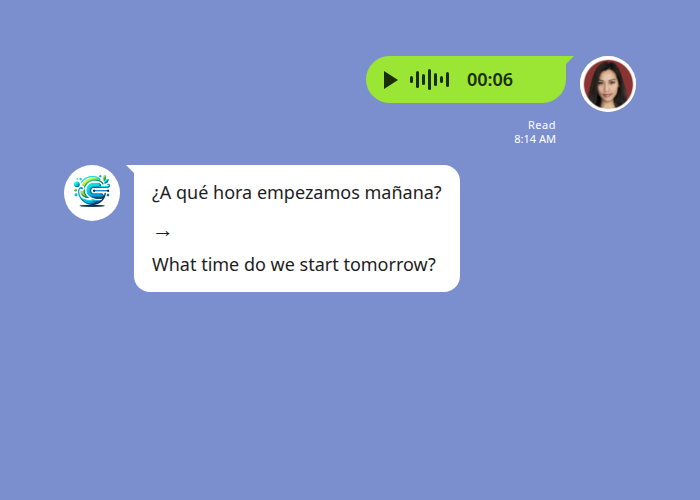
Echonora translates a Spanish voice note into English text inside the same LINE group thread.
The bot’s reply is a single text bubble showing the transcribed Spanish above the arrow and the English translation below. The original voice note (the green pill above) stays in the thread — anyone can play it back to hear the speaker’s tone.
When the English supervisor replies in text, the bot translates it the other direction:
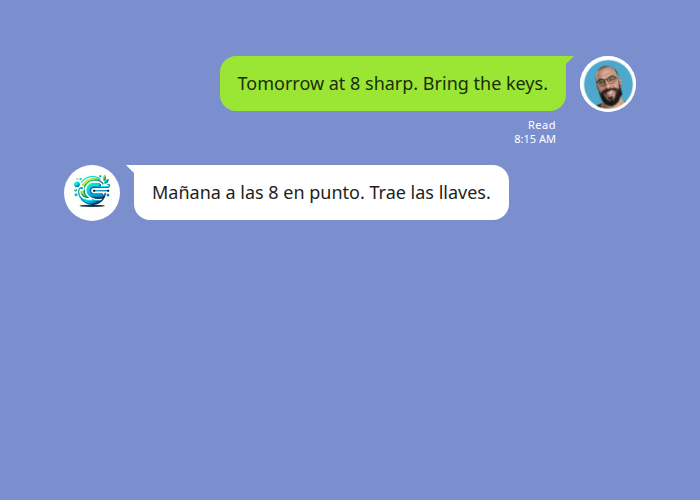
The reverse direction — English text translated automatically into Spanish for the Spanish-speaking members of the group.
Both directions work the same way. In a 2-language group like Spanish–English, you do not see country flags in the bot’s reply — flags only appear when there are 3 or more languages in the group, to tell each target apart.
When Spanish Voice Translation Works Best — and When It Doesn’t
Voice translation is genuinely useful most of the time, but a few things affect how well it transcribes:
- Quiet environments (office, kitchen, car interior) — transcription accuracy is high.
- Standard accents across Latin American and European Spanish — handled well.
- Background noise (factory floor, construction site, busy street) — degrades transcription. The translation is only as accurate as what the bot can hear.
- Heavy regional dialects or fast slang — can be mis-transcribed. If a phrase comes out wrong, it usually helps to re-record more slowly or rephrase.
- Length — voice notes up to about 30 seconds are quick and reliable. Longer notes still work but take a few more seconds.
One thing the bot does not do: it does not generate a voice reply in English. The translation is text only. Your original Spanish voice note stays as audio in the thread; the English version arrives as a text bubble next to it.
Troubleshooting Spanish Voice Translation
The bot isn’t responding to my voice notes. Confirm the activation command went through — Echonora should have replied with a confirmation when you sent @Echonora english and spanish. If you didn’t see a confirmation, re-send the command. Also check that @echonora is still a member of the group (someone may have removed it).
The transcription is wrong. Re-record in a quieter spot, speak more slowly, or send the same content as a typed message. Background noise and heavy accent are the two most common causes — the translation step is fine, the issue is at the speech-to-text stage.
I hit my daily message limit. The free plan covers 20 translated messages per day. For a Spanish–English group with regular daily traffic, you’ll likely want a paid plan — see the pricing details in the Spanish translation pillar.
I want to translate audio files (not LINE voice notes). Echonora translates LINE voice notes only — voice messages recorded inside the LINE app. Audio files uploaded from outside LINE, or voice notes forwarded from other messaging apps, are not supported.
What about privacy? The voice note and its transcription are processed to deliver the translation, then the translated text is posted back into your LINE group. See the privacy policy for full data-handling details.
Start Using Echonora — Break Language Barriers
Translate Spanish voice messages in your LINE group automatically. 180+ languages, free plan, no credit card.
Frequently Asked Questions
Does Echonora translate Spanish voice notes back into Spanish audio for English speakers?
No. The translation is text only. The original Spanish voice note stays in the thread (LINE preserves it), and Echonora adds the English transcription and translation as a text bubble alongside it.
How fast is voice translation?
Roughly 3–8 seconds for a typical 30-second voice note — from the moment the speaker finishes recording to the bot’s translation appearing in the group. Longer voice notes take proportionally longer.
Does it work with Latin American Spanish, European Spanish, or both?
Both. Standard regional accents across Mexican, Caribbean, South American, and Castilian Spanish are handled. Very heavy regional dialect or fast colloquial slang can occasionally trip the transcription — in those cases, re-recording more slowly usually fixes it.
Can I add a third or fourth language to the same group?
Yes — Echonora supports up to 5 languages per group. To add Portuguese, for example, send @Echonora english and spanish and portuguese. The bot will then translate every message into the other two languages, each prefixed by a country flag so you can tell them apart.
Is voice translation included in the free plan?
Yes. Voice messages count toward the 20 translated messages per day on the free plan — same as text messages. No separate voice add-on.
What happens if there is background noise?
Transcription accuracy drops. The translation step is fine — the issue is at the speech-to-text stage. For noisy environments (factory floor, construction site, busy street), step somewhere quieter to record, or send the same content as a typed message.
Ready to Translate Spanish Voice in Your LINE Group?
Adding Echonora to your Spanish–English LINE group takes about two minutes. The free plan covers 20 messages a day — enough to try it on real conversations and see whether voice translation removes the friction you’re currently dealing with. If you’re managing a bilingual hotel team, a multilingual construction crew, or a family chat with Spanish-speaking relatives, this is the lowest-effort way to make every voice note legible to everyone.
Start Using Echonora — Break Language Barriers
Spanish ⇄ English voice and text in LINE, automatically. 180+ languages supported.