

Spanish-English Parenting on LINE: Translating School Notices and Teacher Messages
Published
Your phone buzzes at 8pm. It’s the class LINE group, and a new message from the teacher has just landed — three lines of English about a permission slip, a due date, and something your child is supposed to bring. You read it twice. You catch Friday and field trip, but the rest is a blur, and now you’re wondering whether you’ve missed something important that every other parent already understood.
If you’re a Spanish-speaking parent raising a child in an English-language school, this is a familiar weekly weight. The information you need is right there in the group chat — you just can’t read it fast enough, or reply with the confidence you’d have in Spanish. This guide shows how to translate school notices, PTA group chats, and teacher messages in real time, directly inside the LINE conversations you’re already in, so nothing gets lost between English and Spanish.
Why an English school notice is harder than it looks
School communication is a language of its own. A short notice can pack in a permission deadline, a dress-code detail, a payment amount, and an implied action — all in the compressed, idiom-heavy English that schools use with parents they assume are fluent. Miss one clause and your child shows up without a water bottle on sports day, or the signed form arrives a day late.
The usual workaround is to copy the message, switch to a translation app, paste it in, read the result, then switch back to reply. It works, but it’s slow, it breaks your attention across two apps, and it leaves no shared record in the group — so when the teacher replies to your Spanish message, you’re copying and pasting all over again. For a fast-moving PTA thread with twenty parents, that friction is enough to make you stop reading altogether. The fix is to bring the translation into the chat, so both languages sit side by side for everyone who needs them.
Set up Spanish–English translation in your class LINE group
Echonora is a translation bot that lives inside the LINE group your class or PTA already uses. Instead of a separate app, it reads each message as it’s posted and replies with the translation in the group thread, where every parent can see it. Setup takes about a minute:
- Add the bot on LINE using the friend-add link, then invite it into your class or parent group the same way you’d add any member.
- Activate the language pair by posting the command in the group:
@Echonora English and Spanish. You use plain language names — no codes to memorise. - Start chatting normally. When the teacher posts an English notice, the bot follows it with the Spanish translation. When you reply in Spanish, the bot posts the English so the teacher understands you too.
Here’s what a permission-slip reminder looks like once the pair is active — the English notice, the Spanish translation right beneath it, and the parent’s Spanish reply carried back into English:
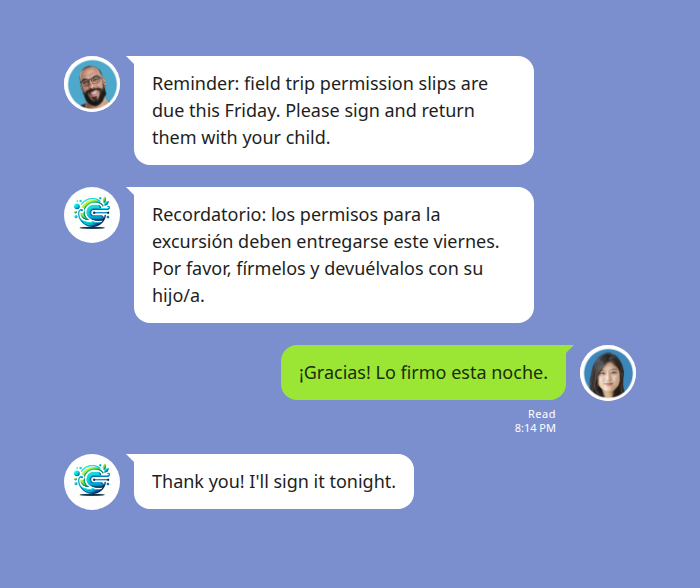
Because the translation appears in the thread itself, there’s a running bilingual record of the whole conversation. If your partner reads Spanish and you’re more comfortable in English — or the other way around — you both follow the same chat without anyone re-typing anything.
Keeping the PTA and parent group readable for everyone
Class groups are rarely just two languages. A single PTA thread might have Spanish-speaking families, English-only parents, and someone whose first language is Vietnamese or Mandarin. A translator that only works one pair at a time forces everyone into English by default — which is exactly the barrier you’re trying to remove.
A group can carry two to five languages at once, translating each message into every other configured language in the room. Post in Spanish and the English parents read English while the Vietnamese family reads Vietnamese; post in English and it flows the other way. Everyone contributes in the language they actually think in, and no parent is quietly excluded from the fundraiser plan or the carpool roster because the thread moved too fast in a language they’re still learning. For the broader picture of how mixed-language school and family chats work, see our guide to LINE translation for school parent groups.
Voice notes from teachers translate too
Teachers and room parents love a quick voice note — it’s faster than typing and warmer in tone. But a 20-second English voice message is the hardest thing of all to catch if English isn’t your first language: there’s no text to re-read, and it’s gone as soon as it plays.
Voice messages are handled the same way text is. When someone sends a LINE voice note, the bot transcribes it and posts the translation as text in the thread, usually within a few seconds. The original recording stays in the chat, and underneath it you get the words — in your language — that you can read at your own pace and scroll back to later.
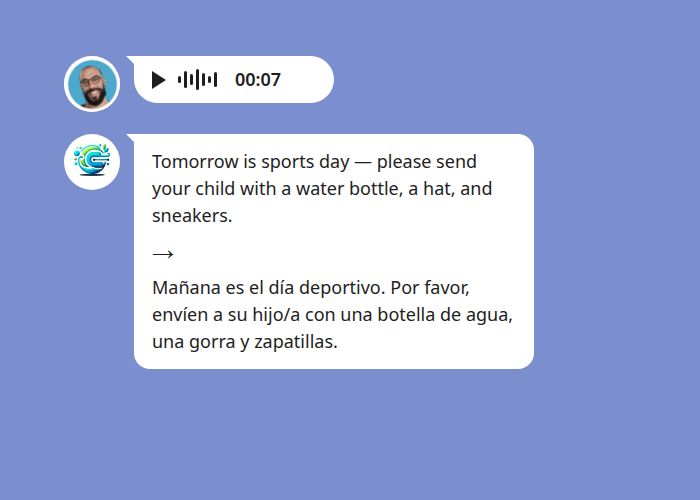
That sports-day reminder — water bottle, hat, sneakers — is precisely the kind of detail that slips past in a spoken message and leaves a child unprepared. As text in Spanish, it’s something you can act on tonight and check again in the morning.
In-chat translation vs. copy-paste and app-switching
There’s nothing wrong with a general translation app for a one-off sign or a menu. But for the ongoing back-and-forth of school life, the difference between translating inside the chat and translating beside it adds up fast.
| Copy-paste into a translate app | LINE in-app translate | In-chat translation with Echonora | |
|---|---|---|---|
| Where it happens | A separate app — switch out and back | Inside LINE, per language pair | Inside the LINE group, in the thread |
| Shared record | None — only you see it | Personal / local to each user | Both languages visible to the whole group |
| Voice notes | Not supported | Text only | Transcribed and translated as text |
| Mixed-language groups | One paste at a time | Limited beyond one pair | Two to five languages in one group |
| Effort per message | Copy, switch, paste, switch back | Per-message tap | Automatic once activated |
For the full list of supported language pairs and the exact activation syntax, see the supported languages reference.
What it costs to keep the class chat bilingual
You can start for free. The free plan covers 20 translated messages a day, needs no credit card, and never expires — enough for a typical evening of notices and replies in a single class group. When a busy week pushes past that (a fundraiser, an excursion, an end-of-term flurry), the Monthly plan is US$10 for unlimited translation across all your groups, and the Annual plan is US$100 a year.
One more thing worth knowing for parent groups: the unlimited benefit is per user but extends to every group that person is in. If one room parent or the class rep has a paid plan, the whole group gets unlimited translation — the other families don’t each need their own subscription. Because the conversations sit inside your LINE group with the people you invited, it’s worth a look at the privacy policy for exactly how messages are handled.
Start Using Echonora — Break Language Barriers
180+ languages, real-time text and voice translation right inside your class LINE group.
Common questions from Spanish-speaking parents
Do I need every other parent to install anything?
No. The bot is added to the group once, and it translates for everyone in the thread. Other parents keep using LINE exactly as they do now — they just start seeing messages in their own language.
Will the teacher see my Spanish messages in English?
Yes. Translation runs both directions. You write in Spanish, and the English translation is posted in the same thread so the teacher — and any English-only parents — can read and reply.
Can we run more than Spanish and English?
Yes. A single group supports two to five languages at once. If your class has Spanish, English, and a third language among its families, all three can be active together and every message is translated into the others.
Is this the same as a formal school interpreter?
No — and it isn’t meant to replace one. For legal documents, IEP meetings, or anything where precise official wording matters, use your school’s interpreter service. This is for the everyday flow of notices, reminders, and quick questions that fill a class group between those formal moments.
Read the school chat with confidence
Being a parent is demanding enough without a language barrier standing between you and your child’s school day. Bringing Spanish–English translation into the LINE group turns a stream of half-understood English notices into a conversation you can follow, act on, and reply to — in the language you think in, alongside every other family in the room. For the complete picture of Spanish translation on LINE, start with our Spanish LINE Translator guide.
Never miss a school notice again
Add Echonora to your class LINE group and read every message in Spanish — free to start, no credit card.