

LINE Translator for School Parent Groups: How Multicultural Families Handle PTA Chats and Teacher Messages
Published
If you’ve ever sat staring at a LINE message from your kid’s homeroom teacher at 7:43 AM, trying to figure out whether the “swim cap” notice means bring a swim cap today or buy one before Friday, you already know the problem this post is about.
For cross-border couples and multicultural families, the school year now runs through a chat app. Parent groups, class teacher announcements, PTA coordination, after-school activity sign-ups — most of it happens in a LINE group where one parent reads the messages natively and the other parent reads them through a slow loop of long-press, copy, switch to Google Translate, paste, hope the meaning survives.
This post is about closing that gap with an in-chat translator instead. We’ll cover where the language barrier actually hurts in school comms, what an in-group translation bot looks like in practice (with real chat examples), how it stacks up against the workarounds most multicultural families use today, and how to set it up in your own parent group.
Where the language gap shows up in school chats
Most multicultural families don’t have one big translation problem. They have a dozen small ones that pile up:
- Homeroom teacher one-liners. Short, often informal Japanese or Mandarin, references to school routines you didn’t grow up with. (“明日は給食ありません” — “no school lunch tomorrow.” A native parent skims it; a non-native parent doesn’t even know which word to look up.)
- Permission slips and forms. Field trips, vaccinations, health surveys. These are sent as photo attachments or PDF links, often with a deadline in the same message.
- Last-minute schedule changes. Typhoon day, snow day, fire drill rescheduled, swim class moved to Wednesday. These show up in the parent group at 6 AM and need an answer by 7.
- PTA coordination. Bake sale signups, sports-day volunteer rota, fundraising. Lots of back-and-forth, lots of social subtext.
- Parent-to-parent chat. Birthday party invites, playdate logistics, “did your kid mention what happened at recess today?” The casual stuff that builds the social fabric of being a parent in a school community.
Each one of these is small. The cumulative effect is large. A parent who can’t read the group chat in real time is a parent who shows up to school events on the wrong day, sends the wrong supplies, and slowly drifts out of the social network of other parents — which is itself one of the main reasons parent groups exist.
What a parent-group translation bot actually looks like
The simplest way to picture this is to show a real exchange. Imagine a class group with three first languages — an English-speaking dad, a Japanese-speaking mom, and a Thai-speaking nanny who handles pickup three days a week. The teacher posts in Japanese. Each parent should read the message in their own language without anyone manually translating anything.
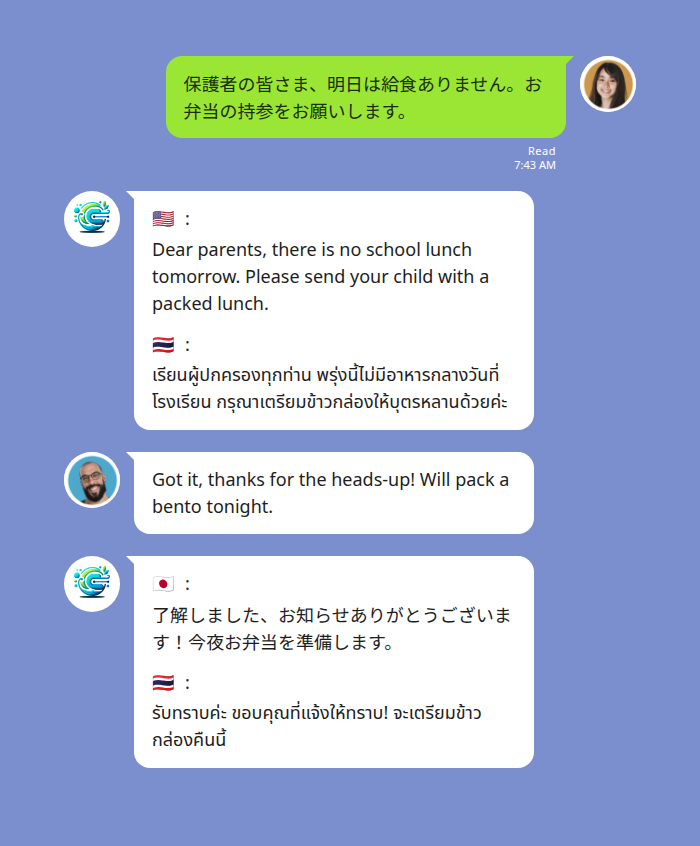
A trilingual parent group: the teacher’s Japanese notice is translated into English and Thai in the same thread, so every parent reads in their own language.
The bot sits in the LINE group as another member. When any participant — teacher, parent, nanny — posts a message, the bot replies with the same content rendered into every other configured language in the group. Country-flag emojis mark each target language so it’s clear at a glance which translation is yours. The original message stays in the thread, so the native speakers don’t see noise; they keep reading what they always read.
A few details that matter for parent-group dynamics:
- No one switches apps. The translation appears in the same LINE thread, right under the source message. A parent reading on the school run doesn’t have to copy anything anywhere.
- The chat history stays bilingual. Three months later, when you’re trying to remember which Saturday the sports day was on, you can scroll back and read the answer in your own language.
- Voice notes work too. When the busy teacher voice-notes the class group at 9:50 PM instead of typing, the bot transcribes and translates the voice message into text in each language. The original audio stays in the thread; the bot’s reply contains the source-language text and a translation for each other language in the group. (Voice translation typically lands in 3–8 seconds — conversational pace, not real-time. Good enough for school-comms tempo.)
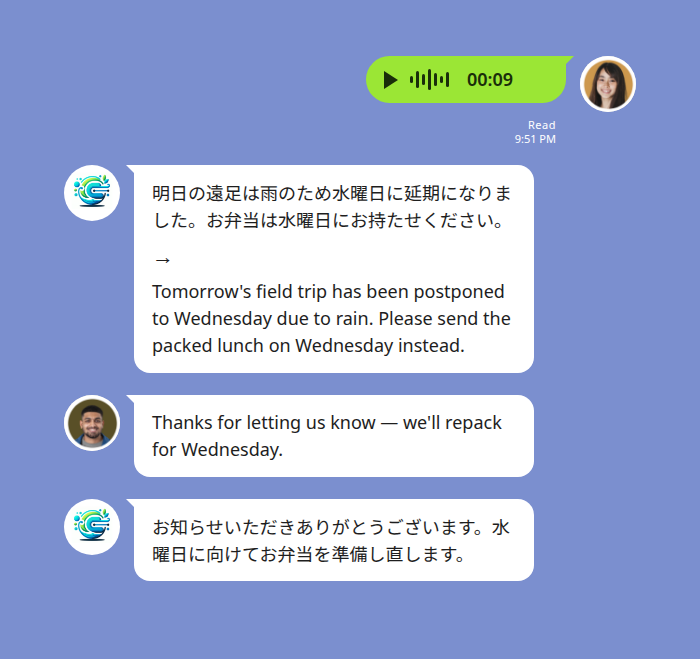
The teacher voice-notes a schedule change at 9:51 PM. The bot transcribes the Japanese voice message and posts an English translation in the thread, alongside the original audio.
This isn’t a new product category — group-chat translation bots have been around for a while. The shift is that the bot now handles enough languages, enough nuance, and enough voice that it can carry the school-comms load instead of being a fallback for the easy bits.
How this compares to what most multicultural families do today
Most parents we talk to already have a system. It’s just a tiring one. Here’s the realistic comparison:
| Approach | Works for | Friction | What breaks |
|---|---|---|---|
| Long-press Google Translate | Single short messages | High — switch apps, copy, paste back | Lose nuance, lose the thread, slow for voice notes |
| WhatsApp’s on-device translation (Sept 2025+) | WhatsApp users on supported language pairs | Low — translates in place | Only WhatsApp; each user sees their own translation locally, so you can’t ask “did you see what the teacher said?” because the other parent’s screen shows different text. Voice notes not covered. |
| LINE’s built-in translate | One-off pair translation | Medium — per-pair, manual | Not designed for mixed-language groups with three first languages. Voice not covered. |
| In-chat translation bot (Echonora) | Mixed-language parent groups, voice notes, persistent record | Low after setup | Group must use LINE. Server-side processing (see privacy notes below). |
| Ask your child to translate | Anything | Variable | Kids get the meaning roughly right and the tone often wrong, which is how parent-teacher misunderstandings get started. Not a system you want to rely on. |
The honest read: WhatsApp’s on-device translation is a real improvement for WhatsApp-using families on common European-language pairs. If your kid’s school uses WhatsApp, your spouse speaks Spanish, and you speak English, WhatsApp probably handles your school comms now. For LINE-using families — most of Japan, Taiwan, Thailand, Indonesia, and a large diaspora community across Australia, the US, and Europe — and for the broader set of Asian language pairs (Vietnamese, Indonesian, Thai, Korean, Mandarin), the in-chat bot is currently the cleaner answer. And for voice messages from teachers (which is most teachers, most of the time), nothing else really competes.
The Free plan and parent-group reality
Echonora’s Free plan covers 20 bot translation events per day, no credit card, no expiry. For a typical parent-group day — a morning announcement from the teacher, two or three parent replies, a permission-slip reminder — that ceiling is genuinely workable, often for weeks at a time.
The day it stops being workable is the day something happens. A typhoon cancels school and the group lights up with 60 messages between 6 AM and 8 AM. A field trip gets rescheduled and parents go back and forth about whether to keep the lunch order. Sports day approaches and the PTA group runs hot for a week.
Two things to know:
- The metering counts bot translation events, not your typed messages. If you and three other parents type 50 messages in a multilingual group, you don’t burn 50 credits — you burn however many bot translations got posted in reply. Multilingual groups are economical here: one source message in Japanese translates to English and Thai in a single event, not two.
- For families that hit the daily cap, $10/month covers unlimited translation across every group the subscribing parent is in. The whole-group benefit means one parent paying covers the entire family chat and every other LINE group they participate in.
We’d rather frame this honestly than oversell: most parent groups don’t need a paid plan most of the time. The plan exists for the weeks of the year when school comms spike — and one paying parent in a household covers the household.
Start Using Echonora — Break Language Barriers
180+ languages, real-time text and voice translation inside your LINE groups.
How to set it up in a school parent group
Three steps. The whole thing takes about a minute if you’re already an admin in the group.
- Add the bot as a LINE friend. Use the direct-add link (it opens the LINE friend-add flow for
@echonora). You don’t need to message it; just have it in your friends list. - Invite the bot into your parent group. From the group settings, invite
@echonorathe same way you’d invite another parent. It will join silently. - Activate the languages your group uses. Post a message in the group like
@Echonora english and japanese and thai(in our three-language example). The bot confirms the configured languages. From that point on, every message in the group is translated into the other configured languages.
For mixed-language families, the bot supports up to 5 languages in a single group simultaneously — useful if grandparents from a third country are also in the chat. The full list of supported languages and the exact activation syntax for every pair is on the supported-languages reference.
One thing to flag with the rest of the group before you switch it on: the bot is another member of the chat, and translations appear publicly. Some parents prefer to mention it explicitly (“hey, I’m adding a translation bot so my partner can follow along”) rather than have it appear unannounced.
A privacy note for school communities
Schools are a sensitive context. Worth being explicit about what happens with the messages:
Translation is server-side — the bot processes each message via a language model to render translations, then posts them back into the thread. Messages live in the LINE group with the people invited; Echonora isn’t in the business of selling chat content as a marketing surface. The full data-handling specifics, including country-specific notes, are in the privacy policy.
In practical terms: this is the same posture as adding any other third-party bot to a LINE group. If your school’s parent group has rules about third-party tools, check those rules before adding the bot, and let the other parents know it’s there.
Frequently asked
Does this work with the teacher’s voice messages?
Yes. The bot transcribes the voice note and posts the source-language transcript plus a translation for each other language in the group. Translation typically arrives in 3–8 seconds. The teacher’s original voice file stays in the thread, so other native-speaking parents can still play it back.
What if I’m in three different parent groups (class group, PTA, sports team)?
One paying user covers every group they’re a member of. If one parent in a household pays $10/month or $100/year, all the parent groups that parent is in get unlimited translation. Other parents in those groups don’t need their own subscription.
Can I add it to a group I’m not the admin of?
You need to be able to invite members to the group. Most parent groups allow any member to invite. If yours is locked down, ask the admin to invite the bot.
What languages does it support?
180+, covering all the ISO 639-1 languages — including all the Asian language pairs that come up in multicultural-family school comms (Japanese, Mandarin, Vietnamese, Thai, Indonesian, Korean, Tagalog) plus Spanish, Portuguese, French, German, and so on. Up to 5 of those can be active in a single group at the same time.
What happens at 20 messages a day on Free?
The bot keeps translating with a soft notice prompting you to upgrade if the group is going to keep going. If you ignore the prompt and the day continues to be busy, translation pauses until the daily reset. The Free plan resets daily.
This is one of several use-case clusters under our broader guide on LINE translation for cross-cultural families, which covers parenting across languages, marriage communication, caregiving, and the daily-life logistics that make multilingual households work.
Set up your parent group in about a minute
Add @Echonora on LINE and post @Echonora english and japanese (substitute your languages) in the group.