

LINE Official Account vs WhatsApp Business: Feature Comparison for 2026
Published
If your business communicates across borders, you’ve probably weighed both LINE Official Account and WhatsApp Business. They are the dominant business messaging platforms in their respective regions, but they’re built for different audiences, priced on different models, and solve different problems. The right choice depends less on which has more features and more on where your customers, staff, and partners already are.
This guide compares the two platforms side by side — audience reach, pricing, broadcast rules, group chat capabilities, automation, and multilingual support — so you can match the tool to your situation. For full context on LINE OA itself, see our complete guide to LINE Official Account for US businesses.
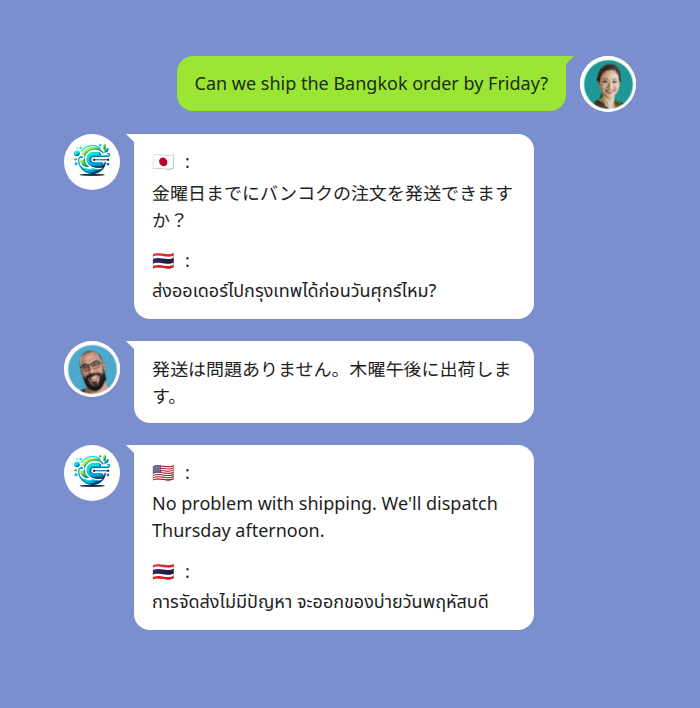
A LINE group with in-thread multilingual translation — one of the clearest differences between LINE and WhatsApp for cross-border teams.
At-a-Glance Comparison
| Feature | LINE Official Account | WhatsApp Business |
|---|---|---|
| Dominant in | Japan, Taiwan, Thailand, Indonesia | India, Brazil, Indonesia, Europe, Latin America |
| Free tier | Yes (broadcast cap; free Messaging API up to limits) | Free Business app for small teams |
| Paid tiers | Light, Standard, Premium (per-message after cap) | Conversation-based pricing via Business Platform/API |
| Group chat | Native; supports in-thread translation bots | Limited; Communities up to 1,024 with broadcast channels |
| Broadcast | ~200/month free, then per-message | Template-based via BSP; per-conversation charge |
| Rich menu | Yes (persistent UI on chat) | No persistent menu |
| Automation | Built-in keyword + API | Via BSP / Business Platform only |
| Multilingual group translation | Yes, via 3rd-party bot in-thread | Per-user in-app translation only |
| API access | Free LINE Messaging API | Paid Business Platform via BSP |
| Best for | Asia-facing brands, hospitality, manufacturing, B2B with Asian partners | Global commerce, ad-driven funnels, transactional notifications |
Audience and Geographic Reach
LINE Official Account is the default business channel in Japan (around 95 million monthly active users), Taiwan, and Thailand, with strong adoption in Indonesia. If you sell into these markets, run hospitality for Asian travellers, or coordinate with suppliers and staff in the region, LINE is non-negotiable — your audience is already there.
WhatsApp Business dominates almost everywhere else. India, Brazil, most of Europe, Latin America, the Middle East, and large parts of Africa run on WhatsApp. It also has significant penetration in Indonesia, where it overlaps with LINE.
The key question isn’t which app is bigger globally. It’s: where are your customers? Pick the platform that matches your audience’s daily habits. Trying to push users onto a second messenger they don’t already use rarely works.
Pricing and Messaging Limits
LINE OA uses a tiered subscription model. The free Communication Plan includes a small broadcast allowance (around 200 messages per month) and lets you reply to inbound messages without limit. Higher tiers (Light, Standard, Premium) raise the included broadcast volume and charge per message beyond the cap. One-to-one chat — replies to customers who message you first — has no per-message charge on the free tier. The LINE Messaging API is free within the same broadcast limits, with usage-based billing on overflow.
WhatsApp Business has two products:
- The free Business app is for small teams. Limited automation, no API, intended for human-led conversations.
- The WhatsApp Business Platform (formerly Business API) is the enterprise product. You access it through a Business Solution Provider (BSP) such as Twilio, MessageBird, or 360dialog. Pricing is conversation-based: charged per 24-hour conversation window, with rates that vary by country and message category (marketing, utility, authentication, or service). Service conversations initiated by the customer are free in most markets; business-initiated conversations are paid.
For predictable budgeting, LINE OA’s flat-tier model is easier to forecast. WhatsApp’s conversation-based pricing can be cheaper at low volume but harder to plan for as outbound campaigns scale.
Broadcast, Templates, and Outreach
LINE OA broadcast is direct: write a message, pick your audience segment, schedule, send. No template approval required. You can include images, video, rich menus, and links. Each broadcast counts against your monthly message allowance.
WhatsApp Business Platform requires pre-approved message templates for any outbound message sent outside a 24-hour customer conversation window. Templates go through Meta’s review process — variables are allowed, but content has to comply with Meta’s commerce and marketing policies. Once approved, you can send templates at scale, but you cannot freely send promotional messages without an opted-in audience and an approved template.
For businesses that run frequent campaigns and want full creative control, LINE’s broadcast model is more flexible. For businesses that need governance, opt-in compliance, and a paper trail for high-volume transactional messaging (order confirmations, OTPs, shipping updates), WhatsApp’s template system is more rigorous — and that’s a feature, not a bug.
Group Chat and Multilingual Communication
This is where the two platforms diverge most sharply.
LINE supports native group chats where multiple users — staff, customers, suppliers — chat together in one thread. Businesses commonly use LINE groups for project coordination with overseas teams, supplier communication, or customer community management. Group chat is the same experience whether you’re a personal user or a business.
WhatsApp groups exist but are limited for business use. The Business Platform doesn’t natively support sending API messages into groups — it’s built around one-to-one conversations. WhatsApp Communities (introduced in 2022) bundle groups with broadcast announcement channels and support up to 1,024 members per community, but messaging is structured around top-down announcements rather than open multi-party conversation.
Multilingual group translation is the practical differentiator. On LINE, you can add Echonora to a group and every message is translated in-thread for every participant — across 180+ languages, including voice messages. A Filipino caregiver, a Japanese employer, and an English-speaking family coordinator can all participate in one LINE group and read every message in their own language, without anyone leaving the chat or copy-pasting into another tool.
WhatsApp added per-user in-chat translation (powered by Meta AI) in 2024, but that’s a private feature — each user sees translations on their own device, and there’s no shared multilingual thread. For cross-border team coordination where everyone needs to follow the same conversation, LINE with an in-thread translation bot is the more practical setup.
How translation works in a LINE group: Add the bot, send
@Echonora English and Tagalog, and from that point on every text or voice message in the group is translated to both languages, posted in the same thread. The free plan covers 20 messages per day per group — no credit card, no expiry.
Automation, APIs, and Integrations
The LINE Messaging API is free and well-documented. You can build chatbots, connect to CRM, route inquiries, push order updates, and run rich-menu-driven self-service flows. Auto-reply and keyword triggers are configurable in the LINE OA Manager without code. Webhooks deliver inbound events to your server in real time.
The WhatsApp Business Platform API is more powerful at enterprise scale but always intermediated. You don’t get direct API access from Meta — you go through a BSP, which adds setup overhead and per-message fees on top of Meta’s conversation charges. Integrations with major CRMs (HubSpot, Salesforce, Zendesk) are widely available, and the platform supports interactive buttons, list messages, and product catalogs natively.
For a small team building a self-service customer flow on a budget, LINE Messaging API is easier and cheaper to start with. For a regulated industry or a high-volume e-commerce operation that needs enterprise governance, WhatsApp Business Platform via a BSP is the better fit.
Which Should You Choose?
Use LINE Official Account if:
- Your customers, staff, or suppliers are in Japan, Taiwan, Thailand, or Indonesia.
- You need group-chat-based coordination with overseas teams or multilingual partners.
- You want a flat-tier pricing model that’s easy to forecast.
- You’re building an in-chat experience with rich menus, persistent UI, and bot-driven self-service.
Use WhatsApp Business if:
- Your customers are in India, Brazil, Europe, Latin America, or much of Africa.
- You need transactional messaging at scale — order confirmations, OTPs, shipping updates — with template governance.
- You’re running click-to-WhatsApp ads and want a tight Meta ad-to-chat funnel.
- Your team is already operating on Meta Business Manager.
Use both if your business spans Asia and Western markets — they’re not mutually exclusive. Many cross-border operators run LINE for Asia-region partners and WhatsApp for everyone else. The platforms complement rather than replace each other, and the channel choice should match where each audience actually spends their day.
If LINE is the right platform for your audience, the next step is reading the complete LINE Official Account guide for US businesses — it walks through setup, plans, and how to add multilingual group translation. Hospitality teams will also find the restaurant-specific setup guide useful.
Start Using Echonora — Break Language Barriers
Add Echonora to any LINE group for real-time translation across 180+ languages — text and voice. Free plan, no credit card.
Frequently Asked Questions
Is LINE Official Account free? Yes — the Communication Plan is free and includes around 200 broadcast messages per month plus unlimited replies to inbound messages. Higher tiers (Light, Standard, Premium) unlock larger broadcast allowances and per-message billing on overflow.
Is WhatsApp Business free? The WhatsApp Business app (for small teams) is free. The WhatsApp Business Platform/API is paid — conversation-based pricing through a Business Solution Provider, with rates varying by country and message category.
Can you translate WhatsApp messages in a group chat for everyone? Not natively. WhatsApp added per-user in-chat translation in 2024, but each user sees translations privately on their own device. There’s no shared multilingual thread that all participants see.
Can you translate LINE group messages for everyone in the chat? Yes. Add a translation bot like Echonora to the LINE group and every message — text or voice — is translated in-thread for every participant across 180+ languages.
Which platform has better automation? For free, easy-to-set-up automation, LINE OA wins — auto-reply, keyword triggers, and the Messaging API are all included. For enterprise-grade governance and high-volume transactional messaging, the WhatsApp Business Platform wins, with the trade-off of per-message fees and BSP overhead.
Can I use both platforms? Yes, and many global businesses do. They run LINE for Asia-region operations and WhatsApp for the rest of their markets.
Try Echonora in your LINE group today
Real-time translation across 180+ languages — text and voice — directly in your LINE group chat. Free plan, no credit card.