

Retail Translation for Multilingual Staff: Serving Customers in Their Own Language
Published
It’s 10:42 on a Saturday. The lunch rush is forty minutes out, the front window is half-empty, and the shift lead needs two boxes of new arrivals on the floor — fast. The staff member closest to the stockroom reads English as a second language. In most stores, that gap gets bridged with pointing, a half-understood instruction, and a restock that lands ten minutes late. On a slow day that’s a shrug. On a Saturday it’s a missed sell-through window on the highest-margin display in the shop.
Retail runs on two conversations happening at once: the one between staff behind the scenes, and the one between staff and the customer in front of them. When the people having those conversations don’t share a first language, both slow down — and in retail, slow is expensive in a way that’s hard to see on a P&L until you add it up.
The retail language gap costs more than a missed sale
The obvious cost is the sale you don’t close because a staff member couldn’t confirm stock fast enough. The less obvious costs are the ones that compound: the restock that misses the rush, the returns that come back because a size or care instruction got garbled, the new hire who takes three months to get productive instead of three weeks because every floor instruction needs re-explaining.
Retail floors are now genuinely multilingual. A single store can have staff whose first languages span Spanish, Vietnamese, Tagalog, and Mandarin, serving customers who arrive in just as many. The conventional fixes don’t fit the pace: a separate translation app means a staff member has to stop, pull out a phone, copy-paste, and switch back — while a customer waits. By the time the translation is done, the moment is gone.
What retail needs isn’t a better dictionary. It’s translation that lives where the team is already coordinating, fast enough to keep up with a customer standing at the counter.
Two places translation breaks in a store
It helps to separate the two, because they fail differently.
Back-of-house is the team coordinating with each other: restock instructions, shift handovers, “who’s covering the fitting rooms,” price-change announcements, end-of-day reconciliation. This is where a small misread quietly costs an hour. The instruction was clear in the sender’s head and clear on the screen — it just wasn’t clear in the reader’s language.
The counter is the live moment: a customer asks whether a jacket comes in a medium, whether the sale price applies to the item in their hand, whether the store can hold something until tomorrow. A staff member who’s confident in the answer but not in the language either guesses, fetches a colleague, or loses the customer’s patience. The cost here isn’t an hour — it’s the sale and the impression.
Most stores already run both conversations through a group chat on their phones. The fix is to make that existing chat bilingual, rather than bolting a separate tool onto a workflow that’s already moving fast.
How it works on a retail floor
Echonora is a translation bot that lives inside the LINE group chat a store team is already using. You add it to the group, tell it which languages the group speaks, and from then on every message someone sends gets posted back in the other languages — in the same thread, automatically. No app switching, no copy-paste, no separate login for each staff member.
Take the Saturday restock. The shift lead writes the instruction once, in English. The staff member reads it in Spanish, in the same chat, a second later — and replies in Spanish, which the lead reads back in English. Nobody changed how they work; the message just arrived in a language each person actually reads.
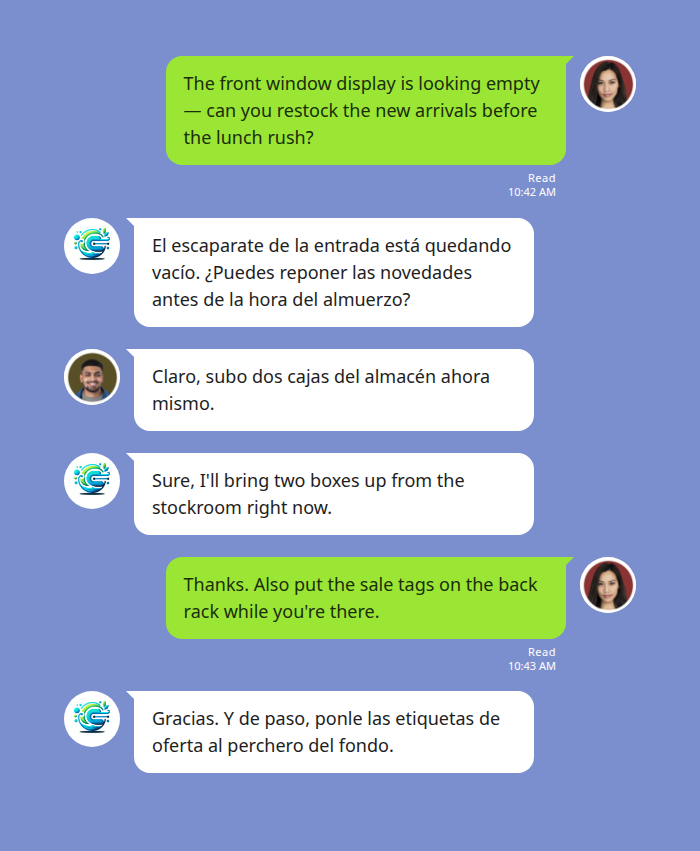
Back-of-house coordination: one instruction, read by each person in their own language.
The team can run a group with two to five languages at once, so a floor with Spanish-, Vietnamese-, and Mandarin-speaking staff all reads the same shift announcement in their own language from a single message the manager types. One announcement, everyone covered — not three separate explanations.
The counter: when the answer can’t wait
The back-of-house case is forgiving; the counter isn’t. A staff member with a customer in front of them and gloves, a steamer, or an armful of returns in hand can’t stop to type. This is where voice matters.
A floor staff member can send a voice note straight into the team chat — “a customer’s asking if we have this in a medium in the back, can someone check?” — and the rest of the team reads it as text in their own language within a few seconds. Whoever’s near the stockroom voice-notes back, and the answer lands in the original language too. The customer waits seconds, not minutes, and the staff member never broke eye contact to fiddle with a phone.
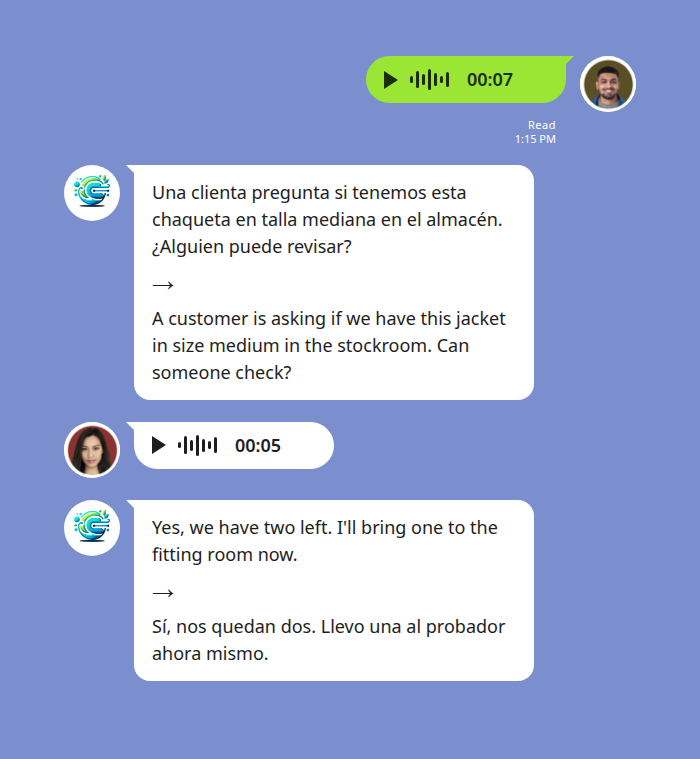
A hands-busy floor moment: a voice note becomes a readable answer for the whole team in seconds.
The voice note the staff member recorded stays in the thread as well, so if a question comes up later about what was actually asked, the record is right there. For a store handling holds, special orders, or price-match promises across a shift, that thread becomes the simple answer to “wait, what did we tell that customer?” See the privacy policy for how messages are handled.
Setting it up without onboarding friction
The reason this works in retail specifically is that there’s nothing to roll out. Staff stay in the consumer LINE app they already have on their personal phones — there’s no new account to create, no per-seat license to provision, no training session where someone explains a new piece of software to a floor team that turns over.
You add the bot to the store group and activate the languages with a single message naming them — for example, @Echonora English and Spanish (it recognises plain language names, not codes). Add a third language later by naming it the same way. The full list of supported language pairs and exact activation syntax covers every combination across 180+ languages.
For the bigger picture on coordinating mixed-language teams — shift handovers, safety, onboarding — see the LINE translation guide for workplace teams, the parent guide this article sits under.
Start Using Echonora — Break Language Barriers
180+ languages, real-time text and voice translation right inside the LINE group your store already uses
What it costs to try
You can validate it on one store’s group chat before committing anything. The free plan covers 20 messages a day with no credit card and no expiry — enough to run a real shift’s worth of back-of-house coordination and see whether it changes the tempo on the floor. When a busy store crosses that daily volume, a single paid plan covers unlimited translation, and because the benefit extends to every group a paying member is in, one account per store or per shift lead generally covers the floor rather than one per employee. Current pricing is on echonora.com.
The test is simple: pick your busiest Saturday, put the bot in the team chat, and watch whether the restock lands on time and the customer at the counter gets an answer in seconds instead of minutes.
FAQ
Does every staff member need to install or sign up for anything? No. Staff use the LINE app they already have. You add the bot to the existing store group chat once; from then on, translations appear in the thread for everyone. There’s no per-person account to create.
Can it handle more than two languages in one store? Yes. A single group supports two to five languages at once. One announcement from the manager is translated into every configured language, so a mixed-language floor all reads the same message in their own language.
Does it translate voice, or only typed messages? Both. A staff member can send a LINE voice note and the team reads it as text in their own language, usually within a few seconds — useful when someone’s hands are full on the floor. Background noise on a busy floor can affect accuracy, so it’s most reliable for clear, close-range voice notes.
Is the translation private to each person, or shared in the chat? Shared in the thread. Everyone in the group sees the message in their language, and the conversation stays as a record — which is what makes it useful for confirming what a customer was told about a hold or a price.
Start Using Echonora — Break Language Barriers
Put real-time translation in your store team chat today — free to start, no credit card