

LINE Translation for Remote Teams: How Distributed Teams Communicate Across Languages
Published
When a team works in one building, language gaps are visible. A colleague pauses mid-sentence, looks for help, someone walks over to translate. The friction is awkward but it surfaces. The problem gets named, then it gets handled.
Remote teams don’t get that. Distributed teams hide the gap inside the silence between time zones — a Slack thread that goes quiet, an email that gets a “got it” reply, a project board where one swimlane mysteriously stops moving. By the time anyone notices, the cost has already been paid.
This is the part of distributed work that gets ignored. The remote-work playbooks talk about async communication, written norms, and clear ownership. They assume everyone is reading the same language. When they aren’t, the playbook stops working — and most teams reach for individual translation tools that paper over the problem without ever touching the root cause: the team has no shared multilingual space where the same translated message reaches every member at the same time.
That shared space exists. It’s a LINE group with a translation bot in it.
Why remote multilingual teams break differently than co-located ones
In a co-located team, three things compensate for language friction. People share context — they see what the work looks like. They share time — they’re awake during the same hours. And they share visibility — when one person doesn’t understand, the room can usually tell.
Strip all three of those out and you have a distributed multilingual team. Here’s what fails first:
- Async drift. A US PM writes “we need to revisit the auth flow by EOW.” A Vietnamese engineer reads it eight hours later, runs it through a translation app, gets back something close enough, and assumes the deadline is “this week” rather than “Friday.” By Monday the work isn’t started. Nobody was wrong. Nobody was even careless.
- Untranslated decisions. A team lead voice-notes a decision in English on the way to a meeting. The Japanese designer on the team listens to it three times, catches about 60% of it, asks the lead for clarification in slow polite English, gets a hurried reply. The clarification never lands in writing where the rest of the team can see it.
- The “got it” gap. Everyone responds “got it” because nobody wants to be the person who didn’t understand. The misunderstanding compounds across a dozen messages before something visible breaks.
In a co-located team, any one of these would be caught by a glance across the room. In a distributed team, none of them are.
The async problem: when “good enough” English isn’t
Most distributed teams default to “we all work in English.” That works until it doesn’t, and the failure mode is specific: it works for the people whose English is strong, and it silently breaks for everyone else.
The cost shows up later — in code reviews that go in circles, in QA bugs that should have been spec’d out, in client calls where a remote partner stays quiet because they can’t keep up at conversational pace. It also shows up in retention. The most expensive consequence of a multilingual team that pretends to be monolingual is that the strongest non-native speakers get tired of working at half-speed and leave first.
The fix isn’t to switch the team’s working language. The fix is to stop forcing every person to do translation work in their head, on their own time, with no shared record.
How LINE group translation works for a distributed team
LINE has 200M+ monthly active users concentrated in Japan, Taiwan, Thailand, and Indonesia — exactly the regions that produce remote workforces for global teams. If you’re working with engineers in Tokyo, designers in Taipei, customer-success staff in Bangkok, or BPO partners in Manila and Jakarta, your remote colleagues are almost certainly already on LINE for everything outside work.
Add a translation bot to a LINE group and the math changes. Every message gets translated once, in the group, where everyone can read it. The HQ side writes in English. The Tokyo side reads it in Japanese. The Ho Chi Minh side reads it in Vietnamese. Nobody runs anything through their own translation app. There is one canonical version of the conversation, and every member of the team sees it in their own first language.
Here’s what that looks like in practice — a product PM in HQ posting a release-blocker update to a distributed team:
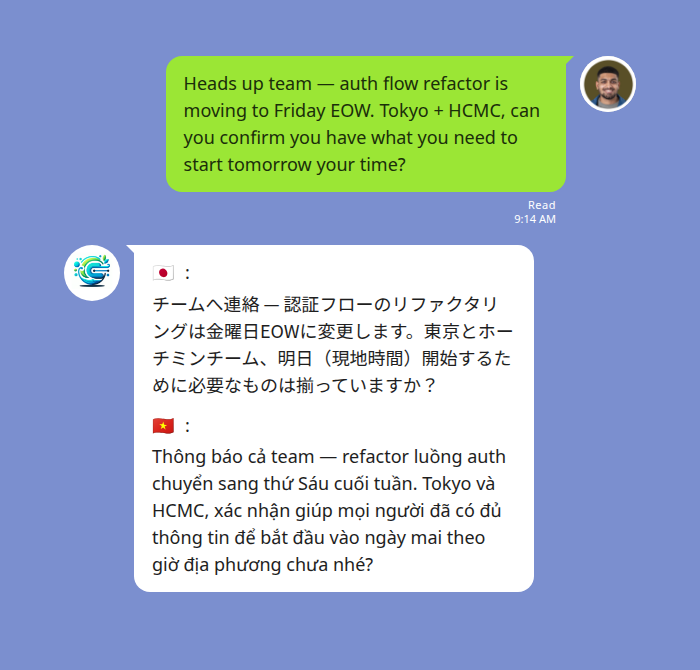
The three things to notice:
- The PM types once. No special syntax for the translation. The bot picks up every message in the group.
- Each team member sees the message marked with their language flag. No ambiguity about which line is for whom.
- The translated message persists in the group. When the Tokyo engineer wakes up six hours later, the message and its translation are still there.
That last point matters more than it sounds. With individual translation apps, the translation is private to whoever ran it. With a group translation bot, the translation is a shared artifact — the same way a Slack message or a Notion page is.
Three remote scenarios where it pays off
1. Cross-time-zone async standups
The standard async standup pattern — each person posts what they did, what they’re doing, what’s blocked — assumes everyone can write a comprehensible paragraph in the team’s working language. For a distributed team where half the engineers think in Japanese or Vietnamese, that paragraph either gets watered down to “did some work on the API” or it takes 20 minutes to compose. In a LINE group with translation, each person writes in their own language at full fluency, and HQ reads it in English at the same fluency. The standup goes from 20 minutes to 3, and the actual content improves.
2. Remote field engineers and on-site staff
A common pattern for B2B teams: HQ in a Western city, technical specialists deployed to client sites across Southeast Asia. The field engineer doesn’t have time to type a careful status report — they need to be hands-on at the site. A voice note in their first language solves it. The translation bot transcribes the audio and posts both the transcript and the translation back to the group:
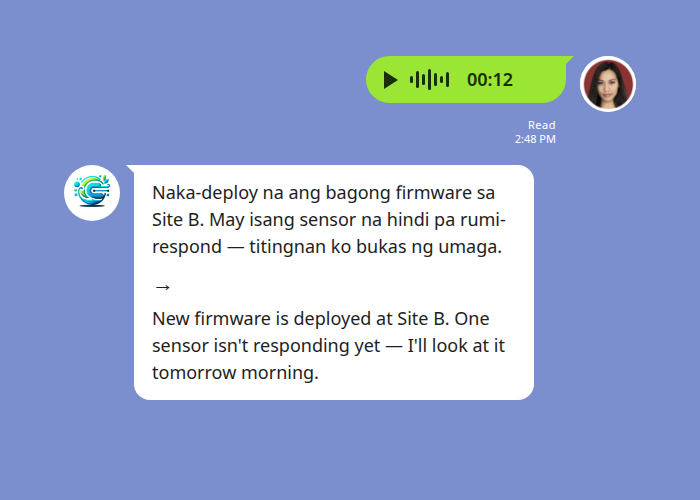
HQ now has a status update they can act on in seconds. The original audio file stays in the group thread too, so if anyone needs to verify a detail, they can play it back. Translation runs through a speech-to-text step before the language model translates, so heavy ambient noise on the client site can degrade accuracy — worth being aware of when the audio comes from a factory floor or a construction site.
3. Distributed agency / client briefings
When the work crosses an agency boundary — a remote client in Tokyo, your team distributed across HQ and Manila — the language gap doubles. You’re translating and trying to maintain a professional register the client recognizes. A shared LINE group with translation lets the client write to you in Japanese, your account lead reply in English, and your Manila-based delivery team read both sides in English without anyone running side-channel translations. The client sees responses in Japanese; the team sees the original Japanese plus the English translation in one thread.
What it isn’t
Worth being clear about the boundaries:
- It is not a live video-call interpreter. Translation happens on chat messages and voice notes posted to the group, not on a real-time video or audio call. For live calls, use a different tool.
- It is not a document translator. Long PDFs, contracts, design docs — those still need a proper translation workflow. The group bot translates messages people post in chat.
- It is not a substitute for hiring multilingual managers. If a remote team has structural communication problems, a translation bot won’t fix the org chart. What it will do is remove the language tax from every message — making the real problems easier to see and easier to solve.
90-second setup for a distributed team
- One person — usually the team lead — adds Echonora as a friend on LINE. Click the friend-add link, accept the friend request.
- Create a LINE group with the distributed team in it, or use an existing one. Add Echonora to the group.
- Activate the languages. In the group, type:
@Echonora English and Japanese and Vietnamese— or whatever combination matches the team. Echonora supports up to 5 languages in one group and 180+ languages overall. - Test it. Have someone post a message in each language. Confirm the bot translates correctly. You’re done.
The free plan covers 20 translated messages a day with no credit card and no expiry — enough to validate the pattern with the team before anyone pays anything. When the team is ready, one person upgrades to the paid plan and the unlimited benefit extends to every LINE group that person is in. For a typical distributed team, one paid subscription covers all the project groups the team lead is a member of.
Full setup syntax for groups with more than two languages is documented in the Echonora supported languages reference.
Start Using Echonora — Break Language Barriers
180+ languages, real-time text and voice translation right inside your LINE group
FAQs
Does this only work if the whole team uses LINE? Yes — the bot lives inside LINE groups. The good news is that if you’re working with remote staff or partners in Japan, Taiwan, Thailand, Vietnam, Indonesia, or the Philippines, they’re probably already on LINE. Adding HQ teammates to LINE for one work group is a smaller lift than asking remote staff to standardize on a Western chat tool.
What about privacy on sensitive product or client work? Messages live inside the LINE group with the people you’ve invited. Echonora processes the messages to deliver the translation. The full data-handling specifics are in the privacy policy — worth a read before adopting the bot for sensitive client conversations.
Can we keep some messages out of translation? Anyone in the group can pause translation with a command and resume later — useful if a sub-thread is between two people who share a first language and don’t need the translation overhead.
Does it work for purely written, never-meeting teams? That’s exactly the case it’s built for. Async written communication is the primary use; voice notes are a secondary convenience for field staff. Teams that only ever interact in chat get more value than teams that mostly meet on video.
How much does it cost for a remote team of 5? Free plan: 20 messages a day, no card, no expiry — good for evaluation. Paid plans are $10/month or $100/year, billed to one person on the team. That one subscription unlocks unlimited translation in every LINE group the subscriber is a member of, so for a distributed team where the team lead sits in all the relevant groups, one paid account covers the whole team’s project chats. See the broader Workplace translator guide for how to think about per-team vs per-person subscription structure.
The fastest way to test whether this fits your distributed team is to add Echonora to one group and run a real conversation through it. No card, no commitment, no install for anyone but the person who runs the activation command.
Start Using Echonora — Break Language Barriers
Translate text and voice across 180+ languages, right inside the LINE group your team already uses