

LINE Translation for International Schools: Clear Parent-Teacher Communication Across Languages
Published
In a LINE-dominant market, the class group chat is where school life actually happens — field-trip reminders, sick-day pickups, homework photos, last-minute schedule changes. At an international school, that same group can hold a dozen first languages at once. A reminder typed in English lands as a wall of text a Japanese or Thai parent has to copy into a separate app, translate, and hope they read correctly before the deadline passes.
A LINE translation bot removes that step. Translation happens inside the group everyone already uses, so a message a teacher writes once is read by every parent in their own language — without anyone leaving the chat.
Why language gaps slow down international school communication
International schools sit on a structural mismatch: instruction is usually in English, but families speak the languages of wherever the school is based and wherever its students come from — Japanese, Thai, Mandarin, Korean, Vietnamese, and more in a single cohort.
The cost shows up in small, repeated friction:
- Permission slips returned late because a parent didn’t catch the deadline buried in an English message.
- Pickup and sickness mix-ups when an urgent, time-sensitive note isn’t understood fast enough.
- Parents who go quiet — not disengaged, just unsure they’ve understood, so they don’t reply.
- Teachers doing manual translation by copy-pasting into a separate app, message by message, after hours.
None of this is about effort. It’s about the gap between the language a message is written in and the language a parent reads fluently — and that gap is exactly what in-chat translation closes.
How a LINE translation bot fits a class group
Add the bot to the class LINE group and set the languages once. From then on, every message posted is translated into the group’s other configured languages and shown right in the thread. A group can run 2 to 5 languages simultaneously, which covers most international-school class chats — say English for the school, Japanese and Thai for families.
The translation is shared, not private: every parent sees the same source message rendered into their language, so there’s a single readable record the whole group can refer back to.
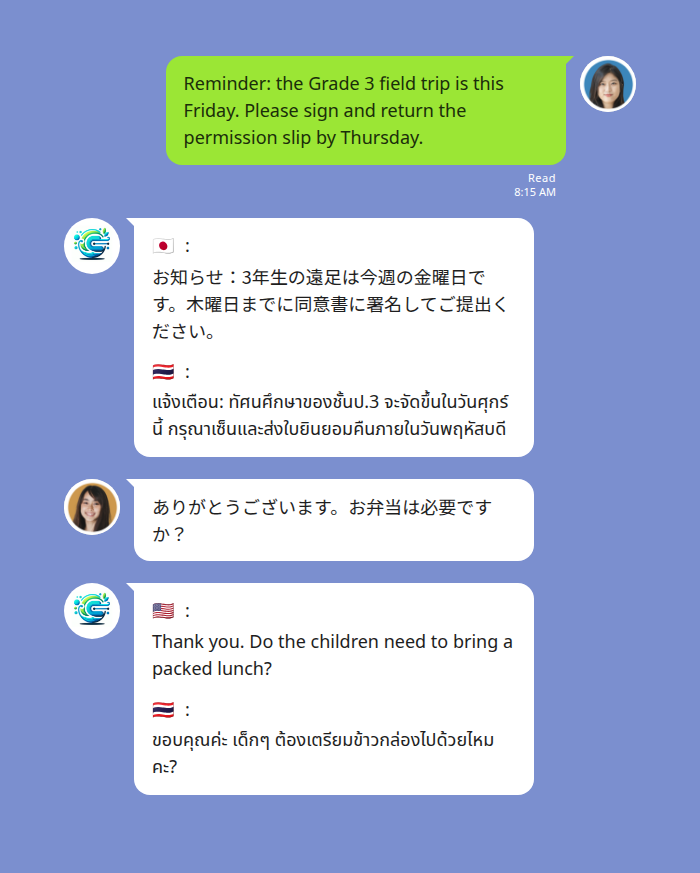
A teacher posts the field-trip reminder once in English; Japanese and Thai parents read it in their own language, and a parent’s reply comes back to the teacher in English.
One-to-one teacher–parent messages
The same thing works in a private teacher-parent chat, which is often where the most time-sensitive messages go — a fever, an early pickup, a behaviour note that needs a careful tone.
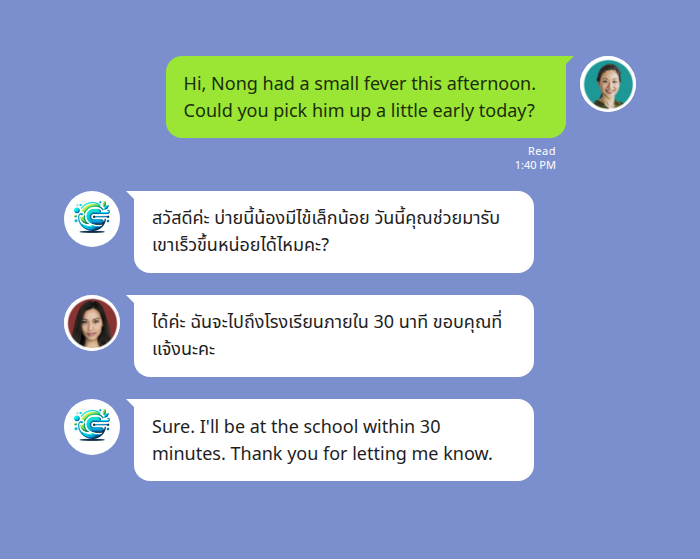
The teacher writes in English and the parent reads in Thai; the parent replies in Thai and the teacher reads in English — at conversational speed instead of waiting on a manual translation.
Setting it up in your class LINE group
Setup is a single message. Add the bot to the group, then type the languages you want — using language names, not codes:
@Echonora english and japanese and thaiThat activates English, Japanese, and Thai for everyone in that group. You can list 2 to 5 languages this way. For the full list of supported language pairs and the exact activation syntax, see the supported-languages reference.
If your school manages several class groups, each group keeps its own language set — a Grade 3 chat can run English + Japanese while a Grade 5 chat runs English + Thai + Korean.
Voice notes and after-hours messages
Parents and teachers don’t always have time to type. A voice note in the LINE group is transcribed and translated the same way text is: the speaker records in their language, and the bot posts the text translation alongside, typically in a few seconds. The original voice note stays in the thread — LINE keeps it — so nothing is lost.
That matters for the realities of school communication: a parent voice-noting from the car, a teacher leaving an end-of-day update with hands full. Because the translation is text, it’s also searchable later — useful when someone needs to check exactly what was said about a date or a dose of medicine.
For anything medical or safety-related, a translated message is a strong aid but not a substitute for a professional interpreter in formal or high-stakes situations.
Privacy — what stays in the chat
Messages stay inside the LINE group with the people invited to it. The bot processes messages to deliver the translation; it isn’t a marketing surface. For data-handling specifics, see the privacy policy. For a school weighing this across many family groups, that “translation lives in the chat the parents already trust” model is usually easier to explain to families than asking them to onboard onto a separate platform.
Start Using Echonora — Break Language Barriers
Keep every parent in the loop, in their own language — right inside your class LINE group. 180+ languages, instant text and voice translation.
Frequently asked questions
Does every parent need to install anything new? No. Parents stay in the LINE app they already use. One person adds the bot to the group and sets the languages; everyone else just reads and writes normally.
How many languages can one class group have? Between 2 and 5 at the same time. That’s enough for most international-school class chats.
Is it free? There’s a free plan with 20 messages a day, no credit card, and no expiry — enough to try it on one class group. For a school running many busy groups, the Monthly ($10) or Annual ($100) plan gives unlimited translation, and the unlimited benefit extends to every group a subscriber is a member of.
Can it handle voice messages from parents? Yes — voice notes are transcribed and translated to text in the thread, with the original recording preserved.
Where can I see the full setup details? The LINE Translation Bot Guide walks through activation, supported languages, and common group setups end to end.
Start Using Echonora — Break Language Barriers
Clear parent-teacher communication across 180+ languages, without leaving LINE.