

LINE Translation Bot for Healthcare: Multilingual Patient and Caregiver Communication
Published
When an elderly parent’s day-to-day care is shared between family members and a foreign domestic caregiver, the hardest part is often not the care itself — it’s the language gap that sits between the people giving it. A daughter texts in English. The live-in caregiver reads Indonesian. The agency coordinator works in Chinese. A missed instruction about medication timing or a misread message about a dizzy spell isn’t a small inconvenience — it can matter.
A LINE healthcare translation bot closes that gap inside the chat everyone already uses. This guide shows how Echonora handles multilingual patient communication for families and caregivers — in text and in voice — and, just as importantly, where a caregiver translation app should and shouldn’t be relied on.
The hidden language gap in everyday care
Across Taiwan, Japan, and many diaspora communities, a large share of in-home and facility care is delivered by workers whose first language differs from the family they serve. Day-to-day coordination — “Did she take her tablets?”, “She didn’t sleep well”, “The appointment moved to Thursday” — happens in a LINE group, because that’s where families already talk.
The problem is that the same group holds two or three first languages at once. People fall back on copy-pasting into a separate translation app, screenshotting, or simply guessing. Important details get lost in the friction, and the person with the least language overlap — usually the caregiver doing the actual hands-on work — ends up the least informed.
Why copy-paste translation breaks down in care work
Standalone translation apps are fine for a one-off phrase. They fall apart as a coordination tool for several reasons:
- App-switching loses the thread. Copy a message out, translate it, paste a reply back — and nothing stays in the chat. There’s no shared record a third family member or the agency can scroll back through later.
- Voice gets skipped. A caregiver with their hands full is far more likely to send a quick voice note than type. Most copy-paste workflows can’t handle that at all.
- Three-way care has no home. When a family member, a caregiver, and an agency coordinator are all in one group speaking three languages, per-person private translation leaves everyone seeing a different slice of the conversation.
An in-chat bot fixes all three by living inside the LINE group itself: every message is translated in place, in the thread, visible to everyone.
How Echonora works inside a family care group
Add the Echonora bot to your LINE care group and activate it once with the languages in the room — for an English-and-Indonesian group, you’d type @Echonora English and Indonesian. From then on, every message a family member sends in English is reposted in Indonesian for the caregiver, and every Indonesian reply comes back in English. No app-switching, no copy-paste.
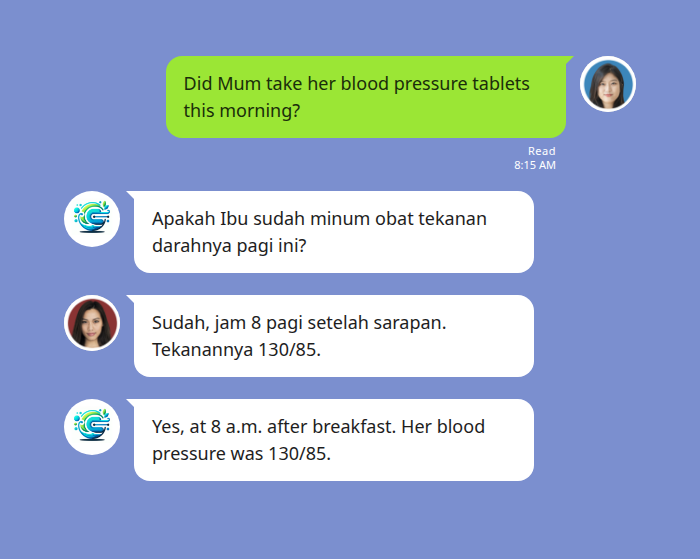
A morning medication check — the family asks in English, the caregiver answers in Indonesian, and both read in their own language without leaving the chat.
Because the translation lives in the group, a second family member who joins the chat later can scroll back and see exactly what was asked and answered — a shared, readable care record rather than a private translation that vanishes on someone’s phone.
Voice notes for hands-busy moments
Care work is physical. A caregiver helping someone out of bed, preparing a meal, or managing a difficult moment can’t always stop to type. Echonora translates LINE voice messages the same way it handles text: the caregiver records a voice note in their own language, and the bot posts back the transcription plus the translation, usually within 3–8 seconds.
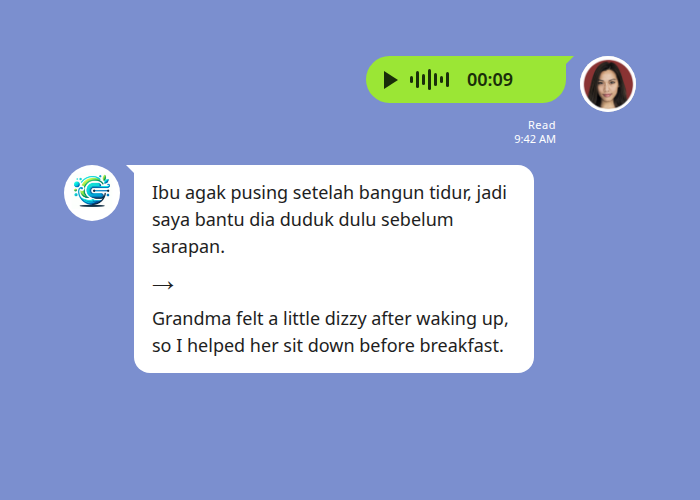
A spoken update arrives as text the family can read — the caregiver’s original voice note stays in the thread, with the translation alongside it.
The bot’s reply is text only — it doesn’t read anything back aloud — and the caregiver’s own voice note stays in the LINE thread, so nothing is lost. (Background noise can reduce accuracy, so a clear recording helps.)
Coordinating a multilingual care team
Real care arrangements often involve more than two languages: a family in English, a caregiver in Indonesian, and an agency or care coordinator working in Chinese. Echonora supports 2 to 5 languages in a single group. When someone posts, the bot translates the message into every other language in the room at once — each one clearly marked so everyone knows which line is theirs.
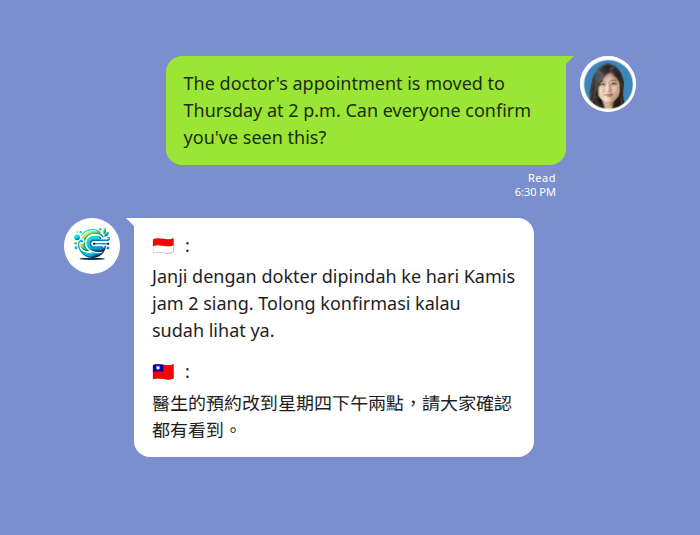
One announcement, three languages — the family posts in English; the caregiver reads Indonesian and the agency coordinator reads Traditional Chinese, in the same message.
Everyone confirms against the same source message, so a schedule change reaches the whole care team in one post instead of three separate side-conversations.
Echonora vs. the alternatives
| Google Translate | LINE in-app translate | Echonora | |
|---|---|---|---|
| Lives in the chat | No — separate app, copy-paste | Partial — per-pair | Yes — translates in the LINE group thread |
| Voice messages | No | Text only | Yes — voice notes transcribed and translated |
| 3+ languages in one group | No | Not designed for it | Yes — 2 to 5 languages per group |
| Shared, readable record | No — copy-paste loses it | Personal/local only | Yes — translations stay in the thread |
| Languages | Many | Limited pairs | 180+ languages |
For the full list of supported language pairs and the exact activation syntax, see the supported-languages reference. For the complete walkthrough of setup and features, start with the LINE Translation Bot Guide.
Start Using Echonora — Break Language Barriers
Supports 180+ languages, with real-time text and voice translation right inside your LINE group.
Where Echonora fits — and where it doesn’t
Echonora is a tool for everyday care coordination: medication reminders, daily updates, scheduling, check-ins, and keeping a family and its caregivers on the same page. It is genuinely good at that, and it removes a real, daily source of friction and error.
It is not a formal medical interpreter, and it shouldn’t be used as one. For clinical consultations, diagnoses, consent discussions, emergency situations, or any conversation with a doctor where precision is safety-critical, use a qualified professional medical interpreter. Treat the bot’s translations as a helpful aid for routine coordination, not as a substitute for professional interpretation when the stakes are clinical.
Because care messages can be personal, it’s worth knowing how your data is handled — see Echonora’s privacy policy for specifics.
Frequently asked questions
Is there a free version I can try with our caregiver first?
Yes. The Free plan covers 20 messages a day — no credit card, no expiry. It’s a genuine way to validate the bot in your real care group before deciding whether to upgrade. When daily volume grows, the Monthly plan ($10/month) or Annual plan ($100/year) unlocks unlimited translation.
Does everyone in the group need to pay?
No. The subscription is per user, but the unlimited benefit extends to every group that paying member is in. If one family member subscribes, the whole care group gets unlimited translation — the caregiver and agency coordinator don’t need their own subscriptions.
Can the caregiver send voice messages instead of typing?
Yes. Echonora transcribes and translates LINE voice notes, typically within 3–8 seconds. The reply is text, and the original voice note stays in the thread. This is ideal for hands-busy care moments.
How many languages can one care group have?
Between 2 and 5 languages in a single group. A family-plus-caregiver pair is the most common setup, but a family, a foreign caregiver, and an agency coordinator across three languages all work in one group.
Can I use it for a doctor’s appointment?
Use it for coordinating around appointments — reminders, scheduling, and follow-up updates. For the clinical conversation itself, rely on a qualified medical interpreter. Echonora is built for everyday coordination, not formal medical interpretation.
Keep your whole care team on the same page
Add Echonora to your LINE group and translate text and voice across 180+ languages — free to start.