

LINE Translation Bot for E-commerce: Managing International Suppliers and Buyers
Published
Cross-border e-commerce runs on chat
If you import, dropship, or sell across Asia, most of your real work happens in chat. Factory updates, sample approvals, shipping nudges, and last-minute buyer questions rarely move at email speed — they happen in LINE, where your suppliers in Taiwan, Vietnam, Thailand, and Japan already live.
The problem is language. Your manufacturer types in Traditional Chinese, your logistics contact in Vietnamese, and your buyers in English. Every message becomes a copy-paste trip to a separate translation app, and every trip is a chance to lose context, tone, or a decimal place on a quantity.
A LINE translation bot for e-commerce removes that trip. Translation happens inside the same group chat your trade partners already use — so a supplier message and its English version sit in one thread, on the record, for everyone to read.
The hidden cost of supplier and buyer miscommunication
Trade mistakes are expensive, and most of them start as small wording gaps:
- A spec confirmed in broken English that the factory read differently than you meant
- A lead time agreed verbally that nobody can point to later
- A buyer complaint mistranslated into a refund you didn’t owe
- A shipping instruction lost between your forwarder’s language and yours
When the translation lives outside the chat — in a separate app, in someone’s head, in a screenshot — there’s no shared record. When something goes wrong, you’re reconstructing what was said from memory across two languages.
Keeping translation inside the thread gives you an auditable trail: the original message and its translation, timestamped, visible to every party. For a dispute over what a supplier promised, that record is worth more than any after-the-fact email.
Real-time translation for supplier and buyer chats
Echonora is a translation bot that lives inside your LINE group. You add it once, tell it which languages the group speaks, and it translates every message from then on — no app-switching, no copy-paste.
To set the languages, @-mention the bot with the two languages, joined with “and”:
@Echonora English and ChineseFrom that point, when your buyer writes in English, the supplier reads it in Chinese, and the supplier’s reply comes back to the buyer in English — both versions in the same thread. This is the everyday supplier communication on LINE that actually moves an order: confirming quantities, pinning down lead times, approving a sample photo, chasing a delayed shipment.
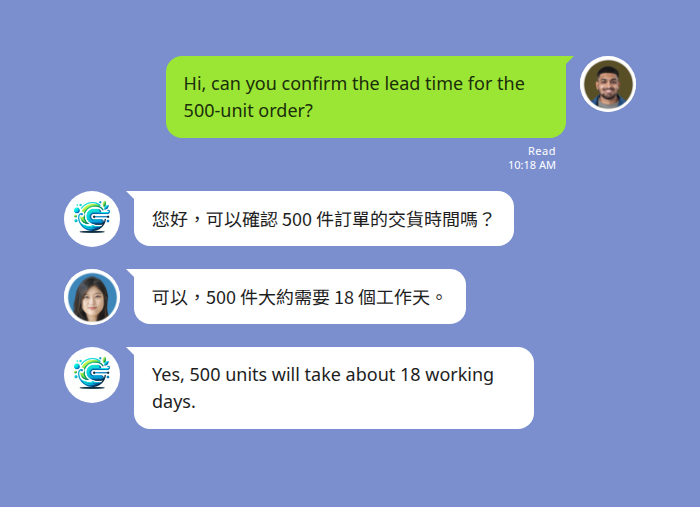
Buyer and supplier each read the order details in their own language — both versions stay in one thread.
One group, many languages: buyers, factories, and logistics together
Most supply chains aren’t two languages — they’re three or four. The buyer speaks English, the factory Mandarin, the freight forwarder Vietnamese. Echonora supports 2 to 5 languages in a single group, so you can put everyone who touches an order into one chat instead of relaying messages between separate threads.
When a group has three or more languages, the bot translates each message into all the others at once, with a country flag marking each version:
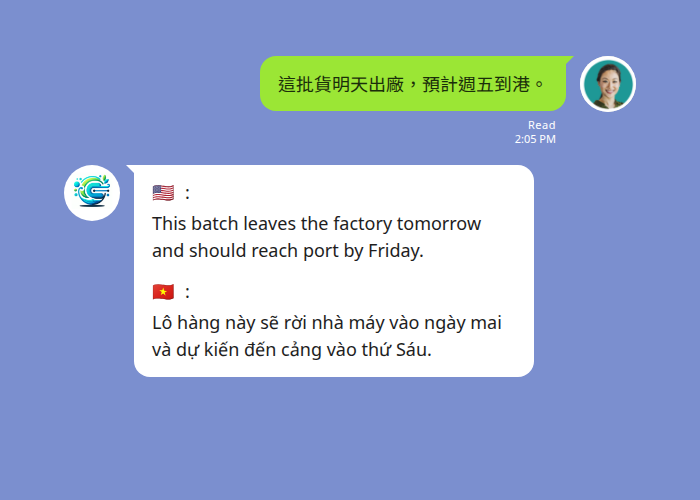
One factory update reaches the buyer and the forwarder simultaneously, each in their own language.
One factory update — “this batch leaves tomorrow, should reach port Friday” — lands in front of the buyer and the forwarder simultaneously, each in their own language. No one waits on a middleman to relay it, and the whole chain sees the same timeline.
Voice notes work the same way. A warehouse contact can record a quick update with their hands full; the bot transcribes it and posts the translation in text for everyone else. Translation typically arrives in a few seconds — conversational pace, not email lag.
Echonora vs Google Translate vs DeepL for trade comms
General-purpose translators are fine for a one-off lookup. They fall short for ongoing international trade relationships because they live outside the chat.
| Google Translate | DeepL | Echonora | |
|---|---|---|---|
| Lives inside the chat | No — separate app | No — separate app | Yes — inside LINE |
| Shared, on-the-record translation | No — personal copy-paste | No — personal copy-paste | Yes — visible to the whole group |
| Multilingual group (3–5 languages) | One pair at a time | One pair at a time | Up to 5 languages in one group |
| Voice message translation | Manual | Manual | Yes — transcribe + translate |
| Audit trail for disputes | None | None | Full thread record |
The difference isn’t translation quality — it’s that the translation stays where the work happens and where everyone can see it.
Start Using Echonora — Break Language Barriers
180+ languages, real-time text and voice translation right inside your LINE group
Setting up Echonora for your trade team
- Add the bot on LINE, then invite it into the group you already use with a supplier or buyer.
- Activate the languages with one message, e.g.
@Echonora English and Chinese. For a mixed group, list each language:@Echonora English and Chinese and Vietnamese. - Start chatting. Every message is translated in-thread from then on.
You can validate it on a single supplier line first — the free plan covers 20 messages a day with no credit card and no expiry. When the volume of a real trade relationship outgrows that, the Monthly or Annual plan unlocks unlimited translation across all your groups. For a B2B team, the practical pattern is a paid account per buyer or per site lead, since one paid member makes the whole group unlimited.
For the full list of supported language pairs and exact activation syntax, see the supported languages reference. For how messages are handled, see the privacy policy.
New to the bot? Start with the complete LINE translation bot guide for the fundamentals, then come back here for the e-commerce workflow.
FAQ
Does it work with suppliers in different countries at once? Yes. A single LINE group can run 2 to 5 languages simultaneously, so a buyer, a factory, and a logistics partner in three countries can share one thread and each read it in their own language.
Can I translate voice messages from a warehouse or factory? Yes. The bot transcribes LINE voice notes and posts the translation as text, so an operator can record an update hands-free and the rest of the chain reads it in their language.
Will my suppliers need to install anything new? No. Echonora runs inside the LINE they already use. You add the bot to the group once — there’s no new app or account for your suppliers to learn.
How many languages does it support? 180+ languages, covering the major trade languages across Asia and beyond — Mandarin, Vietnamese, Thai, Indonesian, Japanese, Korean, and English among them.
Is there a free way to try it? Yes — the free plan gives you 20 messages a day with no credit card and no expiry. Validate it on one supplier chat before scaling to your whole team.
Keep every supplier and buyer chat on the record
Add Echonora to your LINE group and translate text and voice in 180+ languages — free to start, no credit card.