

LINE Spanish Translation for Healthcare: Communicating with Spanish-Speaking Patients and Staff
Published
It is 8:40 on a Monday morning at a busy outpatient clinic. A daughter arrives with her elderly mother for a follow-up. The front-desk coordinator speaks English; the family speaks Spanish; the one bilingual medical assistant who usually bridges the gap is on the floor with another patient. So the check-in stalls — the appointment gets rescheduled by guesswork, the medication list never makes it into the note, and everyone spends the next twenty minutes catching up on a conversation that should have taken two.
Miscommunication with Spanish-speaking patients and staff is not a minor inconvenience in a healthcare setting. It slows throughput, creates safety risk, and quietly pushes work onto whichever bilingual staff member happens to be nearby. A LINE-based translation bot won’t replace a professional interpreter for a clinical conversation — and this guide is careful about that line — but for the coordination that fills a clinic’s day, it removes a real bottleneck.
Where a translation bot fits in healthcare — and where it does not
Start with the boundary, because it matters most. A chat translation bot is a coordination tool, not a clinical interpreter. For anything where an error could affect diagnosis, treatment, informed consent, or a patient’s understanding of their own care, a qualified medical interpreter — in person, by phone, or by video — is the standard, and no automated tool should stand in for one.
What a bot handles well is the large volume of operational, non-diagnostic communication that surrounds care:
- Front-desk and scheduling — confirming, moving, or reminding about appointments; explaining what to bring.
- Logistics and wayfinding — parking, transport, which floor, what time, what documents.
- Staff-to-staff coordination — housekeeping, dietary, transport, and care-aide teams passing routine status between shifts.
- Routine reminders and non-clinical follow-up — “bring your insurance card,” “the pharmacy closes at 5,” “your ride is booked for Thursday.”
The simple test: if a mistranslation would change a clinical decision, route it to a certified interpreter. If a mistranslation would only mean someone shows up on the wrong day, a chat translator is a fast, low-friction fit. Used this way, it takes routine coordination off your bilingual staff so their interpreting skills are reserved for the moments that actually need them.
Front desk, scheduling, and patient reminders
Most patient-facing friction is not clinical — it is logistical. A reschedule, a reminder about fasting before a blood test, a note about which documents to bring. These are exactly the exchanges that stall when the front desk and the family don’t share a language, and exactly the ones that are safe to translate automatically.
With a Spanish–English translator in a LINE group, the coordinator types in English, the family reads in Spanish, and the reply comes back translated — no app-switching, no copy-paste, no waiting for a bilingual colleague to free up. The whole exchange stays in one thread that anyone on the team can scroll back through later.
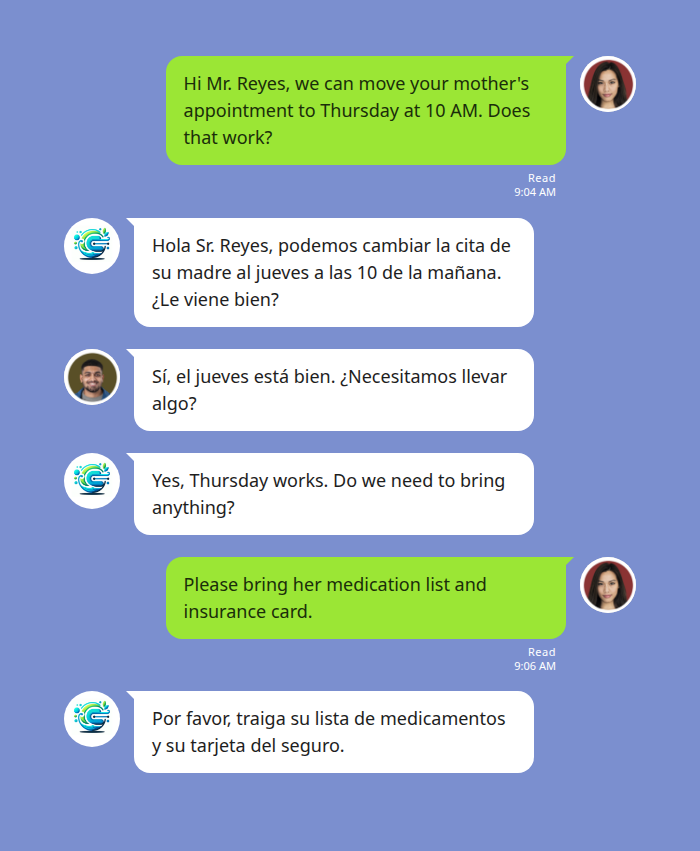
Because the translation is shared in the group rather than private to each phone, everyone sees the same confirmed details — the new time, the documents to bring — which cuts down on the “I thought you said Thursday” problem that plagues verbal-only rescheduling.
Coordinating bilingual clinical and support staff
Healthcare runs on shift handovers, and a large share of frontline support staff — care aides, housekeeping, dietary, patient transport — are Spanish-speaking. When a supervisor and a team member don’t share a first language, routine status updates get thin, delayed, or dropped, and the gaps surface at the worst moments.
Voice makes this especially practical. A care aide with their hands full can send a quick voice note in Spanish; the charge nurse reads it in English a few seconds later. The bot transcribes the speech and translates the text — the reply arrives as text, typically within a few seconds — while the original voice note stays in the thread. This keeps hands-busy staff moving without stopping to type in a second language.
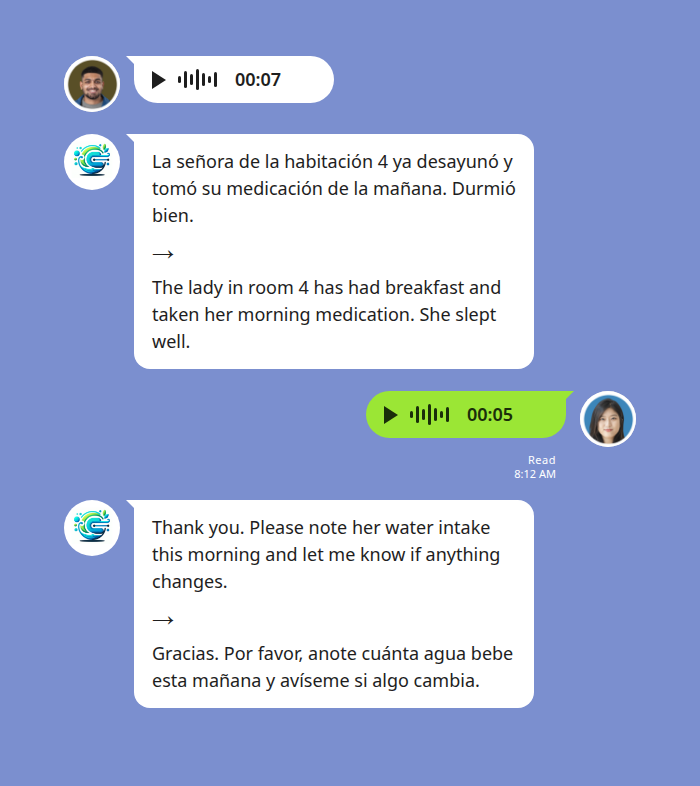
Keep the same boundary in mind here: routine handover status — meals taken, sleep quality, water intake, whether a room is ready — is well within scope. Anything that shades into clinical assessment or a change in a care plan should still go through your normal clinical channels and, where a language gap exists, a qualified interpreter. One caution: background noise on a busy floor can degrade voice transcription, so encourage staff to record somewhere reasonably quiet.
How it compares to copy-paste translation
Most clinics already “solve” this with a general-purpose translation app and a lot of copy-pasting. That works for a one-off sentence, but it breaks down across a shift: it lives outside the chat, leaves no shared record, and asks staff to switch apps mid-task.
| General translation app | Phone in-app translate | In-chat translation bot | |
|---|---|---|---|
| Where it lives | Separate app — copy-paste in and out | Inside the chat, per message | Inside the LINE group your team already uses |
| Shared record | None — translation is lost on paste | Private to each device | One thread everyone can scroll back through |
| Voice messages | Manual, clumsy | Text-focused | Voice note transcribed and translated in the thread |
| Group of 3+ languages | One pair at a time | Limited | Up to five languages in one group |
For a healthcare team, the shared, scroll-back-able record is the quiet differentiator: when the morning review asks who told the family what, the thread is the answer.
Start Using Echonora — Break Language Barriers
Real-time Spanish–English translation of text and voice, right inside the LINE group your team already uses. 180+ languages, free to start.
Setting it up in your clinic’s LINE group
Setup is deliberately light — no new app for staff to learn, no per-seat onboarding. The workflow:
- Add the bot on LINE and invite it into the group your front desk or care team already uses.
- Activate the language pair by typing the command in the group:
@Echonora English and SpanishYou use plain language names, not codes. Need a third language for a mixed team? Just add it — @Echonora English and Spanish and Tagalog — up to five languages in one group.
3. Start typing. From then on, messages are translated in-thread automatically; voice notes are transcribed and translated too.
You can validate the whole thing on the free plan first — 20 messages a day, no credit card, no expiry — before rolling it out to a wider team. For the full list of supported language pairs and exact activation syntax, see the supported-languages reference. This is a cluster in our broader complete guide to Spanish translation in LINE, which covers the product end to end.
Privacy and record-keeping
Healthcare teams should treat any patient communication channel deliberately. Messages are processed to deliver the translation and stay within the LINE group with the people you have invited; see the privacy policy for data-handling specifics. Before using any chat tool for patient-related communication, confirm the workflow against your organization’s own privacy and interpreter policies, and keep clinical conversations on the channels your compliance team has approved for them.
Frequently asked questions
Can this replace a medical interpreter?
No. It is a coordination tool for scheduling, logistics, reminders, and routine staff communication. Clinical, diagnostic, and consent conversations still require a qualified medical interpreter.
Does it translate Spanish voice messages?
Yes. A voice note is transcribed and then translated to text in the thread, usually within a few seconds. The reply is text; the original voice note stays in the chat. Background noise on a busy floor can reduce accuracy.
Do all our staff need their own subscription?
No. The subscription is per user, but the benefit extends to every group that user is in — so a shift lead or coordinator can cover the groups they belong to. Companies typically arrange paid accounts by department, shift, or site rather than per employee.
What does it cost to try?
There is a perpetual free plan — 20 messages a day, no credit card, no expiry — which is enough to validate it on one front desk or one care team before expanding. Paid plans on the pricing page unlock unlimited translation.
Can we run more than two languages in one group?
Yes — up to five languages in a single group, which suits mixed teams where staff also speak Tagalog, Vietnamese, or another language alongside Spanish and English.
Take routine coordination off your bilingual staff
Add Echonora to your clinic’s LINE group and translate Spanish and English in real time — text and voice. Free to start.