

How to Set Up 3+ Languages in One LINE Group: Multi-Language Translation Guide
Published
Most LINE translation guides stop at two languages — one supplier, one buyer; one supervisor, one worker. But real teams are rarely that tidy. A factory floor might run Mandarin, Vietnamese, and Thai on the same shift. An international project group could mix English, Japanese, and Chinese. When more than two first languages share one chat, a two-language setup leaves someone reading messages they can’t understand.
Echonora handles up to five languages in a single LINE group, translating every message into all the other configured languages at once. This guide walks through the setup, shows what the translations look like, and covers the practical details that keep a busy multi-language group readable.
If you’re new to the bot, start with the LINE Translation Bot Guide for the basics, then come back here for the multi-language specifics.
Why run 3+ languages in one LINE group
The point of a shared group is that everyone sees the same message. The moment you split a three-language team into separate two-language chats, you lose that — the Thai operator and the Vietnamese operator never see each other’s questions, and the supervisor ends up re-typing the same instruction three times.
A single multi-language group fixes that:
- One announcement reaches everyone. A shift change, a safety notice, or a delivery update gets posted once and lands in every member’s language.
- Cross-language replies stay visible. When the Vietnamese operator answers a question, the Thai operator and the Mandarin lead both read it — context isn’t trapped in a side chat.
- There’s one record. A bilingual reviewer or a new team member can scroll back through one thread instead of stitching three together.
This is common in factories, logistics teams, hospitality crews, and international project groups — anywhere three or more first languages genuinely share the work.
Before you start: what you need
Setup takes about a minute. You’ll need:
- The bot added on LINE. If you haven’t added it yet, do that first — it’s the same bot for every market.
- A LINE group with the people you want to translate for.
- The list of languages you want active — anywhere from two up to five. You can use any of the 180+ supported languages.
You don’t need everyone to install anything extra or change their phone language. Translation happens inside the group thread they’re already in.
Step-by-step: activate 3+ languages
- Invite the bot into your LINE group (the same way you’d add any member).
- Send one activation message naming all the languages you want, connected with “and”:
@Echonora english and chinese and vietnameseAdd a fourth or fifth the same way:
@Echonora english and chinese and vietnamese and thai- Read the confirmation. The bot replies confirming the active languages. From that point, every message in the group is translated into all the other configured languages.
A few things worth knowing:
- Use language names, not codes. Write
english and chinese and vietnamese, noten zh vi. Names are clearer and the bot is built around them. - You can name languages in your own language. The bot recognises activation commands in English, Chinese, Japanese, Thai, Indonesian, and Vietnamese — so a Thai team lead can set the group up in Thai if that’s easier.
- Chinese defaults to Traditional (繁體) unless you specify otherwise.
- Spelling helps. Echonora tries to recognise close matches, but accurate language names are the safest.
For the full list of accepted forms and every supported language, see the supported languages and setup reference.
What translations look like with 3+ languages
In a two-language group, the bot just posts the translation — no labels needed, because there’s only one target. With three or more languages, it marks each translation with a country flag so everyone can find their line at a glance.
So when the Mandarin-speaking lead posts an instruction, the bot replies with the English and Vietnamese versions, each flagged:
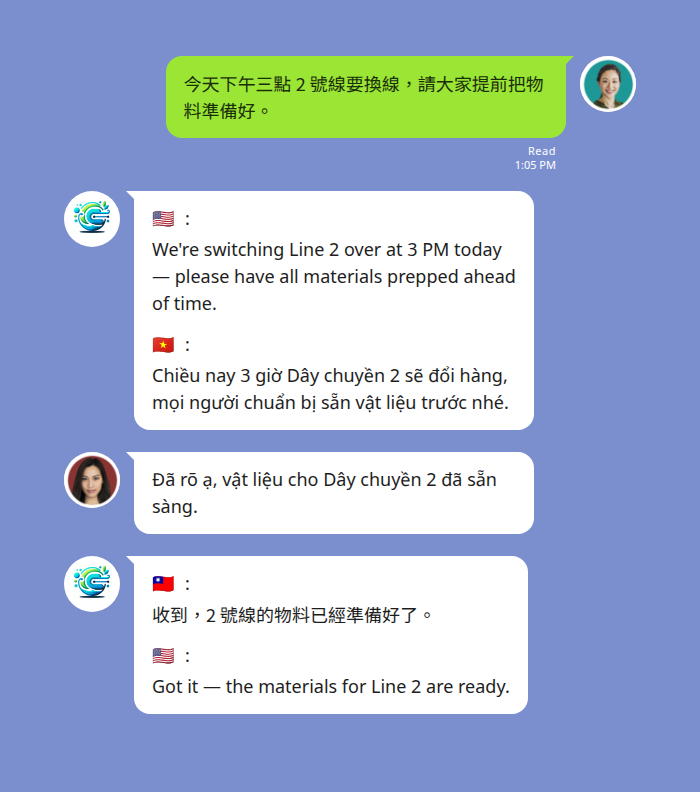
A 3-language factory shift group: one message, read by everyone in their own language.
Notice the source language itself isn’t repeated in the translation block — only the other languages in the group are shown. Each member scans for their flag and reads on.
Voice messages in a multi-language group
Voice notes work the same way as text. Someone records a LINE voice message, and the bot posts a text translation for everyone else — handy when hands are busy on a line or a site and typing isn’t practical.
The bot transcribes the voice note, then posts the transcript alongside the translation. Here a Vietnamese operator voice-notes the line lead, and the bot posts the transcript plus the Chinese reading (in a group with three or more languages, each translation is flagged the same way as text):
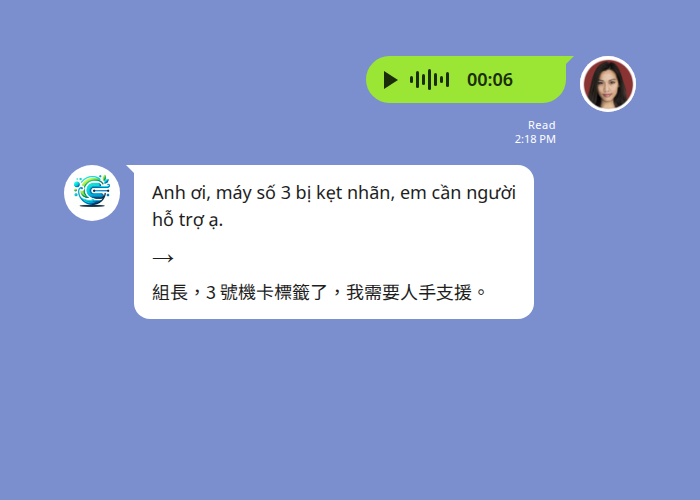
A voice note from the floor, transcribed and translated in seconds.
Translation usually lands in about 3–8 seconds for a typical short voice note — conversational pace. The original voice note stays in the thread (LINE keeps it), and the text is added alongside. A couple of honest caveats: heavy background noise on a factory floor or construction site can reduce transcription accuracy, and strong accents are occasionally mis-heard. For anything critical, a quick text follow-up is good practice.
Keeping a 3–5 language group readable
A multi-language group can get busy. A few habits keep it clean:
- One idea per message. Short, single-topic messages translate more reliably than long paragraphs covering three things.
- Name people and parts explicitly. “Line 2” and “the blue pallet” travel across languages better than “over there” or “that one.”
- Let the bot finish. In a fast back-and-forth, give the translation a moment to post before the next message, so the flagged replies stay in order.
- Mind sensitive topics. For anything involving health, safety, or contracts, confirm understanding directly — machine translation is a strong bridge, not a substitute for a careful check on high-stakes details. See the privacy policy for how chat data is handled.
Start Using Echonora — Break Language Barriers
Set up 3, 4, or 5 languages in one LINE group, with instant translation of text and voice across 180+ languages.
Free or paid for a multi-language group?
Here’s a detail that works in your favour: in a 3–5 language group, one source message counts as one translation, no matter how many languages it’s rendered into. A single message translated into four languages is still metered as one — so a multi-language group gets more language coverage per message than a two-language pair would.
The Free plan gives you 20 messages a day, with no credit card and no expiry — enough to validate the setup with your real team before committing. When daily volume grows past that — a full shift coordinating, a long planning thread — the Monthly ($10) or Annual ($100/year) plans unlock unlimited translation.
One more thing that helps teams: a subscription is per user, but the unlimited benefit covers every group that user is in. So one paid account on a shift lead can cover several site or department groups they belong to — you don’t need a subscription for every employee.
FAQ
How many languages can one LINE group have? Up to five at once. Two is the most common setup, but three, four, and five all work — every message is translated into all the other active languages.
Do I need a separate group for each language pair? No. That’s the whole point of multi-language groups — keep one group, set all the languages, and everyone reads in their own language in the same thread.
Can I add or change languages later?
Yes. Send a new @Echonora activation message with the languages you want active.
How do members tell which translation is theirs? In a 3+ language group, each translation is marked with a country flag, so members scan for their flag and read that line.
Does each member need to install or set up anything? No. Only the bot is added to the group. Members don’t change their phone language or install an app — they just read the group as usual.
Start Using Echonora — Break Language Barriers
Translate text and voice for your whole team, right inside the LINE group you already use.