

How to Improve LINE Voice Message Translation Accuracy: Background Noise, Accents & Speaking Tips
Published
Voice notes are the fastest way to get a message across when your hands are full or typing in a second language is slow. In a LINE group running Echonora, a teammate can hold the mic, say what they need, and everyone else reads it in their own language seconds later. But anyone who has used voice-to-text knows the catch: the translation is only as good as what the microphone actually picked up.
The good news is that voice accuracy is mostly under your control. A few small habits — where you stand, how you pace your words, how long each note runs — make the difference between a clean translation and one your colleague has to ask about. This guide walks through the practical ones.
How LINE voice translation actually works
Echonora translates a voice note in two steps. First it transcribes your speech into text (speech-to-text). Then it translates that text into each language set up in the group. This “transcribe-then-translate” order matters for accuracy: if the transcription mis-hears a word, the translation faithfully carries that mistake forward.
So the single biggest lever you have is the quality of the audio the bot receives. Everything below is about giving the transcription step the cleanest possible input.
A few things worth knowing up front:
- Translation typically arrives in 3–8 seconds for a normal voice note — conversational pace, not instant.
- Your original recording stays in the LINE thread (LINE keeps it), and the bot adds the text translation alongside. So anyone can replay the audio if a translation reads oddly.
- The bot’s reply is text only — it shows the transcribed words, an arrow, and the translation. It does not read the message back out loud.
Cut the background noise
Background noise is the most common reason a voice translation comes out garbled. Factory floors, construction sites, busy kitchens, and outdoors with wind or traffic all bleed into the recording and pull the transcription off course.
You don’t need a quiet office — just a few seconds of lower noise:
- Step away from the loudest source before you record — move a few metres from the machine, the extractor fan, or the road.
- Pause during the loud part. If a forklift is reversing or a mixer is running, wait the few seconds for it to pass, then speak.
- Hold the phone closer to your mouth (a hand-span away) so your voice is louder than the room.
- Shield the mic from wind with your hand or your body when you’re outside.
If the environment genuinely can’t be quietened — mid-shift on a live line — that’s the moment to consider typing the message instead (more on that below).
Speak clearly, and mind strong accents
The transcription step is trained on clear speech. Heavy regional accents and very fast or mumbled delivery are where it most often slips.
- Slow down slightly. You don’t need to sound robotic — just don’t rush the ends of words.
- Finish each word. Trailing off or swallowing the last syllable is a frequent cause of a wrong transcription.
- Say names and numbers deliberately. Proper names, part numbers, room numbers, and times carry the most risk because the transcriber can’t guess them from context. Slow right down for these.
- Avoid heavy slang and dialect in the moment — the more standard your wording, the more reliably it transcribes.
Because your original voice note stays in the thread, a colleague who reads something odd can always tap play and check — but a clear recording saves everyone that round trip.
Keep each note short and on one topic
One long, rambling voice note is harder to transcribe accurately than two short ones — and far harder for the reader to act on. A good rule of thumb:
- One idea per note. Cover a single instruction, question, or update, then send.
- Aim for short bursts rather than a one-minute monologue. Shorter audio gives the transcriber less room to drift, and the reader gets the translation faster.
- Re-record instead of correcting. If you fumble a sentence, it’s quicker to send a fresh clean note than to talk over your own mistake.
This also plays nicely with the way Echonora counts usage: each voice note the bot translates is one translation event, whether the group has two languages or five — so a tidy, single-topic note is the efficient choice as well as the accurate one.
When to type instead of speak
Voice is a tool, not a rule. There are moments when a typed message will simply be more accurate, and a good operator switches without hesitation:
- The environment is unavoidably loud and you can’t step away.
- The message is safety-critical or exact — a dosage, a precise measurement, a legal or compliance instruction — where there’s no room for a mis-heard word.
- It’s mostly numbers, codes, or proper names strung together.
Echonora translates typed messages and voice notes the same way in the same thread, so you can mix the two freely — voice for the quick, conversational majority, text for the handful that have to be exact.
What good looks like
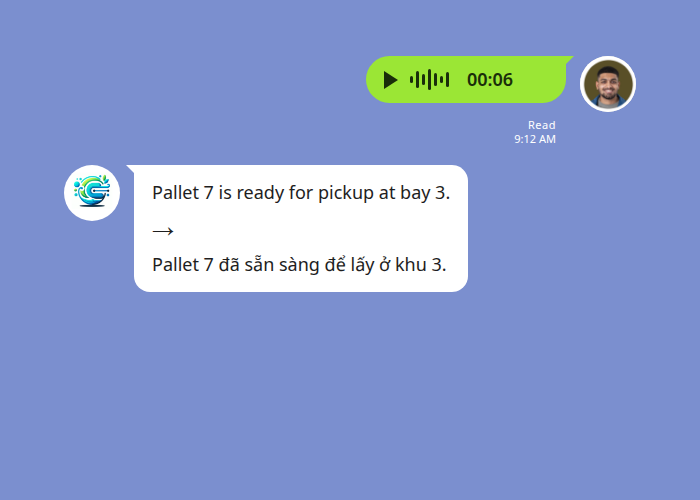
Here is a clear voice note in a two-language warehouse group. The supervisor records one short instruction in a quieter corner; Echonora posts the transcript and the translation underneath, and the original audio stays in the thread to replay if needed.
And a care-home example: a Thai-speaking aide sends a short, single-topic update, and the English-reading nurse gets it cleanly a few seconds later.
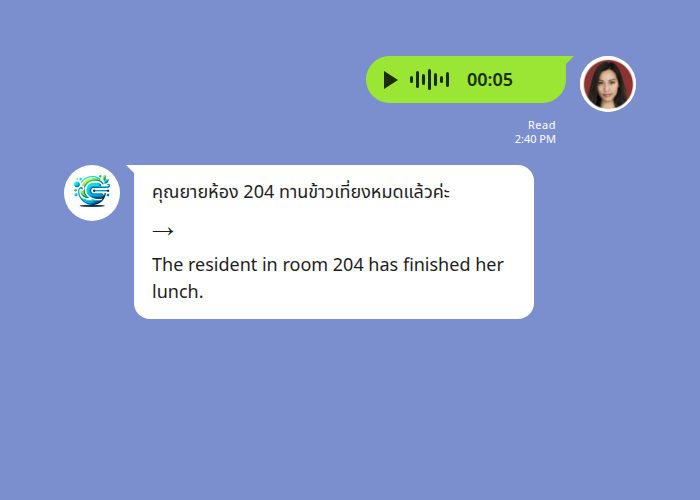
In both cases the recording was short, close-mic’d, and away from the worst of the noise — which is exactly why the transcription, and therefore the translation, came out clean.
Frequently asked questions
Does Echonora work if there’s some background noise?
Yes — light background noise is usually fine. It’s sustained loud noise (machinery, wind, a busy kitchen) that degrades the transcription. Step away from the source for a few seconds and you’ll get a much cleaner result.
Will it handle my accent?
In most cases, yes. Clear, slightly slowed speech transcribes reliably across accents. Very fast delivery, heavy dialect, or swallowed word-endings are where mistakes creep in — so slow down for names, numbers, and anything precise.
What languages can I send voice notes in?
Echonora supports 180+ languages for translation. See the full list of supported languages and the exact activation syntax for every pair.
Does a voice note use up my free daily messages faster?
No. Recording a voice note is free; what counts is the bot’s translation — one translation event per note, regardless of how many languages the group uses.
Can the bot read the translation back out loud?
No. Echonora replies with text — the transcribed words plus the translation. Your own voice recording stays in the thread for anyone to replay.
For the complete setup walkthrough — adding the bot, choosing languages, and getting your group running — see the LINE Translation Bot Guide.
Start Using Echonora — Break Language Barriers
180+ languages, real-time text and voice translation right inside your LINE group
Clear voice, clean translation. Get your group speaking each other’s language without anyone switching apps.
Add Echonora to your LINE group today
Free to start — 20 messages a day, no credit card, no expiry.