

Farm Crew Translation: How to Communicate with Seasonal Workers on LINE
Published
When the crew speaks five languages and the clock is the weather
A modern farm crew rarely shares one first language. A single harvest team can mix English-speaking supervisors with Spanish-speaking pickers, Thai greenhouse staff, and Vietnamese packing-line workers — many of them seasonal, many arriving for a few weeks and gone with the crop. The work is time-critical and weather-driven: a frost warning, a broken irrigation line, or a shifted pick window has to reach everyone now, not after someone tracks down a bilingual lead.
That is the core problem of agriculture multilingual communication: instructions are urgent, hands are busy and dirty, and the workforce turns over constantly. Printed notices get ignored in the field. Group texts in one language only reach the people who read that language. And pulling a separate translation app out mid-task — copy the message, switch apps, paste, translate, switch back — simply does not happen when you are kneeling in a row of strawberries.
Why seasonal crews are hard to reach with standard tools
Seasonal worker translation has constraints that office translation tools were never built for:
- High turnover. You cannot onboard every picker onto a new enterprise app for a six-week season. Whatever you use has to be something they already have on their phone.
- Hands-busy, outdoor work. Typing is slow with gloves on or hands full. Voice is the natural input.
- Mixed literacy and many language pairs. A crew might need English, Spanish, and Thai in the same conversation — not just one pair.
- Trust and clarity matter. Safety instructions, pay details, and schedule changes can’t get lost in a half-understood paraphrase.
Most farm teams already coordinate over a chat app on their phones. The fix is not another app to install — it is translation that lives inside the chat everyone is already in.
How LINE-based translation works for a farm team
Echonora is a translation bot that joins your existing LINE group chat. You add it once, tell it which languages your crew speaks, and from then on every message posted in the group is translated for everyone — in the same thread, visible to the whole team.
Because the translation appears in the group thread rather than privately on each person’s phone, everyone sees the same shared record. A supervisor’s instruction, the Spanish translation, and the Thai translation all sit together — so a bilingual lead can glance at the thread and confirm nothing got garbled, and there is a record of what was said.
A single group supports 2 to 5 languages at once. The bot translates one source message into every other configured language, so a frost warning typed once reaches the whole multilingual crew at the same moment.
Scenario 1 — A frost warning before everyone clocks out. The supervisor types one message in English. Echonora posts it back to the group in Spanish and Thai, each clearly labelled, so the Spanish-speaking pickers and the Thai greenhouse crew all read the same instruction in their own language before they leave for the day.
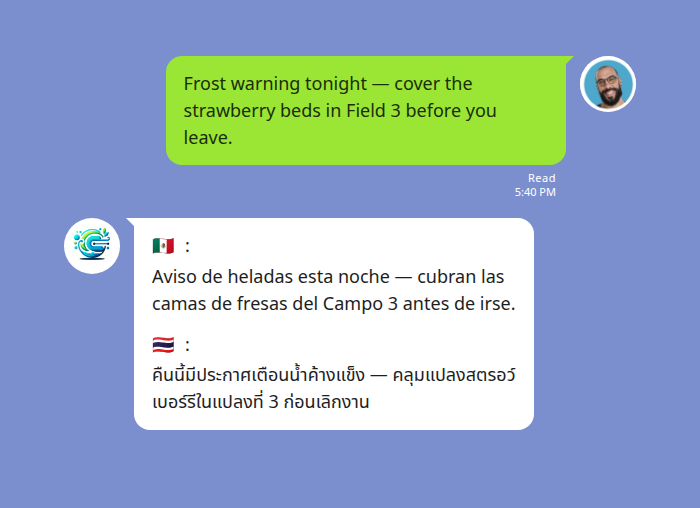
One English message reaches Spanish- and Thai-speaking crew in the same thread.
Voice notes for hands that are full
Out in the field, typing is the bottleneck — so Echonora translates voice messages the same way it handles text. A worker records a LINE voice note in their own language; the bot transcribes it and posts the text plus a translation back into the thread. The original voice note stays in the chat (LINE keeps it), and the translation appears alongside it, usually within a few seconds.
That means a worker can report a problem without stopping to type — speak it, and the supervisor reads it in English moments later.
Scenario 2 — Reporting a leak from the north block. A Thai-speaking worker sees water pooling near new seedlings and sends a quick voice note instead of typing. Echonora posts the Thai transcript and the English translation into the group, and the supervisor can act before the seedlings drown.
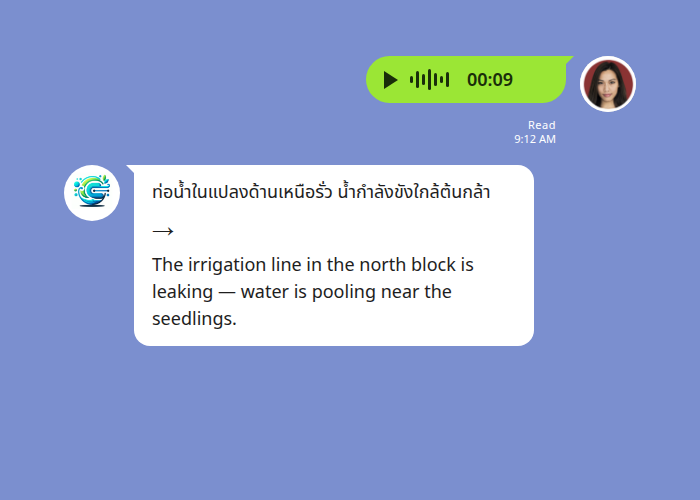
A spoken note in Thai, transcribed and translated to English in seconds.
One honest caveat for farm settings: speech-to-text works best in reasonably quiet conditions. Heavy machinery, wind, or a loud packing line can degrade transcription accuracy, and strong regional accents can occasionally be mis-heard. For critical instructions in a noisy environment, a short typed message is still the most reliable — voice shines for the dozens of quick, routine updates that would otherwise never get sent at all.
Setting it up for your crew
Setup takes a minute and no IT project:
- Add Echonora to your LINE crew group.
- Activate the languages your team speaks. In English the command is simply the bot’s name followed by your languages joined with “and” — for example:
@Echonora English and Spanish and Thai - That’s it. Every message — typed or spoken — is now translated for the whole group.
You use plain language names, not codes, and the bot is forgiving about spelling. For the full list of supported languages and exact activation syntax, see the complete list of supported language pairs.
Because the crew uses the LINE app they already have, there is nothing new for a seasonal worker to learn or install on day one.
In-chat translation vs. copy-paste apps
| Copy-paste translation app | In-chat group translation (Echonora) | |
|---|---|---|
| Where it happens | Separate app — switch out, translate, switch back | Inside the LINE group everyone is already in |
| Who sees the translation | Just the person who copied it | The whole crew, in the shared thread |
| Voice notes | Manual, awkward | Spoken note transcribed + translated automatically |
| Languages at once | One pair at a time | 2–5 languages in a single group |
| Record of what was said | None — lost on paste | Persistent thread the whole team can review |
Onboarding a constantly-changing crew onto a separate tool is exactly the friction seasonal work can’t absorb. Meeting workers in the chat they already use removes it.
Start Using Echonora — Break Language Barriers
Supports 180+ languages, with real-time text and voice translation right inside your LINE group.
Frequently asked questions
Do my workers need to download anything new?
No. Echonora works inside LINE, which most crews already use. They just need to be in the group.
How many languages can one crew group handle?
Between 2 and 5 simultaneously. One message is translated into all the other configured languages at once.
What does it cost to start?
There’s a free plan — 20 messages a day, no credit card, no expiry — so you can prove it on one crew before committing. For unlimited translation across all your groups, plans are $10/month or $100/year. The paid benefit covers every group the subscriber is in, so you can equip leads rather than every individual worker.
Is it private?
Messages stay in your LINE group and are processed to deliver the translation. See the privacy policy for data-handling specifics.
We coordinate more than just the field crew — office, suppliers, drivers.
The same approach works for any mixed-language workplace team. See the parent guide: LINE Translation for Workplace Teams.
Start Using Echonora — Break Language Barriers
Coordinate your whole multilingual crew — text and voice — in the LINE group they already use.