Turn On Translation in LINE: Tips for Communicating Effectively with Multilingual Staff
Introduction
The growing importance of multilingual teams in global industries
In today’s globalized economy, industries like hospitality, manufacturing, agriculture, and caregiving are increasingly relying on multilingual teams. These diverse workforces bring unique skills and perspectives, helping businesses meet the demands of global markets. However, successful collaboration within these teams hinges on overcoming one major obstacle: language barriers.
Challenges posed by language barriers in the workplace
Language hurdles in the workplace can lead to misunderstandings, reduced productivity, and even safety concerns. For instance, miscommunicated safety instructions on a manufacturing floor or unclear caregiving directives can result in costly mistakes or compromised well-being. Addressing these challenges requires innovative tools and strategies that prioritize clarity and efficiency, making seamless communication a business imperative.
Why Communication Is Key in Multilingual Workforces
Productivity and safety as affected by language gaps
Productivity depends on effective communication. Misunderstandings caused by language gaps can slow down operations, impact quality, and even create risky work environments. In construction, for example, improper interpretation of plans or instructions can lead to delays or even structural hazards. Similarly, caregiving—where precise instructions are critical—leaves no room for message ambiguity.
By reducing miscommunication with translation tools like LINE’s built-in features and Echonora, teams across industries can boost efficiency and safeguard workplace standards. Real-time translations ensure that messages are understood instantly, preventing delays or errors and promoting operational flow.
Team building and trust in multicultural environments
Clear communication is also foundational to building trust and fostering teamwork in diverse environments. When everyone feels heard and understood, workplace morale improves, enhancing collaboration and inclusivity. Tools like Echonora in LINE streamline cross-cultural communication, making it easier for multilingual teams to connect and collaborate without frustrations caused by language barriers.
Understanding Echonora's Role
Features that make Echonora ideal for multilingual communication
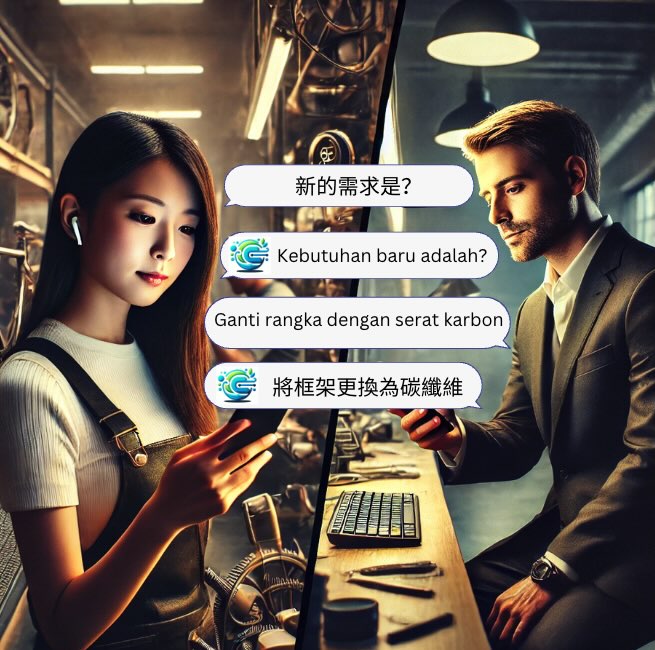
Echonora is an AI-powered chatbot designed to seamlessly translate communications in real time. Integrated directly into the LINE app, it removes the need for external software while supporting multiple languages. These capabilities make it the perfect solution for multilingual workplaces, whether it’s coordinating hotel housekeeping, fieldwork in agricultural settings, or repairs in construction projects.
How Echonora integrates into LINE for real-time translation
Once activated inside LINE, Echonora automatically translates text-based conversations. Users simply set their preferred language, and Echonora handles the rest, converting incoming and outgoing messages into the required languages. This ensures no crucial details are lost during exchanges, making conversations simpler and faster across different language speakers.
Key benefits in practical workplace scenarios
Consider the following example: A hotel supervisor communicates shift updates to staff speaking multiple languages through LINE. With Echonora, the updates are instantly translated into each staff member’s native language, saving time and avoiding potential errors. Similarly, a foreman at a construction site can relay urgent safety instructions to a multilingual crew, knowing the translation will maintain the message's accuracy.
Steps to Turn On Translation in LINE for Multilingual Teams
Quick guide to enabling translation features in LINE
If you’re wondering how to turn on translation in LINE, here are the steps:
- Open the LINE app and navigate to the specific group or individual chat where translation is needed.
- Tap the settings icon within the chat.
- Select the “Translation” option and enable the feature.
- For advanced options, add the Echonora chatbot to the chat and establish language pairs tailored to your team’s needs.
More detailed instructions can be found in the LINE Help Center.
Best practices for setting up Echonora chatbot in groups
Here’s how to get the best results with Echonora:
- Appoint a group admin to oversee translation settings and language configuration.
- Set up specific language pairs that match the linguistic needs of your team (e.g., Spanish-to-English or Japanese-to-Thai).
- Conduct brief training sessions to familiarize users with how to interact with the chatbot and customize preferences.
Visit the Echonora Supported Languages User Guide for further guidance.
Troubleshooting and FAQs
Encountering issues? Try these tips:
- Translation not working: Ensure that all users have joined the LINE chat where Echonora is active and verify the bot’s addition to the group.
- Incorrect translations: Check language settings to confirm that the right language pairs are configured.
- Errors with Echonora integration: Restart the LINE app or re-add Echonora to the group.
For persistent issues, reach out to Echonora's support or consult their comprehensive troubleshooting guide.
Case Studies and Real-World Applications
Scenario: Effective housekeeping communication using Echonora
A prominent hotel chain integrated Echonora into LINE to streamline multilingual housekeeping processes. After deployment, they reported a 35% reduction in task errors and a 20% improvement in team efficiency, as instructions were translated accurately and delivered quickly.
Scenario: Managing engineering repairs with multilingual teams
At a manufacturing plant, a team of engineers using Echonora successfully reduced delays on critical equipment repairs. Instant translations allowed clear communication between Hindi- and Mandarin-speaking technicians, cutting project timelines by 25% while improving overall satisfaction scores.
Scenario: Handling guest services and feedback in diverse languages
A boutique hotel used LINE and Echonora to respond to guest inquiries in real time, regardless of language. Satisfaction scores increased by 30%, as guests felt their needs were addressed promptly in their native language. This tool helped the hotel maintain high service standards and build loyalty with clients from around the globe.
Practical Tips to Overcome Language Barriers
Encouraging language learning for inclusivity
Translation tools are vital, but encouraging employees to learn additional languages fosters inclusivity and long-term benefits. Offering on-site language workshops or access to free online courses can motivate team members to bridge linguistic gaps.
Using visual aids and simplification techniques
Visual communication tools, such as charts or instructional videos, can complement text-based translations. For example, manufacturing teams can use labeled diagrams to explain complex processes while construction supervisors may use visual icons to reinforce safety instructions.
Leveraging technology like Echonora for seamless interaction
Businesses can combine visual aids and productive training with AI-powered tools like Echonora to create a robust communication framework. These solutions seamlessly handle day-to-day communication needs in multilingual workplaces.
Leveraging Additional Resources
Internal guidance: Supported Languages User Guide for Echonora
Learn more about the full capabilities of Echonora, including supported languages and advanced features, by visiting the Echonora Supported Languages User Guide.
External insights: Overcoming workplace language barriers
For additional strategies on addressing language challenges in the workplace, check out this article: 9 Steps to Overcome Language Barriers.
Hospitality tech advancements for communication
Read more about how hospitality businesses are embracing innovative communication technology: Hospitality Tech for Communication.
Further Reading:LINE Translation Bot Guide: Compare Tools and Set Up in Minutes
Conclusion
Summary of effective communication strategies
Overcoming language barriers is essential for operational success and team cohesion in multilingual workplaces. Leveraging tools like Echonora, combined with visual aids and inclusivity-driven programs, equips companies to communicate effectively and foster collaborative environments.
Call-to-action: Implement Echonora and LINE translation features to transform communication with multilingual teams
Take the first step to transform multilingual team communication by integrating Echonora into your LINE app. Experience seamless translation and amplified collaboration. Visit Echonora today to discover how you can enhance workplace efficiency and team dynamics.
Try Echonora and break the language barrier
180+ languages, real-time text and voice translation in your LINE group chats.
Add on LINE →