

Translate Line App, Spanish: How to Change Language & Enable Auto-Translation
Published
Introduction: Why Change LINE App Language or Use Auto-Translation? 🌎💬
Meeting global workplace needs
In today’s global workforce, multilingual collaboration is no longer a rarity—it’s the norm. Language barriers impact productivity, safety, and team trust across industries worldwide. In Taiwan, sectors such as agriculture, manufacturing, construction, and caregiving often employ foreign workers from countries like Vietnam, Indonesia, and Thailand. These diverse workplaces face daily challenges in communication that can lead to misunderstandings and safety incidents.
Echonora was created to address these challenges. This AI-powered group translation chatbot runs directly inside the LINE app, offering seamless, real-time translation without the need for additional apps. By supporting multiple languages—including Spanish—Echonora enables teams to communicate effortlessly across language barriers and boosts workplace efficiency.
Overview of the translate line app, spanish challenge
Many teams rely on LINE for daily communication, but switching the app interface to Spanish can be restricted by device region or app versions. Additionally, translating messages within LINE group chats can be cumbersome without the right tools. Echonora provides a solution by offering instant, automatic translation between Spanish and other languages, ensuring your team stays connected without language hindrances.
Section 1: How to Change LINE App Language to Spanish with Translate Line App Features 🛠️
Step-by-step guide to switching your LINE interface to Spanish
To change your LINE app language to Spanish, follow these steps:
- Open the LINE app and tap the Settings icon, usually found by tapping your profile or on the main screen menu.
- Navigate to Language or App Language settings.
- Select Spanish from the available list of languages.
- Restart the app if prompted to apply changes.
These steps update app menus and system messages to Spanish, providing a more familiar interface for Spanish-speaking users. While screenshots are not included here, this setup is commonly accessed via the app’s settings on most devices.
Potential limitations: not all regions/devices may have Spanish
Note that not every device or LINE account region supports Spanish as an app language. If you cannot find Spanish, try changing your device’s system language to Spanish or updating your LINE app to the latest version. If the option remains unavailable, rely on auto-translation features for communication instead.
Best practices for team-wide language change
For teams, asking every member to switch app languages might be impractical. Instead, encourage use of translation bots like Echonora within group chats so members can type in their preferred languages and have messages automatically translated, maintaining inclusiveness and communication flow without enforcing interface changes.
For additional guidance, visit the LINE Help Center – Using LINE.
Section 2: Enabling Auto-Translation in LINE Chats 🚀
What is auto-translation in LINE?
Auto-translation automatically converts messages typed in one language into another language within LINE chats, supporting smooth real-time communication in multilingual groups without manual translation or app switching.
Introduction to group translation bots (Echonora)
Echonora is a third-party AI-powered translation chatbot designed for LINE group chats. It supports multiple languages including Spanish, English, Mandarin, Vietnamese, Indonesian, and Thai. Unlike LINE’s limited built-in translator, Echonora can translate both text and voice messages instantly, all within the LINE app.
Compare LINE’s built-in features vs. translate line app, spanish tools
LINE’s native translation is limited to text and dependent on device region and app version. Echonora surpasses this by supporting up to five languages simultaneously, including voice transcription and translation, alongside simple control commands for activating or pausing translation, making it ideal for multilingual teams.
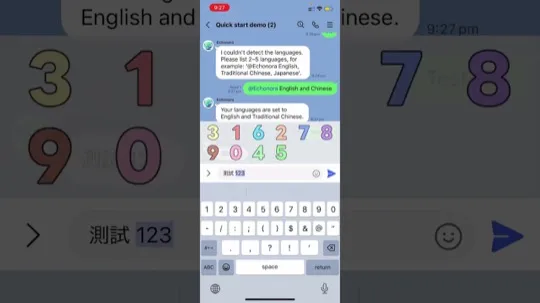
How to set up translation between Spanish and other languages in LINE groups (Echonora demo)
To set up Echonora:
- Add Echonora as a friend on LINE.
- Invite the bot into your group chat.
- Type commands like
@Echonora Spanish and Englishto set source and target languages. - Chat normally—messages are automatically translated in real time.
This quick setup transforms your LINE chat into a multilingual hub.
Video: 💬 Set Up Line Translator for Multilingual Chats in Minutes!
Curious how to get started? Watch this video tutorial to see Echonora in action and learn how to set up multilingual chat translation quickly and easily:
Section 3: Step-by-Step – Using Echonora to Translate Spanish in LINE Groups 🤖📲
How to add Echonora as a friend and to group chats
Find Echonora by searching on LINE or using its QR code. Add it as a friend, then invite Echonora into your group chats where multilingual communication happens. Once added, the bot automatically supports your translation needs.
Setting Spanish as a translation target (with command examples)
Specify target languages by typing commands such as @Echonora Spanish and English. You can include up to five languages in one group for seamless multi-directional translation.
Tips: Multiple languages, text/voice translation, stopping & resuming translation
- Use commands like
@Echonora Spanish, English, and Vietnameseto add languages. - Echonora transcribes and translates voice messages, helping users who prefer speaking to typing.
- Control translation flow with
@Echonora stop translationor@Echonora start translationcommands as needed.
Use case: Multilingual hotel/restaurant team collaboration
In hotels and restaurants, diverse staff often speak different languages. Echonora enables teams such as housekeeping, front desk, and kitchen staff to communicate clearly by instantly translating messages and voice notes, improving coordination and customer service.
Learn more at the Echonora language support guide.
Section 4: Choosing the Best Translate Line App, Spanish Option for Your Team 🏆
Comparing LINE built-in vs. third-party solutions (pros/cons table)
| Feature | LINE Built-in Translation | Echonora Third-Party Bot |
|---|---|---|
| Language Support | Limited; depends on device region | Supports up to 5 languages simultaneously |
| Message Types | Text only | Text and voice message translation with transcription |
| User Access | Individual on-demand | One payer covers entire group access |
| Customization | Basic | Configurable language pairs and translation control |
| Installation | Built-in | Requires adding bot to group |
Positive outcomes: workplace communication, productivity, and inclusiveness
Using Echonora greatly improves workplace inclusiveness by letting members communicate naturally in their own language. This leads to fewer misunderstandings, higher productivity, and stronger team trust—key for industries relying on swift, accurate communication.
Reference other translation solutions: Google Translate, LINE translators
Though Google Translate and others offer helpful services, integrating Echonora directly into LINE avoids switching apps, ensuring faster and more convenient group conversations.
For insights into tech’s impact on hospitality, see Hospitality Net – How Tech is Transforming Hotel Operations.
Section 5: Overcoming Language Barriers in Teams and Workplaces 🌐🤝
Tips for communicating with international/multilingual staff
Clear communication with a diverse workforce requires simple language, established protocols, and reliable translation support. These combined with active training empower teams to collaborate confidently across languages.
Integrating translation tools with staff training
Include Echonora and similar tools in onboarding and ongoing training so team members become comfortable using translations to enhance workplace communication.
Encouraging cross-language trust and teamwork
Building a workplace culture that embraces language diversity and facilitates easy access to translation fosters mutual respect and seamless cooperation.
Explore strategies at 9 Steps to Overcoming Language Barriers in the Workplace.
FAQs: Common LINE Translation and Language Issues ❓
Cannot find Spanish in LINE app? (troubleshooting)
If Spanish does not show as a language option, verify your device’s system language setting and update LINE to the latest version. If unavailable, use translation bots like Echonora to maintain multilingual communication.
How to reset or customize translation settings in LINE groups
Adjust translation behavior with commands such as @Echonora stop translation to pause or re-specify languages to reset the bot’s translation targets, customizing the experience for your group.
Is auto-translation safe/private?
Both LINE and Echonora prioritize user privacy. Chats remain within LINE’s secure environment, and translation data is handled responsibly. For full details, visit the LINE Help Center.
More resources: user guides, video tutorials
Find helpful guides and tutorials on the Echonora user guide page and YouTube channel to optimize your translation experience.
Additional Resources & Video Tutorials 🎬📚
Spanish support in other messaging apps
Many messaging platforms offer some Spanish translation, but Echonora’s tight integration in LINE provides real-time, hassle-free support built for professional collaboration.
Video: 🌏 How to Use LINE Translator for Multi-Language Chats
Watch this video to learn how to enable and maximize multi-language chat support in LINE using Echonora, helping your team communicate effortlessly across languages:
Internal links: line translation bot shift schedules, app translator settings
- Echonora Language Support Guide
- Line Translator Case Study: Japanese to English
- Simplifying Shift Schedules with LINE Translation Bot
- App Translator Settings and Collaboration Tips
Further Reading:LINE Translation Bot Guide: Compare Tools and Set Up in Minutes
Further Reading:LINE Translator for Spanish: Complete Guide
Conclusion: Get Started with Translate Line App, Spanish Today! 🎉
Summary of steps and tools
Changing your LINE app language to Spanish or enabling auto-translation via tools like Echonora dramatically improves multilingual communication. Echonora’s one payer, full group access model makes it an affordable, effective solution for real-time translation of text and voice messages within LINE groups, fitting perfectly into diverse workplace needs.
Why auto-translation is a game changer for teams and workplaces
Auto-translation eliminates language challenges that slow down collaboration, boosting productivity and inclusiveness while fostering a safer and more trusting team environment vital for success in global workplaces.
Call-to-action: Try Echonora in your LINE chat
Empower your team with seamless multilingual communication today. Add Echonora to your LINE groups and start translating Spanish and other languages effortlessly. Visit https://echonora.com to get started now!
Try Echonora and break the language barrier
180+ languages, real-time text and voice translation in your LINE group chats.