

LINE Translator: How to Translate into Multiple Languages at Once with Echonora
Published
Have you ever been in a LINE group where people speak more than two languages — like English, Japanese, and Thai — and you’re stuck copy-pasting messages into Google Translate over and over again?
With Echonora’s new multi-language translation function, those days are gone. You can chat naturally in your own language, and Echonora will automatically translate your message into all selected languages — instantly and in one go.
💡 What This Feature Does
Echonora now supports up to five languages in a single group chat. That means one message can instantly appear in multiple languages — for example:
🇺🇸 English: Good morning, everyone! Let’s meet at 10 AM. 🇯🇵 Japanese: おはようございます!午前10時に集まりましょう。 🇹🇭 Thai: สวัสดีตอนเช้าทุกคน! เจอกันตอน 10 โมงเช้า
No need for separate groups or repeated translations — everyone stays in sync no matter what language they speak.
⚙️ How to Set It Up
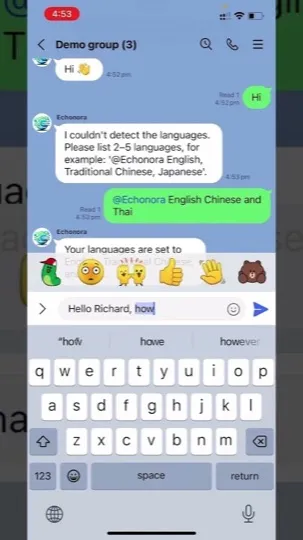
Setting up multi-language translation is simple! Just type the setup command directly in your LINE group chat:
@Echonora English, Japanese, Thaior using language codes:
@Echonora en, ja, th✅ Tips:
- You can include up to five languages (for example, English, Chinese, Vietnamese, Thai, Japanese).
- You only need to set it up once per group.
- Echonora will confirm your setup with a message showing all active translation languages.
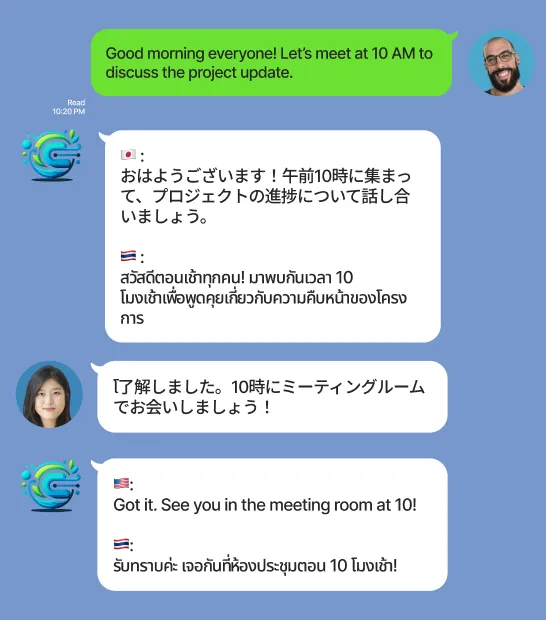
🗣️ Example Conversation
🇺🇸 English user:
Good morning everyone! Let’s meet at 10 AM to discuss the project update.
Echonora auto-translates: 🇯🇵 おはようございます!午前10時に集まって、プロジェクトの進捗について話し合いましょう。 🇹🇭 สวัสดีตอนเช้าทุกคน! มาพบกันเวลา 10 โมงเช้าเพื่อพูดคุยเกี่ยวกับความคืบหน้าของโครงการ
🇯🇵 Japanese user:
了解しました。10時にミーティングルームでお会いしましょう!
Echonora auto-translates: 🇺🇸 Got it. See you in the meeting room at 10! 🇹🇭 รับทราบค่ะ เจอกันที่ห้องประชุมตอน 10 โมงเช้า!
💬 Why Teams Love This
- 🌐 Multilingual harmony: Communicate smoothly across 3–5 languages.
- ⚡ Instant translations: No switching apps or copying text.
- 🧠 Smart context: Echonora keeps the meaning natural, not robotic.
- 💼 Ideal for international businesses: Factories, travel agencies, schools, and global communities.
🚀 Try It Today
Add @Echonora to your LINE group and try:
@Echonora English, Japanese, ThaiThen start chatting naturally. Echonora will handle the rest — fast, accurate, and effortless translation in every direction.
👉 Learn more at Echonora.com