How to Use a LINE App Translator to Synchronize Translations Like a Pro During Event Receptions
Introduction
The challenge of multilingual communication in global events
As businesses navigate the complexities of global expansion, effective communication across multiple languages becomes essential—especially during events where coordination is crucial. Multilingual teams, spanning industries such as hospitality, engineering, and customer service, often face challenges at event receptions. Precise communication can mean the difference between success and failure. Language barriers can lead to misunderstandings that impair guest satisfaction and operational efficiency. A recent study by Argo Trans highlighted that 75% of businesses see these barriers as a significant hurdle in multinational operations, underscoring the necessity for efficient communication solutions.
How the LINE app translator simplifies the process
Introducing the LINE app translator, powered by Echonora. This AI-driven tool facilitates seamless, real-time multilingual communication directly within the widely-used LINE messaging platform, making it ideal for diverse sectors. By integrating Echonora within LINE, businesses eliminate the need for multiple apps, significantly reducing the hassle and potential for miscommunication. Imagine being in a lively event atmosphere where a simple message is translated instantly and delivered accurately to your team—this exemplifies the power of the LINE app translator.
Understanding the Importance of Real-Time Translations
Why live translation is crucial during fast-paced events
Speed and accuracy are paramount during fast-paced events. Real-time translation enables all participants to stay informed and engaged without delays. For instance, at a major conference, if a last-minute change in schedule requires immediate dissemination to attendees, a live translation solution ensures that the information is relayed promptly, protecting everyone’s time and preventing confusion.
Impacts of language barriers on event coordination
Language barriers can lead to critical miscommunications, missed information, and dissatisfaction among guests. Consider a scenario where a security staff member cannot communicate essential safety guidelines due to language differences. Such incidents not only compromise safety but also reflect poorly on the event's success. Reliable tools like the LINE app translator are essential; they bridge gaps that can significantly hinder event success and overall attendee experiences.
Overview of the LINE App Translator
Key features of Echonora's AI chatbot
Echonora's AI chatbot includes impressive features tailored to enhance user experience. It supports an array of languages, such as Mandarin Chinese, Vietnamese, Indonesian, Thai, and English, effectively addressing the needs of diverse teams. Its advanced machine learning algorithms ensure high accuracy and contextual relevance, making it a vital tool for any multinational operation.
How it works inside the LINE platform
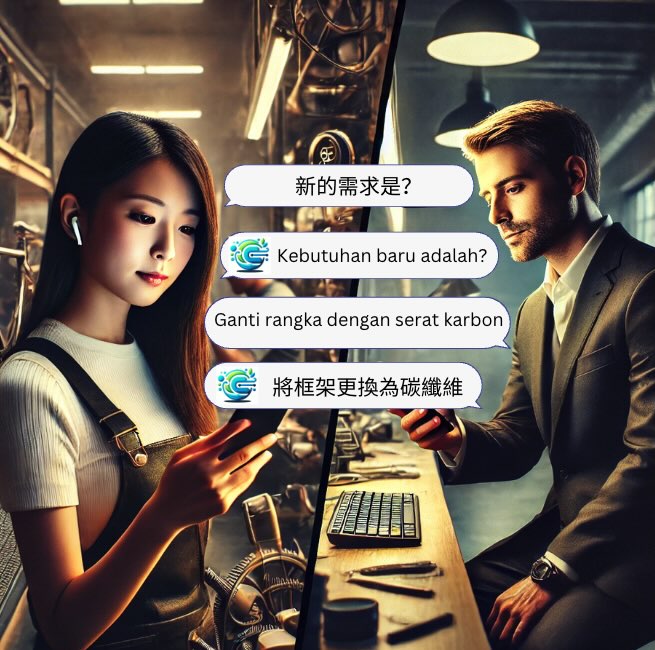
Seamlessly integrated within the LINE app, Echonora allows users to communicate in their preferred language while receiving instant translations. For example, during a team briefing at an event, a manager can send messages in English to team members who speak Vietnamese. As soon as the message is sent, Echonora translates it quickly into Vietnamese, ensuring that all participants grasp the communication. This fluidity fosters efficiency and clarity, which are crucial for smooth event management.
How to Synchronize Translations During Event Receptions
Step 1: Setting up your LINE app with Echonora
To get started, download the LINE app and add Echonora to your contacts. Follow the specific setup instructions available at this guide. After installation, configure your language preferences, allowing the bot to translate messages automatically. This initial setup is vital for the smooth implementation of real-time translations during your events.
Step 2: Creating multilingual group chats
Once your chatbot is set up, establish group chats for your teams. For example, while organizing an event at a hotel, you could create a group chat that includes the front desk, housekeeping, and maintenance teams. This arrangement facilitates enhanced coordination, ensuring that everyone remains informed and connected throughout the event lifecycle.
Step 3: Sending and receiving real-time translated messages
Communicate in your chosen language, and let Echonora take care of translations. For example, if an urgent message about an emergency procedure must be sent, simply type your alert in English. Echonora will instantly translate this into preferred languages, ensuring that all team members receive necessary information promptly. Such capabilities are lifesaving and can profoundly enhance logistics in high-stress scenarios.
Pro tips for communicating clearly
For optimal translation accuracy, use simple and concise language. In multilingual settings, reinforcing important information helps ensure understanding during events. Additionally, testing the translator before the big day aids familiarity with the tool's functionalities. Conducting rehearsal scenarios may better illuminate how effectively the LINE app translator performs during live events.
Use Cases: Enhancing Multilingual Interactions in Events
Coordinating with housekeeping during event setups
Clear communication with housekeeping is essential for ensuring rooms and facilities are prepared correctly for guests. Utilizing the LINE app translator, supervisors can relay requests and updates in real time—whether it's organizing additional linens or detailing specific cleaning instructions—keeping operations running smoothly.
Communicating safety guidelines with maintenance teams
Echonora’s capabilities enable effective communication of crucial safety protocols to maintenance teams. For instance, in emergency situations, the need for immediate action can be conveyed in multiple languages, allowing coordination without risk of miscommunication, which is vital for safety.
Streamlining guest service feedback across languages
Collecting feedback from guests speaking various languages is critical for service enhancement. The LINE app translator can facilitate timely responses and help gauge guest satisfaction rapidly, ultimately raising service standards and supporting continuous improvement.
Benefits of Using the LINE App Translator at Events
Increased efficiency and reduced miscommunication
Echonora helps teams operate more efficiently by minimizing instances of miscommunication that may lead to costly errors. The AI’s real-time responses enable immediate reactions to inquiries and concerns, sustaining an efficient event flow.
Cost-effectiveness and user-friendly deployment
Echonora is a cost-effective alternative compared to traditional interpretation services. Its user-friendly setup facilitates quick adaptation among team members—even those lacking technical expertise—making it an ideal solution for events of any scale.
Case study: Successful event management using Echonora
At a recent international hospitality conference, implementing Echonora allowed teams to coordinate seamlessly. Feedback indicated a remarkable 90% satisfaction rate among attendees regarding communication effectiveness. Participants attributed their positive experiences to the advanced features of the LINE app translator. This success story not only illustrates Echonora's practical proficiency but also underscores its impact on enhancing overall attendee engagement and satisfaction during high-pressure environments.
Practical Tips for Maximizing Translation Accuracy
Common pitfalls to avoid during real-time translations
One major pitfall involves using complex jargon or idiomatic expressions that might perplex the AI translation model. Opt for clear and commonly understood language to achieve better outcomes. Implementing regular checks to ensure translator settings remain accurate can also safeguard against errors in crucial communications.
Leveraging photos and visual aids for clearer communication
Language barriers can often impede understanding; therefore, visual aids like photos or diagrams can effectively bridge gaps. Including relevant visuals in messages can reinforce points better than words alone, enhancing overall communication, especially in critical situations where clarity is paramount.
Further Reading:LINE Translation Bot Guide: Compare Tools and Set Up in Minutes
Conclusion
Recap of key points on synchronizing translations
In summary, the LINE app translator powered by Echonora revolutionizes the management of multilingual communications during events. It streamlines coordination, boosts efficiency, and fortifies team dynamics via clear communication, ultimately aiding in a successful event experience.
Final call to action: Try Echonora for stress-free multilingual communication
Are you ready to elevate your event communications? Embrace the future of multilingual interaction with the LINE app translator and start utilizing Echonora today. For further insights, visit LINE Help or browse through this resource for expert tips on overcoming language barriers. Join the multitude of organizations reaping the benefits of effective communication—set up your free trial or contact a representative to maximize your event's impact and create unforgettable, well-coordinated experiences!
Try Echonora and break the language barrier
180+ languages, real-time text and voice translation in your LINE group chats.
Add on LINE →